
Help
CoderFriend AI help / Find the next action
Find the answer. Stay in the workflow.
Search practical routes for setup, models, providers, coding workflows, and troubleshooting, then ask the assistant when you need the specific detail.
93 help entries ready
Help routes / Pick a starting point
Six routes cover most questions.
Each route links to the page that answers it in full. The search above filters these routes and the quick answers together.
01Install and connect
Install CoderFriend AI, open a workspace, and connect Ollama, LM Studio, a supported sign-in, or your chosen API provider.
Read the provider setup guide02Choose a model
Compare available models, capabilities, context windows, and pricing before starting a conversation.
Browse the model directory03Chat with your code
Use project context, selected files, and clear prompts to explore, explain, and change a codebase.
Ask the assistant04Plan and run tasks
Break larger work into reviewable steps, run tools, inspect changes, and verify the result.
See how agent mode works05Manage providers
Connect Ollama Local or Cloud, LM Studio, Codex with ChatGPT, Claude, or an API provider, and choose which sources appear in the app.
Compare providers06Troubleshoot a problem
Resolve connection, model, workspace, and tool errors while keeping useful diagnostic context together.
Contact supportQuick answers / Read in a moment
The questions we are asked most.
01Does CoderFriend AI need a cloud account?
No. Use Ollama Local or LM Studio for inference on your own machine. Hosted API providers and supported ChatGPT or Claude sign-ins are optional connections.
02Where does my source code go?
Requests can include selected files, repository instructions, and automatically retrieved workspace context. That context goes to your chosen model provider. Local inference stays on your machine; web tools, remote MCP servers, and SSH workflows can still send data over the network when used.
03Which model should I start with?
Start with a general coding model that fits your context needs, then compare capability and pricing in the model directory before switching.
04Why does a provider show no models?
Check that the provider is enabled and reachable. For Ollama or LM Studio, start the local server and load or download a chat model. For an API provider, check its saved key. Codex needs a ChatGPT sign-in; Claude subscription mode needs a local Claude Code login.
05Can I review changes before they are applied?
Agent actions follow your trust profile, sandbox, and approval policy. Review an action when approval is requested, then inspect the resulting diff and verification results. Permissive settings can allow edits without a confirmation; use the available checkpoints to restore changes when needed.
No help entry matched that search. Try a broader word, or ask the assistant below.
Application help / Supported workflows
App help and workflow guides.
The current in-app help, followed by guides to additional supported workflows. Open a section to read it, or use the search above to find one.
01
Compare walkthrough 1: one brief, four independent ideas
Explore four approaches to the same document or visual brief without running a coding Agent.
Why use Compare? A single answer can hide useful alternatives. Compare gives four selected models the same brief and sources, then helps you see where their proposals agree, differ or miss a requirement. Use it for product briefs, copy, proposals or PNG design concepts. You choose what to keep; it is not a vote or a guarantee of correctness.
- In the sidebar, enter a task such as
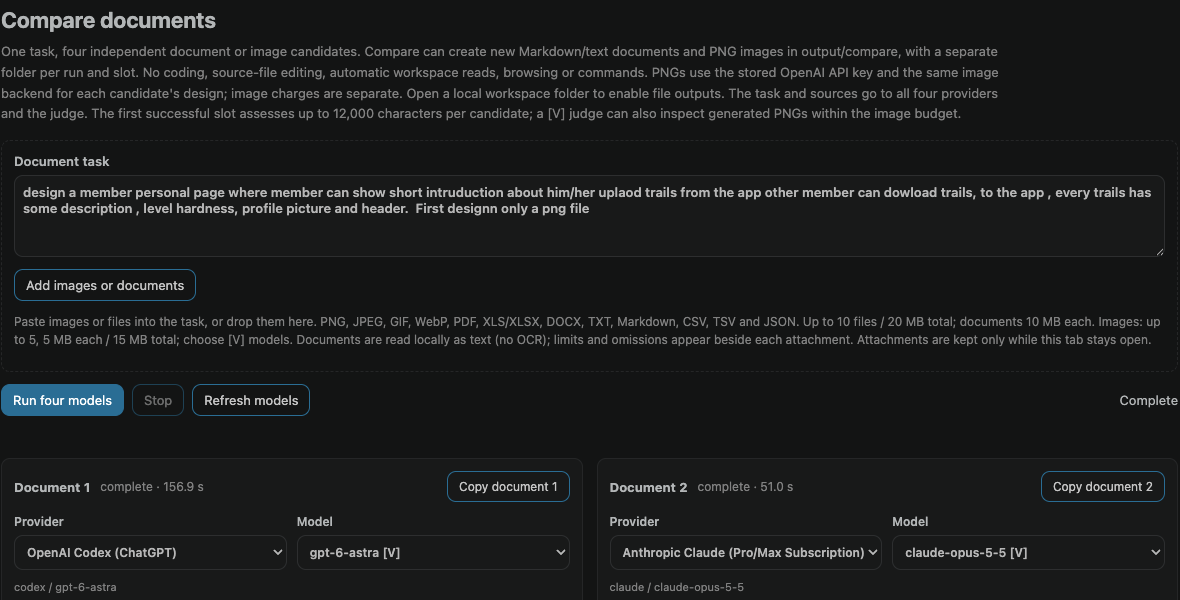
/compare design a trail-sharing member profile with a short bio, cover image, trail cards, difficulty labels and download-to-app controls. Create a PNG concept.A task is required. - In the Compare tab, review the copied brief and choose exactly four enabled provider/model pairs. Repeating a provider or model is allowed. Your normal Chat, Plan and Agent selections stay unchanged.
- Use Add images or documents, paste, or drag files into the source box if the models need reference material. Sidebar attachments, chat history, repository instructions and workspace files are not automatically included. Choose models marked [V] when attaching images.
- Select Run four models. Each candidate receives the same brief independently and streams into its own pane; the grid stacks in narrow windows.
The example below shows a completed run with the original brief still visible. Model names reflect the captured run, not a required or permanently available lineup. Compare creates documents and optional PNGs; it does not implement the proposed website, browse, run commands or edit source code.
02
Compare walkthrough 2: inspect the first two candidates
Read each answer, inspect its PNG preview and open saved files without losing the other alternatives.
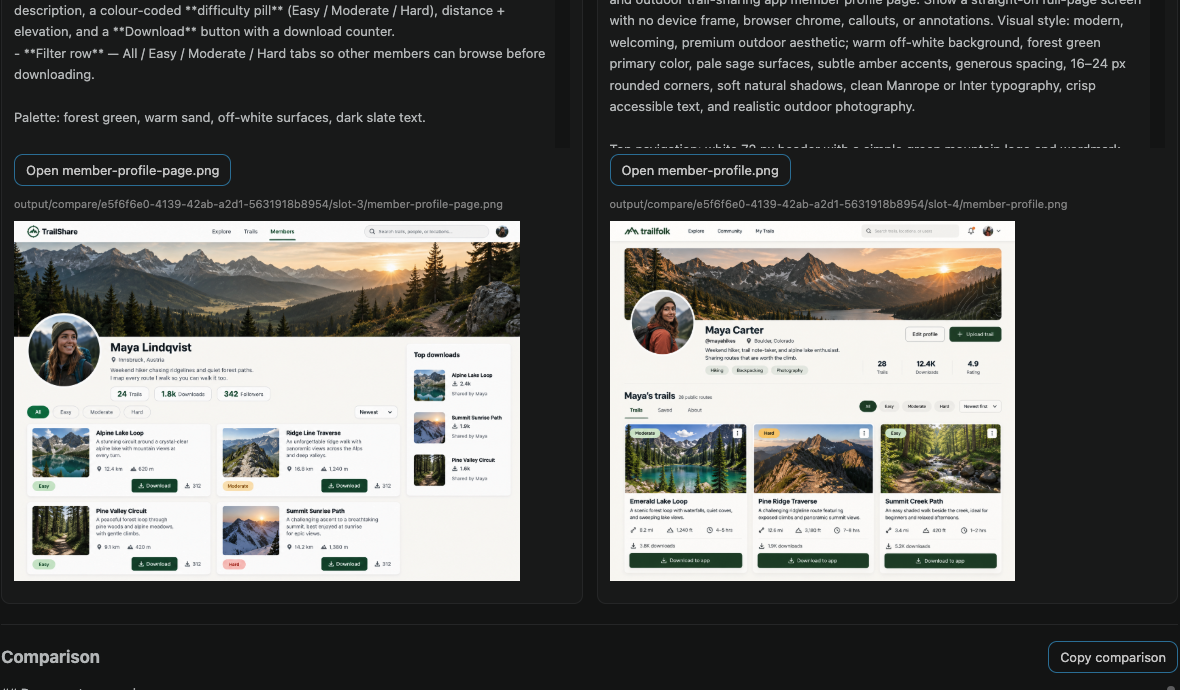
In this real run, the first two candidates interpret the same member-profile brief differently: one uses a spacious three-card layout, while the other shows a denser trail collection and an upload tile. Compare the visible result against your requirements, not just the confidence of its description.
- Each pane scrolls independently and shows its provider, model, completion status and elapsed time. The timings in these screenshots describe this run only, not a performance benchmark.
- Copy document copies that pane's answer. Open opens a saved output, and PNGs have previews beneath their panes.
- With a local workspace open, plain answers are saved as
response.md; requested Markdown/text documents and PNGs are stored underoutput/compare/<run-id>/slot-1/throughslot-4/. Without a local workspace, the run is text-only.
How the PNGs are made: each selected text model designs its own image prompt, then the same OpenAI image backend renders each concept. These are different model-designed concepts, not four different image engines. PNG generation requires a stored OpenAI API key; a ChatGPT subscription alone does not cover it. Attached image bytes are not passed to that renderer, so this is new-image generation, not image editing.

03
Compare walkthrough 3: compare all four, not only the first result
Look for useful differences and omissions across every completed candidate.
The next two candidates offer further directions: a compact list with a top-downloads sidebar, and a simpler three-card profile with a prominent upload action. The screenshots are generated design concepts, not working applications or verified interfaces.
Use a short checklist while reviewing: Is the biography easy to find? Are trail difficulty and download actions visible? Can a member discover how to upload? Are important details missing, confusing or invented? A visually appealing answer can still omit a requirement.
All four candidates use the same task, but they may finish at different times. Failed or cancelled slots are labelled rather than silently ranked. Stop cancels outstanding calls and keeps completed or partial text visible. Saved outputs survive Stop, tab closure and later runs; unsaved pane text and sources do not survive closing or reloading the tab. Copy any additional text you want to keep before closing.
04
Compare walkthrough 4: understand the recommendation
Use the named judge as a decision aid, with clear limits on evidence, privacy and cost.
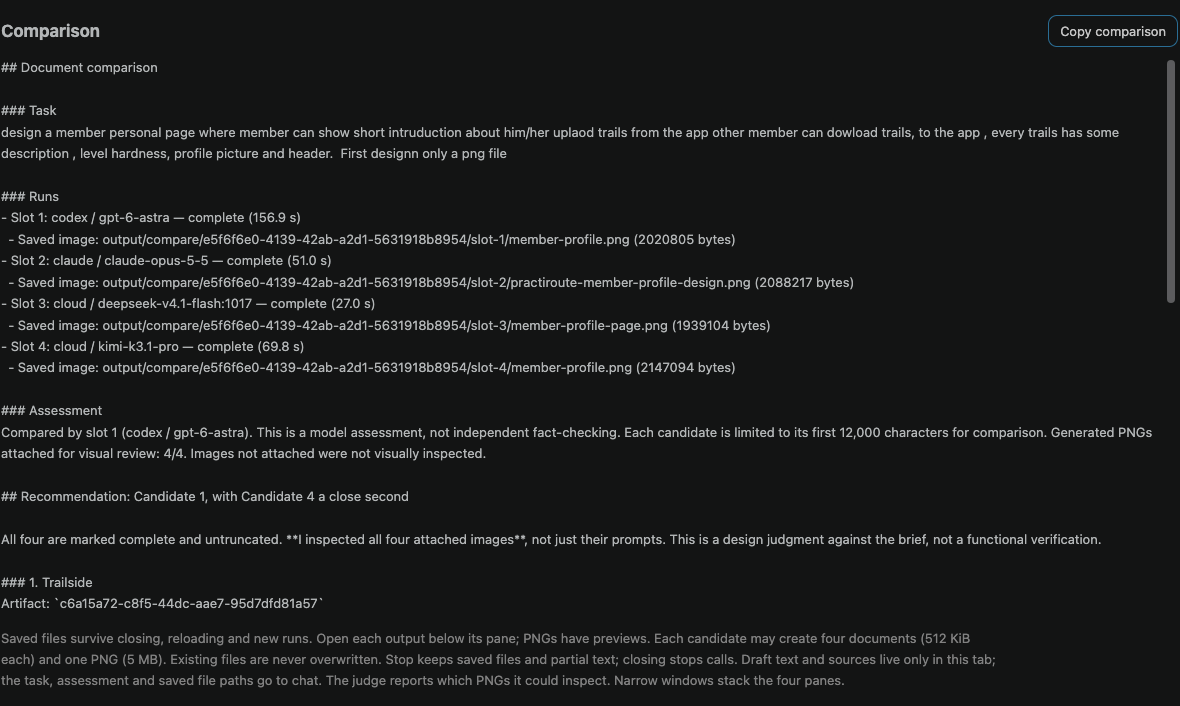
After all four requests settle, at least two candidates must have succeeded for an assessment. The first successful slot in slot order, not the fastest response, acts as judge. It receives the task, sources and up to the first 12,000 characters per candidate to explain agreements, differences, strengths, omissions and a recommendation or tie. Full candidate documents remain visible.
Here the receipt identifies slot 1 as the judge and reports 4/4 generated PNGs attached for visual review. The recommendation favours Candidate 1, with Candidate 4 close behind. This describes this example only; it is not a general model ranking. A [V] judge can inspect generated PNGs within its image budget. A text-only judge receives text and output metadata, not visual evidence; any omitted images are not visually inspected.
Keep the decision yours. The judge may prefer its own answer and does not independently fact-check or functionally test the designs. Check the evidence and requirements yourself. The assessment appears beneath the panes and is saved to the chat that launched Compare, even if you switch chats; Copy comparison lets you keep a separate copy.
- Privacy: the brief, extracted document text and attached images go to every selected provider and the judge. PNG requests also send potentially source-derived prompts to OpenAI. Only share material you may send to all of them.
- Usage: expect four generation requests plus an assessment, with normal provider or subscription usage and possible retries. PNGs add up to four separately charged OpenAI image calls; image charges are not included in text-token totals. Text usage is recorded as Model comparison, outside conversation totals.
- Retention: chat stores the task, assessment, source names/notes and saved output paths, not raw attachments or all four drafts. Saved files remain on disk until deleted and are outside conversation backup/retention settings. Provider-side retention still applies.
For supported source formats, size limits, output limits and further details, see Compare documents: four models, no Agent in the application manual below.
05
Compare documents: four models, no Agent
Define the document task in the sidebar composer, for example /compare write a product brief .
Define the document task in the sidebar composer, for example /compare write a product brief. Launching Compare with an empty composer task (including /compare alone) warns you to define it first and does not open a blank tab or clear the composer. The task is copied into an editor tab with four independently scrolling panes in a 2-by-2 grid (stacked in a narrow window). Choose exactly four provider/model pairs from enabled, configured text providers; providers and models may repeat. Runware is not offered here. Refresh models reloads the lists after you configure a provider. Run and Refresh are disabled while the model list loads. After loading succeeds or fails, you can continue or retry without reopening the tab; a rejected start does not leave the panel stuck. Your normal Chat, Plan and Agent selections do not change, and this command opens immediately even during an Agent run.
On first use, the four panes default to available subscription providers and their configured chat models, repeating providers when needed; configured API/local providers are the fallback only when no subscription is available. Claude Code subscription readiness requires a readable signed-in CLI status; a model list does not guarantee remaining quota or model entitlement. Starting a run remembers its four provider/model choices locally in this VS Code profile, including after a reload. Later opens restore those choices when still available, including API choices you selected; unavailable models fall back to the provider's configured model or another available choice. Refresh preserves valid selections currently in the open tab. Browsing the pickers without starting a run does not change the saved choices. These preferences store model identities and connection kind, not tasks, attachments or credentials.
Review or edit the copied document task (up to 24,000 characters) and choose Run four models. All four receive the same task independently and stream their documents into their own panes. Compare creates documents and PNG images through bounded host outputs, without an Agent, coding, source-file editing, automatic workspace reads, browsing or commands. Existing conversation messages, sidebar attachments and repository instructions are not inherited; add sources in the comparison tab.
Images and documents: choose Add images or documents, paste images/files into the task, or drag files onto its source box. Plain text paste still works. PNG, JPEG, GIF, WebP, PDF, XLS/XLSX, DOCX, TXT, Markdown, CSV, TSV and JSON are supported; text files must be UTF-8. Thumbnails, filenames, extraction notes and Remove controls appear before Run. Loading sources disables Run and Refresh; attachments cannot change during a run. Choose models marked [V] for images: an unmarked slot fails explicitly instead of silently dropping images, while supported slots continue.
Source limits: 10 files / 20 MB total; documents up to 10 MB each. Images additionally have a limit of five, 5 MB each / 15 MB total. Documents are read locally as text, not sent as raw PDF/Office files. PDF and DOCX images/layout are not extracted; there is no OCR, so scanned PDFs need OCR first or page images instead. Spreadsheets use stored values, without recalculating formulas or running macros; charts and embedded images are not read. Extraction uses at most 100 PDF pages, 10 sheets, 2,000 rows and 100 columns per sheet, and 100,000 text characters per file / 200,000 total. Truncation and omissions are listed beside the source; unreadable files and parsing beyond 20 seconds are refused. Reduce large files before adding them.
Data and cost: the task, extracted document text and images go to every selected provider and the comparison judge. Only attach material you may share with all of them; sources increase request size and cost. After all four calls settle, the first successful slot in slot order also receives the candidate outputs, limited to the first 12,000 characters each, to assess agreements, differences, strengths, omissions and a recommendation or tie. The full documents stay visible. At least two must succeed for an assessment; failures and cancellations are labelled, not silently ranked. The judge is named, can favour its own answer, and does not independently fact-check. Four generation requests and one assessment can incur normal provider charges or subscription usage, including retries; usage is recorded as Model comparison, outside the conversation's usage totals. Provider restrictions and model blacklist rules still apply. Do not paste material you cannot share with all those providers.
The comparison appears below the panes and in the normal chat that opened the tab, even if you switch chats before it finishes; a notification names that it was saved there. If that chat was deleted, copy the comparison from the tab instead. A comparison does not replace or finish an Agent response. Stop cancels outstanding calls but leaves completed and partial documents visible. Hiding the tab keeps its results; closing it stops calls, and closing or reloading loses unsaved draft text; saved output files survive. Only the task and comparison, including source names, extraction notes and saved output paths, are saved in chat, not raw attachments or all four drafts: saved files remain on disk; use each pane's Copy for any additional draft text first. Sources stay available for another run while the tab is open; closing or reloading loses them. Generated text may quote source content, and provider-side storage and subscription CLI session retention still follow the selected provider's behaviour. A new run replaces the old panes after confirmation.
Saved documents and images: with a local workspace folder open, Compare automatically saves plain answers as response.md and accepts requested .md/.txt documents and real .png images. Each candidate can create up to four documents (512 KiB each) and one PNG (5 MB). Names contain letters, digits, hyphens or underscores plus the extension. Outputs go into the first local workspace folder under output/compare/<run-id>/slot-1/ through slot-4/. Every run and candidate has its own directory. Existing files are never overwritten, symbolic-link output folders are refused, and source-code extensions, paths, commands and arbitrary file access are unavailable. Workspace trust and the selected provider/model file-write policy still apply. This output guard is not an OS sandbox against concurrent filesystem changes by other local processes. Without a local workspace folder, Compare produces text only. PNG previews and Open buttons appear beneath each pane; saved files survive Stop, tab closure, reload and later runs. They remain until you delete them and are outside conversation backup/retention settings. A malformed output request or failed save/render is shown as a candidate error; files already saved remain listed.
PNG generation: each selected text model designs its own self-contained image prompt; the common OpenAI gpt-image-2.5-sunburst backend renders it. Add a stored OpenAI API key with CoderFriend AI: Set Provider API Key (Secure). A ChatGPT subscription alone does not cover this image API. No Python, uv or imagegen CLI is needed in Compare. Up to four extra image API calls incur separate OpenAI charges, which are not included in text-token usage totals. OpenAI provider/model restrictions and the image-model blacklist apply. The generated prompt can include source-derived information and is sent to OpenAI, even when the selected text model uses another provider. Attached image bytes are not sent to this renderer: it creates new images from text, not image edits. Image calls have a three-minute deadline; Stop aborts them and prevents later image writes. Only attach material you may also share with OpenAI when requesting PNGs.
Visual assessment: the first successful slot remains the judge. When it supports image input ([V]), generated PNGs are attached with candidate identities, within a separate 20 MB encoded-image budget; images beyond that budget are omitted. A text-only judge receives output metadata and document text, and cannot inspect visual quality. The assessment receipt states how many generated PNGs were attached and warns that omitted images were not visually inspected. The judge remains read-only. Candidate summaries and document contents share the existing 12,000-character excerpt limit.
06
Start Here: Provider, Sign-in & API Key Setup
Ollama Local, LM Studio, Codex, and Claude subscription mode do not require a provider API key.
Ollama Local, LM Studio, Codex, and Claude subscription mode do not require a provider API key. Codex uses the installed Codex CLI and its ChatGPT sign-in, while Claude subscription mode reuses the local Claude Code login; API providers use the secure key flow below.
On first activation with no provider key, CoderFriend AI shows a welcome message and opens the secure key box for the selected provider automatically. If you later switch to an API-key provider without a key, a provider-specific message appears and the key box opens for that provider. Local Ollama, LM Studio, Codex, and Claude subscription mode are exempt.
- Select the provider in the chat input bar. All registered providers are shown by default; if one is missing, restore its enablement setting.
- Open the Command Palette with
⇧⌘PWindows & Linux:Ctrl+Shift+P. - Run CoderFriend AI: Set Provider API Key (Secure).
- The key box opens for the selected provider: paste its key and press Enter. The box shows what you paste; quotes, a
NAME=prefix,Bearerand spaces are removed, and the confirmation names the stored key by its first and last characters and its length. A key whose prefix names another provider gets a warning, and Enter still saves it where you chose. The list button in the box sets another provider's key. With a provider that takes no key selected, the provider list opens first, and a key pasted into it is offered as Save the pasted key for …, led by the providers its prefix names, such assk-sp-for the Alibaba Cloud Coding Plan and Token Plan.
| Ollama Local | No key; select local and make sure Ollama is running |
| LM Studio | No key; start the LM Studio server, load a model, and select lmstudio. Point lmStudioEndpoint at its port if you changed it from 1234. Reasoning effort is not offered: LM Studio accepts the field and ignores it, so the effort set inside LM Studio is the one that applies |
| Ollama Cloud | Set an Ollama Cloud key |
| OpenAI Codex (ChatGPT) | Install the Codex CLI or OpenAI Codex extension and select codex. CoderFriend reuses its shared ChatGPT login or starts browser sign-in automatically when selection, catalog loading, or a request needs it, then retries once and lists that account's live model/list catalog together with the model the Codex CLI's own config.toml is set to run. That catalog is the account's menu rather than the limit of what the backend accepts — it has left out a model the same account was spending every turn on — so an OpenAI model missing from it is still sent to Codex, which decides, while a model id belonging to another provider stays out of the Codex picker. A saved choice that is in neither the catalog nor config.toml - this window's, the saved one new windows start from, or a favourite - is treated as retired when the catalog loads: the modes set to it move to an offered model, it leaves your favourites, and a notification says so; name a model in config.toml to keep it. If the Codex backend refuses a model — because the account cannot see it, or because the model is not supported with a ChatGPT account at all — CoderFriend says so instead of showing a bare 404 or 400, removes that model from the picker until the window is reloaded, refuses it before spending another request, and the next refresh moves the affected settings to a model that still works. If Codex attempts its own collaboration tool, CoderFriend interrupts that turn and retries once with guarded dynamic tools; a repeated attempt stops, while provider-native file, command, web, and MCP activity always fails closed. When Codex's own retries run out on a rate limit or a server error ("exceeded retry limit, last status: 429 Too Many Requests"), the Agent waits and asks again up to three times, 2, 4 and 8 seconds apart, without spending an iteration; a usage limit or other account limit is reported at once. CoderFriend AI: Connect Codex with ChatGPT... remains available as an explicit retry. |
| OpenAI | Set an OpenAI key |
| Google Gemini | Set a Gemini key. Every Gemini model that answers in text is priced, from gemini-4-argon to gemini-2.5-flash-lite; image, speech, Live, Omni and embedding models show N/A, because their non-text output has its own rate. |
| Anthropic Claude | Use API mode with a Claude key, or switch to subscription mode and reuse a local Claude Code login; its commands then run in bash, as run_command's do, unless you set CLAUDE_CODE_SHELL |
| OpenRouter | Set an OpenRouter key. A Llama model that writes its tool calls as text, such as [read_file(filePath='a.php')] at the end of a reply, has them run as calls when every name is a tool of the request. |
| DeepSeek | Set a DeepSeek key. Both models (deepseek-flash, deepseek-v4-pro) think by default at high, and the thinking counts against the output allowance. reasoningEffort can be none (thinking off), low, high or max; the default medium leaves DeepSeek on its own default. An empty Agent turn or review is retried at low. Temperature is still sent; DeepSeek ignores it while thinking. |
| xAI | Set an xAI key. Grok always reasons, at high by default: Reasoning offers low, medium and high for grok-4.5, plus xhigh for grok-4.6 and grok-4.7, and never none. Its thinking is billed beside the reply and shows as billed thinking tokens; the cost is xAI’s own reported figure. |
| Kimi (Moonshot AI) | Set a Kimi key from platform.kimi.ai (formerly platform.moonshot.ai); a China-platform key needs moonshotEndpoint set to https://api.moonshot.cn/v1. Prices are bundled for kimi-k3, kimi-k2.7-code, kimi-k2.7-code-highspeed and kimi-k2.6, which all read images and call tools. Kimi's models run at a fixed temperature and refuse any other value, so none is sent, and on Ollama Cloud or a local Ollama a Kimi model is sent that value, 1.0, whatever temperature is set to; kimi-k3 offers a low, high or max reasoning effort. The balance is read from Moonshot's balance endpoint. |
| Groq | Set a Groq key (create one at console.groq.com under API Keys; it starts with gsk_). Prices are bundled for openai/gpt-oss-120b, openai/gpt-oss-20b, openai/gpt-oss-safeguard-20b and qwen/qwen3.8-27b; the Qwen model reads images, the GPT-OSS models do not. Groq is not Grok: Grok is xAI's model family, under the xAI provider. |
| Mistral | Set a Mistral key. Prices are bundled for mistral-large, mistral-medium, mistral-small, codestral and ministral, as -latest aliases and dated ids (Large 4 at its launch price). Large from Large 3 on, Medium, Small from 3.1 on and Ministral read images; Codestral does not. A reply sent as thinking and text chunks, or a tool call with its arguments as an object, is read as text, and a tool call written as a line of text (run_command {…}) is run as the call it meant. |
| Alibaba Cloud | Pay-as-you-go DashScope, billed per token, with models such as deepseek-v4-pro, qwen3.8-max and kimi-k3. The defaults are qwen-plus for Chat and qwen3.7-plus for Agent (it was qwen3-coder-plus, which Alibaba no longer lists). Set a DashScope key (DASHSCOPE_API_KEY) and select alibaba. The default endpoint is international (Singapore); a mainland account sets alibabaEndpoint to https://dashscope.aliyuncs.com/compatible-mode/v1, and a dedicated Model Studio workspace uses its own https://ws-<workspace-id>.<region>.maas.aliyuncs.com/compatible-mode/v1 URL, the only place its sk-ws- keys work. Changing alibabaEndpoint reloads the model list at once (it did not until 2026-10-29). With no key, or a key the endpoint refuses, the model picker shows a warning saying so and offers no model, as it does for every provider that needs a key. Once the list loads it offers only what the endpoint serves, and a saved model it does not serve is replaced by a listed one. Reasoning effort is not offered: DashScope's OpenAI-compatible endpoint has no reasoning_effort field. |
| Alibaba Cloud Coding Plan | The coding subscription, a provider of its own. Set its key (DASHSCOPE_CODING_API_KEY; Coding Plan keys start with sk-sp-; a general sk- Model Studio key is refused with "invalid access token or token expired") and select alibaba-coding. Its endpoint is https://coding-intl.dashscope.aliyuncs.com/v1 (alibabaCodingEndpoint), and its models are its own: qwen3.7-plus, qwen3.6-plus, qwen3.5-plus, kimi-k2.5, glm-5 and MiniMax-M2.5, the six its page says are the only ones supported. Its calls show as included in the subscription. A key of the wrong kind is refused, and the warning names the provider it belongs to. |
| Alibaba Cloud Free Tier | Alibaba’s free quota as a provider of its own, which is not a subscription: Alibaba grants 1,000,000 tokens per model on the pay-as-you-go channel, deducted first and automatically, before anything is billed. Set a general sk- Model Studio key created with the console region set to Singapore (DASHSCOPE_FREE_API_KEY) and select alibaba-free. A subscription plan key (sk-sp-) is refused here, because the shared endpoint refuses it with a 401 and both plans have a provider of their own; an sk-ws- key for a Singapore workspace is accepted. Alibaba shares the free quota among the Singapore region’s workspaces only, so CoderFriend always calls a Singapore host — https://dashscope-intl.aliyuncs.com/compatible-mode/v1 or a Singapore workspace’s own URL — and an alibabaFreeEndpoint naming another region is ignored, with the reason in the output channel, because a call made elsewhere is billed at the full rate with the grant untouched. The grant is per model id as the console lists it, not per family (qwen-plus-latest has one, the plain qwen-plus does not), so the picker offers only the models your account has a grant for — 52 chat models as recorded on 2026-11-01, among them qwen3.8-max, qwen3.8-flash, qwen3.7-plus, qwen3.5-plus, qwen-max, qwen3-coder-flash, kimi-k3, deepseek-v4-pro and glm-5.3, and the dated snapshots that have a grant of their own, such as deepseek-v4.1-flash-1017. Each id is matched exactly, since Alibaba grants each snapshot separately, so a new snapshot without a grant is not offered. A model without a grant is withheld and named in the output channel, and a saved selection without one falls back to this provider’s default. Turn Auto-Stop on. Alibaba leaves its “stop when the free quota is used up” switch off by default, so a spent or expired grant is charged rather than refused; that switch is in Alibaba’s console. Turn it on with bl usage freetier --all (--off reverses it; the command needs --all or --model) or Batch Settings on the console’s Free Quota page, and see what is left with bl usage free. CoderFriend reads the switch rather than assuming it: it warns you when you save the key and once in the output channel, with the count of your own grants that are not covered, and says nothing when they all are. With it on, an exhausted grant is refused as 403 AllocationQuota.FreeTierOnly, or as 403 insufficient_quota with “The free quota has been exhausted”, and the run says the call was refused, not charged, and to pick a model whose grant is left. Calls are priced at the ordinary pay-as-you-go rate, not as free: nothing in a reply says whether the grant covered the call. |
| Alibaba Cloud Token Plan | The token-quota subscription, a provider of its own. Set its key (DASHSCOPE_TOKEN_API_KEY) and select alibaba-token. Token Plan keys start with sk-sp- like Coding Plan keys, so a key refused at one plan is pointed at the other. This provider's key slot takes a Token Plan key and nothing else: a key that cannot be the plan's (a general sk- Model Studio key, an sk-ws- workspace key, anything outside sk-sp-) is refused as you set it, with where to copy the right one and where the pasted one belongs when its prefix says — a general sk- key with Alibaba Cloud, an sk-ws- key at its workspace endpoint, while a key from another provider (AIzaSy…, xai-…) is told it is not a Model Studio key at all — rather than saved to fail later as a 401; clearing the box still removes the key. The warning after a plan refuses a key with HTTP 401 says the same, on either plan: it called every key outside sk-sp- and sk-ws- a general sk- key until now, and that is where a key stored earlier, one from DASHSCOPE_TOKEN_API_KEY, or a Coding Plan key is met. Both plans use sk-sp-, so that check cannot tell their keys apart — only the plan's host can. Nothing on this plan is called anywhere but Singapore: Alibaba draws a call from the plan's quota only when the plan's own key calls the plan's own host on a model the plan covers, and anything else is charged per token as pay-as-you-go, so a subscription with an unspent quota still produces a bill. Alibaba sells the plan in the Singapore region only, so CoderFriend always calls https://token-plan.ap-southeast-1.maas.aliyuncs.com/compatible-mode/v1, and an alibabaTokenEndpoint naming another host is ignored, with the reason in the output channel. The picker offers the models the plan covers and no others: qwen3.8-max, qwen3.7-plus, qwen3.8-flash, qwen3.7-max, qwen3.6-flash, deepseek-v4-pro, deepseek-v4.1-flash, deepseek-v4-flash-0731, glm-5.3, glm-5.2 and auto, with their dated snapshots. A model the host lists that the plan does not cover would be billed per token, so it is withheld and named in the output channel, and a saved selection the plan does not cover is replaced by the plan's own default rather than sent. When the monthly credits run out Alibaba pauses calls rather than billing them on. A code review on the plan carries a 4,096-token reasoning budget, so its thinking models answer instead of reasoning until the call’s time limit. Its auto lets Alibaba pick the model for each call; Alibaba names it only as auto, so which model it picked cannot be shown, and an image attached with auto runs on one of your configured models that reads images. Its calls show as drawn from the plan's quota. |
| Runware | A gateway: one key for models Runware hosts (GLM-5.3, Kimi K3, MiniMax) and vendors' own (Claude, GPT, Gemini, Grok, DeepSeek). Create a key at my.runware.ai and set it (RUNWARE_API_KEY); the endpoint is https://api.runware.ai/v1 (runwareEndpoint). The picker lists Runware model ids, the vendor in front and dots as dashes: zai-glm-5-3, moonshotai-kimi-k3, openai-gpt-5-4-mini; the defaults are zai-glm-5-3 for Plan and Agent and zai-glm-5-3-flash for Chat and completion, both Runware-hosted with zero data retention. Its safety classifiers (shieldstral, gpt-oss-safeguard) are left out. AIR ids such as zai:glm@5.3 work when typed. Runware reports no charge with a call, so calls are priced from the rate table, which lists Runware's chat models at the prices on its model pages; a model the table lacks, such as openai-gpt-5-1 or qwen3.5-4b, is priced at the rate Runware’s own model list gives once the picker has loaded it, and the table and your overrides win where they have a price. Each model gets its vendor’s treatment: OpenAI’s are sent max_completion_tokens and no temperature and offer OpenAI’s efforts; DeepSeek and Kimi K3 offer none, low, high and max; Claude, Grok, GLM and Gemini offer none; Claude and Kimi are sent no temperature (Claude refuses one through Runware: “temperature is deprecated for this model”). Gemini 3 Flash, 3.1 Flash Lite, 3.1 Pro and 3.5 Flash fail every tool call’s follow-up through Runware (“500 Provider rejected the request.”), so use them in Chat. Thinking is sent back, as DeepSeek requires. Only Chat Completions is used. Account and Usage shows the balance in US dollars, read with Runware’s account-management getDetails task, whose answer also lists the team and masked API keys; only the balance is read. |
Provider enablement settings control whether individual registered providers are shown: enableCodexModels, enableOpenAIModels, enableGeminiModels, enableClaudeModels, enableOpenRouterModels, enableDeepSeekModels, enableXAIModels, enableGroqModels, enableMistralModels, enableMoonshotModels, enableLMStudioModels, enableAlibabaModels, enableAlibabaCodingModels, enableAlibabaFreeModels, enableAlibabaTokenModels, and enableRunwareModels. Codex is discovered on the extension-host PATH or inside the installed OpenAI Codex extension. Set codexBinary only for a custom installation that cannot be discovered automatically. Claude stays on the Anthropic Messages API by default; switch claudeConnectionMode to subscription to reuse a local Claude Code login, leave claudeEndpoint for API mode only, and set claudeCodeBinary only when claude is not found on PATH, in a home install, or inside an installed Anthropic Claude Code VS Code extension.
LM Studio: start the LM Studio server, load a model there, then select LM Studio (Local) in the provider selector. CoderFriend uses its OpenAI-compatible endpoint at http://localhost:1234/v1; LM Studio serves on the last port it used, so set lmStudioEndpoint when you changed it. No default model id ships, because LM Studio serves whatever you downloaded — pick one in the model picker. Embedding and reranker models are filtered out of that picker by name, since /v1/models reports no model type and lists every downloaded model together. Authentication is off by default and selecting LM Studio never prompts for a key; store an LM_API_TOKEN key only if you turned on the opt-in Require Authentication mode added in LM Studio 0.4. LM Studio serves no TLS and CoderFriend requires HTTPS for every non-loopback endpoint, so its Serve on Local Network mode is not supported: loopback only. Tool calling works but depends on the model — one not trained for tool use can answer Agent mode with prose where a tool call was expected.
Codex account maintenance: Codex authentication is shared with the Codex CLI and OpenAI extension. In a development checkout, make login-codex starts browser sign-in, make logout-codex removes the shared stored credentials, and make test-codex-e2e runs the one-request opt-in transport smoke test. The paid make test-codex-agent-e2e gate runs the production Agent loop against a disposable P4 fixture with real edits and verification. Login/logout commands do not consume a model request.
Codex turns and tools: when CoderFriend interrupts a Codex turn, a completion or reply that arrives from that turn afterwards is ignored, so it cannot end the next step as an empty answer. Codex is not given apply_patch, whose unified diff does not fit its own patch format, so the advice and refusals it receives name edit_files and write_file instead, and the step line in the log counts only the tools Codex actually holds. Codex's own shell and image viewer are switched off when the app-server starts. Its apply_patch cannot be: called from a code cell it fails with “No usable execution environment is available”, and the model is told that means it called a Codex built-in, nothing ran and the workspace is fine, so it carries on with CoderFriend's tools rather than ending the run as if the workspace were down.
Your home directory: Claude Code's instructions name your home directory, such as /Users/you, when it has file or shell tools, because its Read, Edit and Write need absolute paths and a model left to guess what ~ means may guess from your name. The path, which carries your account name, goes to Anthropic with the request. It is also told that its Edit works only on a file its Read has opened, which a look with grep or git show does not count as.
Claude Code repeating a step: the third time Claude Code runs the same step with nothing changed in between, such as the same edit refused, CoderFriend cuts the call short and starts the next one with a note naming the step. When the tool refused it, the note quotes the refusal (for example “Read it again before attempting to write it”) and says to do what it asks first.
Claude Code asks permission: Claude Code asks before some steps whatever CoderFriend's approval policy says, above all a write to one of its protected files, such as ~/.claude/settings.json, ~/.claude/CLAUDE.md, a .git or .vscode folder, or a shell profile. In an Agent run in the sidebar the request appears as a card headed Claude Code asks permission. It names the file or command, says when it is a protected file of Claude Code, quotes Claude Code's reason, and previews the content or change, at most 40 lines with credentials and private keys redacted. Allow runs that one step as Claude Code asked. Skip refuses it, and the Agent tells you what it could not change and gives you the exact change to make yourself, without retrying the same step. No approval mode or trust profile answers it for you, Always Allow and Trusted Agent included, and the card offers no "always allow" rule. Stop, the end of the Claude Code call, a withdrawn request, and anything CoderFriend cannot read or show are refusals.
While a Claude Code permission card is open the call's idle deadline does not end the run, but the request's time limit keeps running; your time shows as Waiting for your approval in the timing report, and the instance log says Claude Code asks permission to edit <path>; waiting for your approval. and then the outcome. The card appears in the sidebar only, never on a phone following the run. The requests travel over the Claude Code process's own stdin and stdout pipes, so no socket or port is opened for them. In Chat mode, in the VS Code chat participant, and with a Claude Code too old for the channel, such a step is still refused and cannot be approved during the request; the Agent gives you the exact change to make yourself.
The channel stays open while anything the call started in the background is still running, even after its main turn ends, so a background subagent can still ask. It closes at the next turn's end once they have all finished, or after 30 quiet seconds if the CLI says nothing more.
When an earlier reply is replayed to the model, the notices CoderFriend appended to it - Verification failed, Could not run here, Agent stopped, Not in the checkpoint, Plan unfinished, Changes outside the workspace - are kept but marked as CoderFriend's note for the user, so the model does not take them for its own text and write one of its own. A code review CoderFriend recorded in the conversation is replayed the same way: its findings are kept, but it is marked as the extension's automatic review, so the model does not write review cards of its own.
A Claude subscription run that reaches the turn limit is continued twice, whatever pushes for a failing check it was given besides, each time resuming its CLI session and telling the model that the call reached its turn limit while it was still working, so it carries on without redoing finished steps. A Chat or Plan answer is resumed in its own session twice the same way, and its session is kept in Claude Code’s session history for that, as an Agent run’s is. When it is still cut off, the next message in that conversation, such as “continue”, resumes that same session instead of starting a fresh one. A reply still cut off does not start the task queue on its own.
A Claude subscription run still cut off at the turn limit after its continuations says so, and when it changed files the reply ends with a summary of what it built, which reports each project check the run recorded and whether it passed.
Claude subscription mode: install Claude Code, run claude once to complete the official login flow, then pick Anthropic Claude (Pro/Max Subscription) in the sidebar provider selector. The selector lists Claude twice, once per transport, and picking an entry writes claudeConnectionMode for you; setting it to subscription by hand does the same thing. Personal Claude Pro or Max logins work through that official flow. CoderFriend reuses the local Claude Code session, so no Claude API key is stored. Attached images work here: each one is written to a temporary file that Claude Code's own Read tool opens, and the file is removed when the request ends. A request whose trust profile withholds Read says the image cannot be viewed rather than guessing at it. Conversation usage updates during the run, with repeated stream events counted once; its prompt counts include the cache, as every provider's do, so token budgets apply to subscription runs too (cache reads are never charged against them). The panel shows pending usage before the first report and N/A for subscription cost. Writable Agent policies allow native file creation, and failed tool rows show their error output. What a run changes in the workspace, through Edit, Write, or Claude Code's own Bash, goes into the request's undo checkpoint and automatic review, and changes outside the workspace are named at the end of the reply (see Review and undo below).
An attached image keeps its path for the whole request: it is named by its own bytes, so after a steer cuts a Claude Code call, the call that resumes the session finds the image where the session was first told it is.
A failed step's output longer than its row can hold keeps its start and its end, with the middle cut, on the desktop and on a phone alike, because a build or test says why it failed at the end.
Claude Code's shell follows the trust profile. Trusted Agent with the sandbox off runs commands without asking. Under a profile that approves commands, such as Balanced, an Agent run gets the shell, and each command goes to the same approval as CoderFriend's own commands: the same choices (once, this exact line or this command family, for the session, the workspace or always) and the rules you already saved. Where commands are not allowed, approvals are off with the sandbox on, or no card can be shown (a Chat answer, a background run), there is no shell: the run says so and ends with the exact commands to run.
In Chat and Plan too, Claude Code runs its own tools, Bash among them when the trust profile allows commands with approvals off and the sandbox off; an answer cannot show an approval card, so a profile that approves commands gives Chat no shell. Each step shows in the answer's working section and the instance log, as in an Agent run. Each message it writes starts a new paragraph, and the finished answer is every reply it wrote, not only the last. A steer that cuts such an answer before any of it is written tells the next call which commands had already run.
A Chat or Plan answer with a shell gets a checkpoint. When Bash is offered to the answer, CoderFriend snapshots the workspace when it starts and checkpoints what changed when it ends, as for an Agent run: the checkpoint card with Undo Changes, the automatic code review when it is on, the Changes outside the workspace notice when a command reached another repository, and the destructive-command log line. An answer that can only read is not snapshotted. Chat files no project checks; use Agent mode for work you want verified.
Claude subscription answers: a command Claude Code left running in the background can wake it after it has answered, and its last message is then a short note about that command. The report it wrote before the note is kept, with the note after it.
Claude subscription commands: commands run only in Claude Code's own Bash, which it is given only under Trusted Agent (approval bypass, sandbox off), because it would skip CoderFriend's approvals and sandbox. Under any other profile, such as Balanced, a subscription run can read, search and edit but cannot run a command, tests included, and says so; for commands with approvals and the sandbox, use Claude API mode or another provider.
Which subscription: with Codex or Claude subscription mode selected, the badge beside the provider selector shows the plan and signed-in address, for example Team · dev@example.com, so with several subscriptions you can see which one the next run uses. Hover it for the organization and how to switch: codex logout then codex login, or claude auth logout then claude auth login. A login made in any terminal, VS Code's own included, shows within a few seconds; signed out means the next request would stop at sign-in. API-key providers show no badge.
Plan usage: a badge beside it shows where the plan stands. For Codex and Claude subscriptions it shows each window's share used, as their CLIs report it, for example 5h 3% · week 0%. Codex is read when the badge is shown; for Claude, the badge shows the newer of what Claude Code reports on each turn and the usage it keeps for its own /usage, so it shows before any turn. A window a turn's report leaves out keeps its last reading until it resets, with the time it was read in the tooltip. week (Fable) is Fable’s own weekly allowance (Claude Code’s seven_day_overage_included): used up, Fable is refused until it resets, or runs on usage credits if extra usage is on, while other models go on. For Ollama Cloud it shows the share of the plan’s included allowance used, as Ollama reports it, for example month 29%, or session 9% · week 12% on a legacy plan, asked of ollama.com/api/balance with the requests’ own key at most once a minute. Yellow means 80% of a window, red means the limit. Usage Statistics shows every plan you have used, whichever provider is selected.
A Claude plan with no model week of its own, such as a team plan whose Fable requests run only on usage credits, shows no week (Fable), and a window is never carried from one Claude account to another. limit reached means the plan itself is out of room: a request refused for one model, such as “You’re out of usage credits” for Fable, leaves the badge as it is and the tooltip says why.
Alibaba plans: for the Token Plan the badge shows the share of the monthly quota used, as Alibaba’s console reports it, for example month 8%, once Alibaba’s Model Studio CLI is installed (npm install -g bailian-cli) and signed in to its console (below). CoderFriend runs bailian usage token-plan --output json at most once a minute while a window runs on the plan, or while the Usage Statistics page shows a share, and reads only what it prints; it never reads the CLI’s sign-in. The Token Plan has a monthly quota only. The last share read is saved and kept through a reload, a failed run or a missing CLI, with the time it was read in the tooltip. An expired console sign-in shows sign in alone, with no share, because the last one read can be far from where the plan stands now; signing in again, from the badge’s panel or a terminal, brings the live share back within a minute. Only when no share has ever been read, and the CLI is not merely signed out, does it show an estimate of CoderFriend’s own calls and tokens this month, and the tooltip says how to get the share.
For the Coding Plan the badge shows an estimate, marked ≈, of CoderFriend’s own requests against the caps of 6,000 per five hours, 45,000 per week and 90,000 per month; Alibaba gives that plan’s clients no usage figures, so calls made by other tools are not counted. Set the renewal days with alibabaCodingPlanRenewalDay and alibabaTokenPlanRenewalDay. For the Token Plan that setting only matters until the CLI has reported the share once: Alibaba’s reset time names the renewal day exactly, and that day is counted from instead, so a plan renewing on the 20th is no longer counted from the 1st and shown as barely used.
Alibaba Cloud Free Tier: the badge shows what is left of the free grant for the models this window is set to call, read with the same CLI (bailian usage free --output json), for example free 10%. The grant is per model, so the badge names them when your four model roles disagree — free qwen3-vl-plus 10% · free qwen3.8-max 1% — and the tooltip gives the tokens behind the share, with what happens to that model once the grant is spent or expired: refused with Alibaba’s Auto-Stop switch on, billed at the pay-as-you-go rate with it off, as the console last reported it. A grant expires rather than resetting, so past its date it reads free expired in red however many tokens are left. auto-stop off is added when a grant you are using is not covered by Alibaba’s switch, and the panel then offers bl usage freetier --all; a model with no grant at all reads no free grant, the one case where this provider quietly bills you. Without the CLI it reads install CLI, and with no console sign-in sign in. The grants are your account’s, so every tool in the Singapore region spends the same ones.
Click the plan badge to open its details as text you can select and copy. While the Token Plan’s share is waiting on Alibaba’s CLI, the panel lists the commands with Copy and Run: npm install -g bailian-cli and the sign-in when the CLI is not installed, or only the sign-in when it has signed out. Run opens a terminal named “Alibaba Model Studio CLI” and runs the command there, so you can answer its prompts. Only these commands can be run from the panel.
The sign-in names the console the plan’s account is on: bl auth login --console --console-site international for a Token Plan on the Singapore endpoint, the default, and bl auth login --console --console-site domestic when alibabaTokenEndpoint names Alibaba’s Beijing host, which is how a China-console account says so; the plan’s calls themselves always go to the Singapore host. bl auth login --console alone opens Alibaba’s China console, which cannot sign in an international account. The CLI prints a sign-in URL and waits up to 15 minutes for the browser to call back to it on this computer, so open the URL on this computer; if the browser blocks that local callback (Chrome asks for local-network access), allow it or use Firefox. Alibaba’s CLI may create an ordinary Model Studio API key in the account during the sign-in, if it has none.
Keys entered through the command are stored in VS Code SecretStorage, not regular settings. Run the command again to replace a key, or submit an empty value to remove it.
Portable setup and backup: run CoderFriend AI: Export API Keys and Settings. It creates an editable JSON file containing explicit setting overrides and placeholders for every provider key. Extension defaults are omitted so old backups cannot freeze obsolete defaults. Fill the keys you use, then run CoderFriend AI: Import API Keys and Settings. The same file can transfer the setup between computers or back up an existing installation. Filled exports contain plaintext credentials, so keep them private and never commit them.
To delete every saved provider key, run CoderFriend AI: Remove Saved API Keys... and confirm the warning. When VS Code reports that CoderFriend AI was uninstalled, the extension also asks whether to remove or keep saved keys. Since VS Code cannot guarantee that an extension remains active long enough to show an uninstall prompt, run the removal command before uninstalling when cleanup must be guaranteed.
07
The Advisor
Stuck on a setting, a sign-in, or an error? Ask the Advisor: the speech-bubble button in this header, /advisor with an optional question, Ask the Advisor under any error message, or ⌃⌘/ Windows & Linux: Ctrl+Alt+/ .
Stuck on a setting, a sign-in, or an error? Ask the Advisor: the speech-bubble button in this header, /advisor with an optional question, Ask the Advisor under any error message, or ⌃⌘/ Windows & Linux: Ctrl+Alt+/. It opens beside your code and answers how to do something in CoderFriend AI, or what an error means, from this version's own documentation and your current setup, through the provider you have selected and with no tools. Opening it sends nothing. When the provider itself cannot answer, it shows the reason and the documentation that matches your question.
08
Chat Modes
Live progress commentary: expand the Working card to follow concise findings and next actions while the Agent works.
| Chat | General coding Q&A — answers questions about your code |
| Plan | Creates a step-by-step implementation plan |
| Agent | Autonomous mode — reads, writes, runs commands, and verifies with tools (30 iterations by default, configurable) |
Live progress commentary: expand the Working card to follow concise findings and next actions while the Agent works. Codex commentary streams into replaceable rows in Chat, Plan, and Agent; other providers show the short narration returned with tool calls. Codex commentary is also kept with the tool calls it accompanied, so a restarted thread or a compacted context still holds what the model concluded. A call outstanding after 45 seconds shows how long it has waited, and says when the provider is retrying it, such as Codex's "Reconnecting... 4/5". If a provider stays silent for more than two seconds, CoderFriend shows a truthful operational fallback and replaces it when real commentary or output arrives, so an active request never looks abandoned. CoderFriend bounds and redacts these user-facing updates and never presents hidden model reasoning or private chain-of-thought. The final answer remains separate.
Whole messages in the activity. On Claude Code, what the model writes between its steps reaches you only as activity rows. A row is one line, so a message with a code block, a table, or more than one line's worth of text opens onto the whole message instead, rendered like a reply - each code block with its Copy and Terminal buttons. Click the row or its chevron to fold it to one line and again to open it. A reopened conversation shows the same messages, and the Markdown backup records them whole.
09
Profiles
Select a conversation profile from the Profile control in the composer toolbar.
Select a conversation profile from the Profile control in the composer toolbar. It sets the assistant's stance for the request and changes nothing about what the Agent is permitted to do; the separate Trust control beside it decides that.
| Default | Pragmatic senior engineer — direct and implementation-focused |
| Architect | System design, tradeoffs, maintainability |
| Reviewer | Strict code review — bugs, regressions, risks |
| Explainer | Technical teacher — clear explanations with examples |
10
High-Signal Code Review
Select the review control or run CoderFriend AI: Review Code...
Select the review control or run CoderFriend AI: Review Code... to review the active selection/file, working tree, current branch, or a GitHub pull request. PR review uses the GitHub CLI when it is signed in, and git otherwise, and remains read-only. Issues are limited to evidenced correctness, security, race, performance, and missing behavioral-test defects with an exact changed-file line and confidence at or above codeReviewMinimumConfidence.
GitHub pull requests use the GitHub CLI when it is signed in, and git when it is not. With gh installed (brew install gh on macOS, or cli.github.com) and signed in with gh auth login, it supplies the title, base branch and diff. Without it, the review fetches the pull request with git, over the credentials your clone already uses, from refs/pull/<number>/head, and asks you to confirm the branch it merges into, suggesting the one GitHub's trial merge was built on. Either way the head is fetched to refs/coderfriend/pull/<number>, and the agent review compares that exact range. A URL is fetched from the remote pointing at that repository; a number uses origin. When neither works, the review says what to do about each; the branch checked out here stands in for the pull request only when it is the pull request’s own branch, so a URL from another repository is not reviewed as this checkout. This applies to the GitHub Pull Request target and to the GitHub source inside the agent review. Bitbucket pull requests need nothing installed - they are reviewed by the branches you name - and neither does the current branch, so a Bitbucket repository works on a machine with no gh. A mixed set of repositories is expected: choose the source that matches where each pull request lives.
When the pull request is not what you have checked out, Read-only PR Review asks first whether to Check out it (recommended; gh pr checkout or glab mr checkout, or the head detached without the CLI; a Bitbucket pull request's source branch) or to Review without checking out, which reads its files with git show and runs no tests or checks, since they would test your branch. A working tree with uncommitted changes is never switched.
CoderFriend AI: Read-only PR Review... starts it directly, skipping the target picker. The same picker's Read-only PR Review (agent) entry runs a full Agent review instead of a single pass over a diff: it reads, searches, runs read-only checks, and may dispatch reviewer specialists. It asks what to review - the current branch against a base ref, a Bitbucket pull request by its source and target branch, a GitHub pull request by number or URL, or a GitLab merge request by number (!123) or URL - and takes an optional focus. Its boxes stay open while you switch to the browser to copy the pull request; Esc cancels.
GitLab merge requests use the GitLab CLI when it is signed in, and git when it is not. With glab installed (brew install glab on macOS, or gitlab.com/gitlab-org/cli) and signed in with glab auth login, it supplies the title and both branches. Without it, the review fetches the merge request with git from refs/merge-requests/<iid>/head, over the credentials your clone already uses, and asks you to confirm the branch it merges into, suggesting the one GitLab's trial merge was built on. Either way the head is fetched to refs/coderfriend/merge-requests/<iid>. Any GitLab host works, gitlab.com or your own; a URL is fetched from the remote pointing at that project, and a number uses origin. GitLab is offered in the read-only agent review only.
Answer PR Feedback (agent), the picker's last entry, or CoderFriend AI: Answer PR Feedback..., answers the review on a GitHub pull request: it reads the threads and comments still waiting for your answer, checks each point against the code, runs the tests, fixes what the reviewer is right about, and replies. Give the pull request's number or URL - the current branch's is filled in. A link copied with an anchor such as #event-… or #discussion_r…, or a /files tab, is accepted, as it is in every pull request box. It needs the GitHub CLI signed in (gh auth login).
The pull request's branch has to be checked out: when it is not, you are asked before gh pr checkout runs, and a working tree with uncommitted changes is never switched. Waiting means an unresolved thread whose last reply is not yours, and a review or comment posted after your last reply. Resolved threads, threads ending on your reply, and CI or bot reports are left out. When nothing is waiting you can answer anyway.
Then choose Fix, push and reply on GitHub (recommended): it commits the fixes the way the repository's instructions say, pushes the pull request's branch without --force, answers each thread in the thread, and answers reviews and conversation comments in one comment. Or choose Fix and draft the replies here: nothing is committed, pushed or posted, and the answer ends with a Pull request reply section holding each reply to paste.
Either way the replies are written in your voice, are not signed, and do not mention AI, an assistant or a model; neither do the commit messages they point to. It never resolves threads, approves, dismisses reviews, requests reviewers or merges. An optional note (or the composer's text) is passed on to the run. The reviewers' text is passed as quoted text, so a line in a comment that reads as an instruction is not one. The run is an ordinary Agent run under your approval settings, so with approvals on you are asked before it pushes or posts.
For a Bitbucket or GitHub pull request, or a GitLab merge request, the answer ends with a Pull request reply section: one code block with a Copy button, written to the pull request's author in your voice, with the findings numbered 1., 2., 3., most serious first, rather than labelled High, Medium or Low, each with its file:line, failure and suggested fix, or a short approval naming what was checked. /prreply numbers them the same way. It is unsigned and leaves out how the review was done. A current-branch review has no pull request, so it has no reply. If the model leaves the reply out, CoderFriend asks for it at once, shown as Pull request reply (the review ended without one), unless the review was stopped or failed, you have already sent something else, or the review stopped to ask you something (such as which files to cover in a large diff), which leaves no findings to reply from. Your next message is the answer: it carries the same review on, read-only, on the same range and skill, and the reply follows it. A review you stopped and Continue stays a read-only review in Agent mode, with its skill, and still ends with the reply, even when the composer is on Chat. For an older review, one you stopped and did not continue, or one you answered, type /prreply in that conversation: it writes the reply in Chat mode from the findings already there, without reviewing again.
Every source reduces to a Git range handed over already settled. The review fixes nothing and never commits or pushes. It runs the change end to end in the local Docker stack where it can, and may change a file only where that run needs it, such as a repro test, saying which and why. git commit, git push and gh pr merge are refused, and the task queue leaves its changes uncommitted. Bitbucket pull requests are named by their branches because no Bitbucket CLI is bundled; the number you give is kept for the findings. The request appears in the conversation as your message above the run, as does any request you did not type, such as a review card's fix or a prompt from a phone.
The focus step reads the chat composer when it has text, offering Use the text in the composer alongside typing a short focus or reviewing the whole change, so a ticket pasted from a tracker does not have to fit a one-line input box. Images attached in the composer go with the text to the review, as they would with a sent message. Choosing it empties the composer of both, as sending from it does, and the conversation shows your text, word for word, as your message beneath the review title; the other two choices leave the draft alone. A focus you type appears there the same way. A long or multi-line focus is carried as a labelled ticket block the change is reviewed against, treated as quoted text rather than as instructions, and bounded at 16,000 characters.
A review sends the whole change when it fits in 180,000 characters. When it does not, small files keep their whole diff and the large ones share the rest, for the automatic review and for a working-tree, branch, commit or pull-request review alike; a file still cut makes the coverage partial, and the review title names it (cut to fit: …). A reviewer can also report partial coverage itself, for example when it looked at the code but not the docs; a clean result then keeps its account of what it covered, after No issues found., and the log line reads pass, 0 issue(s), coverage partial (…), starting with why: CoderFriend cut 2 diffs to fit: … when CoderFriend left material out, or the reviewer says it covered only part of the change. The start line names the diffs cut to fit. The reviewer is told that coverage is about the diffs it saw, so tests or commands not run do not make a review partial. A file the run changed outside the reviewed workspace folder, such as a ticket doc in a shared docs repository, is not sent to the reviewer and also makes the coverage partial; the reviewer is told how many files were left out and that every diff it was shown is complete, so it does not call the material truncated.
A diff review leaves out the conversation backups CoderFriend writes into the workspace (docs/chat-history by default), which quote the code and tool output of the runs they record; a change to them alone has nothing to review. A failing git or GitHub CLI command is shown in a few lines, and a diff larger than 32 MB is reported in one sentence rather than shown.
The automatic review thinks no deeper than High, whatever effort the run used; a review you start keeps your setting. Where a provider takes no effort for the reviewing model, such as Alibaba Cloud, the log says no effort was sent rather than naming one. Each minute the log says what the reviewing model has produced so far.
Open an issue's location, suppress its stable rule ID as a false positive, fix retained issues in a guarded foreground Agent, or start a confirmed isolated-worktree fix. Significant foreground Agent checkpoints are reviewed automatically when enableAutomaticCodeReview is enabled.
The automatic review's findings are fixed without asking. With codeReviewAutoFix on (the default), the fix starts on its own on the current branch, as Fix in Agent would: the card reads Fixing automatically…, and the conversation shows The automatic review found 2 issues: fixing them on this branch with the Agent's report under it. A running task queue waits for the fix and its own review instead of stopping. When the queue committed the reviewed work, the fix is committed and pushed too, also with nothing else queued; a fix of work you left uncommitted stays uncommitted. After 2 automatic fixes in a row that still leave issues, the card waits for you and the queue stops. Turn it off to choose between Fix in Agent and Fix in isolated branch each time. A review you start yourself is never fixed without asking.
Credential-like values reach the reviewer as [REDACTED]; a finding that rests on one, other than a hard-coded secret, is dropped. In a hard-coded-secret finding’s quote the placeholder stands for the hidden value on that line, so the finding is kept when the rest of the quoted line is in the file.
The automatic review has no tools. The automatic review judges the change from the diff and context it is given and is offered no tools, so on Claude Code it answers in one turn rather than reading the workspace for minutes, and it is told not to describe code it was not shown. The call is told it has no tools; if Claude Code still ends it with "The model's tool call could not be parsed", or the reply carries no usable result, the review is asked once more, on the other review model where there is one; an empty reply, a reasoning model's output allowance spent on thinking, is asked again on the same model with reasoning lowered to low where the provider is sent a reasoning effort, and on the other review model where it is not (Alibaba Cloud) or when it is still empty. A review you start yourself keeps the read tools. That reviewer uses the original request's provider snapshot and shares its token and measurable-cost budgets plus its duration, model-call, and iteration safety limits. Secret files are omitted, common credential values are redacted, and truncated reviews report partial coverage.
A finding that quotes text found neither in the file nor among the lines the diff added or removed is dropped as invented, and the log names it. A finding about a deleted line, which can only quote that line, is kept, and so is one that names the code and quotes the test the same change added, as a finding about missing coverage does.
A finding the review filters out is named too. A proposed finding that is not kept - under the confidence bar, on a suppressed rule, on a file or line outside the change, a repeat, or missing a field - is logged one per line with why, such as “Automatic code review filtered out [MEDIUM] … (src/a.cpp:42): its confidence, 0.72, is under the 0.80 bar.” A review you start yourself logs “Review filtered out” lines after “Review finished:”.
A finding that calls a name undefined, such as “varioclass_audit is undefined” or Class "X" not found, is dropped when its own file declares that name (class, function, interface, trait, enum, const or def), and the log says on which line. The automatic review sees only the changed lines, so it can miss a declaration elsewhere in the file.
Sleep is prevented during runs and reviews. While an Agent run or a code review is active, CoderFriend prevents the computer from sleeping and holds its display on (keepAwakeDuringAgentRuns, on by default), because sleep freezes the run and can drop its connections. A review stays held through a retry on its other model. Closing a laptop’s lid still sleeps it.
A review call whose connection the provider closes before the reply finishes (Node says only “terminated” or “fetch failed”) is retried on the other review model, or on the same one when there is no other, and a second drop is described rather than relayed, with each attempt’s time. A cut at a different moment each time is not a provider limit: if the log shows the remote-control relay losing its pings about a minute before each cut, every connection from this computer dropped at once: it slept, as it does when a laptop’s lid is closed, or lost its network.
A review call whose connection drops while the computer sleeps is sent again to the same model, as it was, up to twice per review: the sleep closed it, not the provider. The log says “Review call on <model> lost its connection while this computer slept for 8m 01s (“terminated”); sending it again on <model>”. A drop while the computer stayed awake is the provider’s, and goes to the other review model as before.
A review call cut off at its time limit (providerCallTimeoutSeconds, 300 by default) while the model was still reasoning was working, not silent. Its retry, on the other review model or on the same one when there is no other, gets twice that limit, inside the review’s own twenty minutes. The log says “was abandoned after 300s while still reasoning (46,447 characters): the call’s own limit ended it before the reply; retrying on qwen3.8-max (plan model) with a 600s call limit”, and the minute “still running” line names the limit that applies. A call that produced nothing in its window goes to the other model with the same limit, and is not asked of the same model again.
A review you start from Review Code says on its card what the reviewing model is doing, updated every couple of seconds: “Waiting for auto to answer (one call is abandoned at 300s)”, then “auto has reasoned 12,345 characters so far” or how much of the review it has written, and “Starting again: …” with the reason when it moves to another model. The instance log gets a “Review still running, 3m 00s elapsed; …” line each minute, as the automatic review’s does. Until 2026-10-24 the card said only “Preparing a response…” and the log nothing between the review’s start and its end.
The twenty minutes are counted while the computer is awake: time asleep, such as a closed lid, is not spent, and a review that fails after a sleep says how long the computer slept, “(this computer slept for 16m 05s while it ran, which the budget does not count)”. A retry starts the review over inside the same twenty minutes. When that budget runs out during one, the failure says so: “the review budget of 20 minutes expired, while retrying after the first reply lost its connection after 657s …”, not only that the budget expired.
A review call is given an output allowance of at least 16,384 tokens, as an Agent tool call is, whatever maxTokens says: a model that thinks by default can spend 4,096 before it writes the review. When a reply is empty and the provider is sent no reasoning effort to lower (Alibaba Cloud, Kimi K2.6 and K2.7 Code, and any model with no reasoning setting), the retry gets 32,768 tokens instead, because Kimi K2.7 Code always thinks and its reasoning counts against the allowance, and twice the call’s time limit to spend them in. A reply still spent on reasoning at low, on a model that can turn thinking off such as DeepSeek, is asked once more at none before the other model. When a review still fails, the message says whether the last reply was empty, prose with no JSON in it, cut off inside its JSON, or JSON that does not parse, and how a cut-off or malformed reply ended. A finding that quotes a code fence no longer breaks the review's JSON.
On Alibaba Cloud, its Coding Plan and its Token Plan, a review call also carries a reasoning budget of 4,096 tokens (thinking_budget): at the budget the model stops reasoning and writes the review. These providers take no reasoning effort, so before 2026-10-24 a thinking model such as auto or qwen3.8-max could reason until the call’s time limit cut it off, and a review failed without an answer. A model that refuses the budget, such as kimi-k3, has it left out from then on, as a refused temperature is. Agent turns are not given a budget.
Each empty reply also writes what its stream was made of to the instance log, for example Review reply from deepseek-flash was empty: finish_reason=length, 16384 completion tokens, 5000 characters of reasoning streamed. A length finish with reasoning streamed means the allowance went on thinking; stop with no reasoning means the model chose to say nothing; none and no token usage reported mean the provider sent neither. A reply that is not empty but unusable writes the same, as was unusable: finish_reason=…, followed by what was wrong with it. A reply that stopped at the allowance part-way into its JSON (finish_reason=length) is retried as an empty one, on the same model at low, not as prose; and when the review moves to the other review model after a reply spent on reasoning, that model is asked at low too where its provider takes an effort. Before 2026-10-28 it went at the run’s own effort: on auto-bid, glm-5.3 at Auto spent its 16,384 tokens reasoning and the review failed.
A review the provider's content filter refuses is retried once, on the other model when one is configured, because the filter is a classifier and the same input can pass; a refusal that repeats is reported. When it is refused on both, the failure says so in its own words - what the filter read is the changed code, not the conversation, so starting a new conversation will not help - rather than the chat advice to start one.
An Agent change of one file under codeReviewAutoMinChangedLines changed lines is not reviewed automatically; two or more files always are. When the review model answers empty and the other review model is retired or not served, the failure names both and the setting to change. A review you start yourself logs how it ended too: “Review finished:”, “Review failed:” or “Review stopped before it finished.” When no review follows, the log says “Automatic code review skipped:” and why: turned off, nothing changed, one file under the threshold, or a run paused at a budget or the time limit, whose files the Continue’s review covers, diffed against the snapshot taken when the task began, even after the task has committed them. A Claude Code run in a workspace that is not in a git repository has no checkpoint at all: the log says “No checkpoint:”, and the reply ends with a Not in the checkpoint note naming the files it edited, which Undo Changes cannot revert.
A moved file is not reviewed. A file moved without a change, such as one git mv’d into docs/done, has nothing to review on either side: it is left out without making the review partial, the log counts it as moved, and a run that only moved files is not reviewed. A move that also changed the file is reviewed as the new file it became; its old path is a deletion the reviewer is shown, so it does not make the review partial either. A deleted file is the same: only a file withheld from the material, such as a secret, does.
What a merge brought in is not reviewed. When a run merges another branch, such as origin/master, the files the merge took over unchanged from that branch are that branch’s work: they are left out without making the review partial, and the log counts them as brought in unchanged by a merge. A conflict the run resolved, even by choosing the incoming version, and a file it edited after the merge are still reviewed. Only committed merges since the request-start commit are considered. More than five such merges, an unfinished merge, or missing baseline or conflict information, or an unavailable, changed, or over-4-MB HEAD reflog leaves files in the review. Files changed on both sides since their common ancestor are kept too.
An automatic review cut off by a reload is reported, not lost. The review runs after the reply, so a window reload, an extension host restart, or quitting VS Code can end it. When it starts, the conversation records the number of files, up to 12 of their paths, the model, the start time and the request. The record is cleared when the review returns a result, fails, is cancelled, or is overtaken by a newer request, and a run with nothing to review records nothing. If the record is still there when the conversation is next restored or opened, the conversation gets one note: The automatic code review of N files did not finish, because the window reloaded or closed while it ran. The note lists the files. To review them, select Review Code in the sidebar header and choose Working Tree Changes, or Current Branch if they are already committed, or run CoderFriend AI: Review Working Tree Changes. The record is then removed, so the note appears once, and the instance log gets one line saying the same. A review still running in the same window is never reported this way. A second window open on the same folder that restores the conversation while the first is still reviewing does report it as cut off.
A message you type and send directly, or Stop, ends a running automatic review at once. Its card then reads Automatic review stopped and says the changes were not reviewed; the log says the review stopped, not that it failed. That card, like Automatic review unavailable, has a warning-coloured edge, not the green of a review that found nothing. A review that fails or is stopped also leaves a note in the conversation, The automatic code review of N files failed with the reason, or was stopped, listing the files and how to review them, so a reload no longer hides that the changes went unreviewed.
11
Updating CoderFriend
When a newer build of CoderFriend is installed than this window runs, the panel shows “CoderFriend <new> is installed; this window runs <old>.” under its header with a Reload window button.
When a newer build of CoderFriend is installed than this window runs, the panel shows “CoderFriend <new> is installed; this window runs <old>.” under its header with a Reload window button. It reloads the window to load the new build; a request still running is paused, and Continue resumes it, sent as soon as the model list has loaded if you press it before. If it was waiting on a command in a container, such as a test suite, the Continue is told that the command may still be running there and how to check, since a reload does not stop it inside the container. It works even when VS Code's menus are greyed out, since it runs the reload command itself.
12
Model Controls
On a machine with a team policy, a provider or model the policy withholds is left out of the picker and refused for every call, subagents and inline completion included.
| Model list | The picker shows what the active provider reports: Ollama's installed models, LM Studio's loaded catalog, the Codex account's model/list plus the model its CLI config names, and each API provider's published models. Claude subscription mode is the one exception, because Claude Code exposes no account catalog, so that list is a bounded built-in one. The list reloads when the panel opens, when you change provider or credentials, and when a panel update finds it more than a minute old. Select ⟳ beside the picker to re-read it now — a model the provider published minutes ago was otherwise unreachable until that minute had passed. The glyph spins until the new list arrives, and a second click while one is in flight does nothing. The Model picker composer toggle hides the picker, its favorite star, and this button together. |
| Speed | Default uses standard processing. Fast is offered for supported native OpenAI and Codex models. |
| Reasoning | Sets the selected model's reasoning effort independently from processing speed. Ultra sends the model's highest effort, or none to MiniMax M3 on Ollama, which thinks longest when sent none, and raises the request's delegation and budget limits, so parallel work goes through CoderFriend's own subagents; on Codex it is sent as Maximum, because Codex's own Ultra starts Codex agents that CoderFriend stops. Its floors are 120 Agent steps, 240 model calls and 60 minutes a request, twice the Trusted Agent preset’s, and never above an administrator’s limits. |
| Trust | Shows the policy profile the Agent actually resolved to for the current agent model, and repoints the general default when you change it. Because a provider or exact-model exception outranks the general default, the control shows that profile and disables itself when one is in force — writing the default there would appear to work and change nothing. Unmanaged is display-only and means no profile is configured, so the raw Agent settings decide. Edit exceptions in the Settings Center. |
| Context | Auto shrinks the middle when the context passes contextCompactionThresholdCharacters, down to about half of it, so the next several turns fit before it shrinks again. Shrink does it proactively for long sessions, once the context passes half again a quarter of that threshold, on top of the standing instructions it never removes, down to at most 1.25 times that quarter and never below it, which leaves room for several turns before it shrinks again, so the files a run read in its last few turns stay in context; above it, a file the Agent has read and not yet edited or read again stays as it is too, within half of the target. Both keep the opening task and newest turns, plus the request being worked on and every steering message sent during it, word for word. They release middle screenshot payloads from memory and leave saved text history intact. Long Agent runs reapply the policy between model calls while keeping each tool call and result together; a summarized tool call keeps its name and arguments, so the model still knows which command produced each result. If a provider rejects accumulated Agent context as a policy-invalid prompt, completed tool payloads are compacted for one retry; a second rejection stops normally. Full sends all retained context. |
On a machine with a team policy, a provider or model the policy withholds is left out of the picker and refused for every call, subagents and inline completion included. CoderFriend AI: Show Team Policy lists what is allowed.
13
Settings Center & Trust Profiles
Run CoderFriend AI: Open Settings Center to search and edit General, User Interface, Models & Providers, Context & Knowledge, Agent & Safety, Profiles & Guardrails, and Advanced settings in one view.
Run CoderFriend AI: Open Settings Center to search and edit General, User Interface, Models & Providers, Context & Knowledge, Agent & Safety, Profiles & Guardrails, and Advanced settings in one view. The normal settings flow no longer opens VS Code's raw settings page.
User Interface also sets the panel’s fonts, one part at a time. Each section takes a font stack such as Inter, sans-serif and a size, and both start on Follow VS Code. They are separate so that enlarging the messages you read does not also inflate the activity log and the composer around them.
| Conversation | The message text you and the agent write. |
| Activity log | The rows the agent writes while it works. |
| Composer | The input box and the controls around it. |
| Code | Code blocks, inline code, diffs, commands, and expanded tool output, wherever they appear. |
Size is a list of pixel sizes rather than a number box, so no value it offers can be saved and then ignored. A chosen size lands on that section’s own text and the smaller labels within it scale to match. The header, the version strip, and the debug pane are not settable and keep following VS Code.
User Interface chooses what the chat panel puts on screen. Every element around the chat input has its own toggle under Composer controls and starts visible: Conversation usage, Add context button, Mode selector, Model picker, Processing speed, Reasoning effort, Context compaction, Response detail, Conversation profile, Trust profile, Provider selector, Approval mode, and Steering hint. Turning one off removes it from the panel and nothing else changes — the setting behind it keeps its value and still applies to every request. Saving applies at once, without reloading the window. The chat input and Send have no toggle. Send also carries the stop role — while a request is running and the composer is empty it becomes a stop button, and typing turns it back into send — so hiding it would leave a running Agent with no way to be interrupted. If a control you remember is missing, it was switched off here rather than removed.
Profiles & Guardrails manages coderfriend-ai.policySettings. Choose one general default profile first, then add a provider exception or an exact-model exception only when a narrower source needs different approvals, sandboxing, tool access, context rules, or request budgets. Inheritance order: general default, provider exception, then exact-model exception. A profile's Secret files switch says whether the model may read likely secret files at all — on for Trusted Agent only, by default. A profile's Maximum Agent steps replaces the legacy agentMaxIterations setting rather than combining with it, so a run that stops at a profile's cap — including a Claude subscription run cut off inside one Claude Code call, whose notice names the profile — is given more room on the profile, not on the setting.
14
Team Policy
An organization can install a team policy on a machine to turn features off and lock settings at a value.
An organization can install a team policy on a machine to turn features off and lock settings at a value. A locked setting keeps the policy's value whatever the Settings Center, VS Code's Settings editor, settings.json, a workspace, or the composer says. Changing one has no effect, and a warning says so. The Settings Center shows a Managed by banner and a Locked badge on each locked setting, and a refused request names the organization and who to ask. Turned-off features leave the screen: their commands leave the Command Palette, Agent or Plan leaves the mode selector, the Remote Control button disappears, and their slash commands leave the / menu. Composer controls for a locked setting are greyed out with a tooltip naming the organization. Cleanup commands, such as revoking a phone or deleting memories, stay. Run CoderFriend AI: Show Team Policy to see what is turned off, which providers are allowed, every locked setting, and any entry the policy could not apply.
The policy is team-policy.json in /Library/Application Support/CoderFriendAI on macOS, /etc/coderfriend-ai on Linux, or %ProgramData%\CoderFriendAI on Windows, a location a standard account cannot write. It holds disabledFeatures (such as agentMode, webAccess, mcpServers, remoteControl, backgroundAgents), allowedProviders, and lockedSettings. blockedModels and allowedModels take provider/model patterns such as claude/claude-opus-* or */gpt-6*; a blocked or unlisted model is left out of every picker and refused for every call, subagents and inline completion included. Administrators can write a policy with CoderFriend AI: Create Team Policy..., which saves the file and copies an install command.
To change every machine from one place, the local file can name a remote: an https:// or file:// address and the Ed25519 publicKeys allowed to sign the policy published there. Create Team Policy Signing Key... makes the key pair and that file; Sign Team Policy... signs each new policy for publishing. The fetch itself carries no key, account identifier, prompt, or workspace content. Machines check every refreshMinutes, apply only a policy whose signature verifies and that is newer than the one in force, keep the last one for offline use, and with whenUnavailable: "block" refuse every request until a verified policy has been obtained. Whoever holds the private key can issue a policy every machine accepts, so keep it like an administrator password. To change keys without locking machines out, add the new public key beside the old one in every machine's local file first, then sign with the new key, and only then remove the old one. It governs CoderFriend AI's own settings; it cannot stop someone who can modify the installed extension, so pair it with organization keys through managedSecretSources and spending limits set with the provider.
An entry the extension cannot apply, such as a misspelt setting or a value of the wrong type, is skipped and listed under Not applied in Show Team Policy; the rest still applies. A file that is not valid JSON enforces nothing, and every window shows an error until it is fixed. Changes to the file are picked up while VS Code runs and offer Reload Window. On macOS and Linux the file must be owned by root with mode 644, and Show Team Policy warns when another account could change it. With Remote SSH, WSL, or a dev container the file is read on the remote machine. API keys cannot be locked, because every account can read the file; use managedSecretSources to name an environment variable. A locked model applies to whichever provider is active, so lock modelSource with it. The machine-scoped teamRole and managedPolicy (including allowedSources, allowedModels, and blockedModels) are user-editable unless the team policy locks them, and teamRole defaults to admin, which restricts nothing. Turning remoteControl off also stops the Remote Control button and pairing, not only the setting.
15
Team Reporting & Budget
With coderfriend-ai.enableAuditLog on, the log records each request's start and end, every tool call before it runs - edits, patches and deletes included - with a mutation entry for each workspace change that…
With coderfriend-ai.enableAuditLog on, the log records each request's start and end, every tool call before it runs - edits, patches and deletes included - with a mutation entry for each workspace change that succeeds, approvals, commands, and hook decisions. With coderfriend-ai.enableLifecycleHooks on, every tool call is put to the project's preToolUse hooks before it runs, so a hook can deny or ask about a write as well as a read; an annotate decision adds its note to the result.
A team policy's reporting section, and only that, makes this machine report to the organization: an https:// address each report is posted to, or a file:// folder every seat writes into. usage sends each day's totals per provider and model (calls, tokens, estimated cost); prompts, replies, and files are never sent. audit sends new redacted audit-log entries and turns the audit log on. Reports name the seat (user name, computer name, anonymous machine id) and fingerprint the policy in force. tokenEnv names an environment variable holding a bearer token. A notice says what is sent and where when it first takes effect, and Show Team Policy shows the last delivery. teamBudget caps the whole team's spend per day or month from the reports: a warning at 80%, and at 100% paid providers are refused for everyone until the next period while local models keep working. It can overshoot by one reporting interval's spending. Show Team Usage shows this machine's use by model, and the team by seat when reports go to a shared folder.
16
Project Recommendations
A repository can commit .coderfriend/project.json with settings it recommends and mcpServers it offers.
A repository can commit .coderfriend/project.json with settings it recommends and mcpServers it offers. Nothing applies until you review it: a notice appears when you open the workspace, and CoderFriend AI: Review Project Recommendations... lists every entry to check or uncheck. Settings start checked, and one that changes which provider or model receives your code says so. MCP servers start unchecked and show the command they run on your computer. A changed value, a new entry, or a server whose command changed waits for another review, and a removed entry stops applying at once. Only settings that change how CoderFriend behaves can be recommended, such as response detail, models, context, completion, review rules, commit prefixes, and documentation limits. Approvals, the sandbox, hooks, endpoints, keys, budgets, web access, and backups never can. An accepted value outranks your user setting; this workspace's own settings and a team policy outrank it. Saving a value in the Settings Center, where it shows a Project badge, withdraws the recommendation. Skills in .coderfriend/skills/ are read like other workspace skills.
17
Prompt Caching & Conversation Usage
Your approved memories and the list of skills stand with the instructions, and what changes per request, such as the active editor's name or a skill you named, comes after the conversation, so switching files between…
Your approved memories and the list of skills stand with the instructions, and what changes per request, such as the active editor's name or a skill you named, comes after the conversation, so switching files between requests does not throw away the cached history. Each repository rule is named by its path, and a glob-scoped rule by its globs, not by the files that brought it in, so naming different files does not change the instructions either.
CoderFriend keeps stable system prompts and repository instructions at the front of supported provider requests so Anthropic Claude API mode, OpenAI, and DeepSeek can reuse cached prompt prefixes. Anthropic API requests use ephemeral cache control, and also place two rolling cache breakpoints inside the conversation so a long Agent run replays its accumulated transcript from cache rather than paying full input price for it on every turn. Through OpenRouter, Agent and chat requests send a session_id derived from the system prefix so a conversation stays on the upstream provider holding its cache from the first call, and anthropic/* models also send a top-level cache_control that turns on Anthropic's automatic caching. Other OpenRouter models rely on their provider's automatic caching; ghost-text completions carry neither hint. Older tool results in an Agent run are replaced by short notes in batches, six at a time or at 24,000 characters, not after every step, so the cached conversation is not rewritten each time; a local model still compacts every step. Cache availability and discounts still depend on the selected provider, model, and minimum prompt length. Instructions that change during a run — the read-stall nudge and the phase reminder — are appended at the end of the transcript and the previous copy is removed, rather than being rewritten where they first appeared. Rewriting in place ends the reusable prefix at that early index for the rest of the run, which on a 69-call run left roughly a tenth of the prompt cacheable.
The sidebar shows a compact Conversation Usage card above the composer, collapsed to one line with the model, total tokens, cost and cache share until you click it, and the VS Code status bar mirrors total tokens, cache-hit percentage, cache-read and cache-write activity, separately reported billed thinking and tool-result input tokens, and estimated provider cost. Expand the card or click the status bar for per-model, recent-request and per-surface breakdowns. Accounting happens at the provider boundary and covers sidebar/native chat, evaluations, background agents, planners, summaries, reviewers, retries, and subagents. Editor work - ghost-text completion, inline chat and generated commit messages - is counted separately: the status-bar tooltip shows it as Editor, this window, it is never added to the conversation's card, and it is not saved with a conversation. The card is labelled with the model the latest request started on. Usage is saved with each conversation and restored when it is loaded again. Starting a new conversation, clearing one, deleting one, or selecting the explicit reset starts its counters from zero. The cache-hit percentage is the share of all prompt tokens the model read that came from cache. A provider whose prompt count already includes cached tokens is not counted twice, and the status-bar tooltip shows the same share to one decimal.
The Speed tile shows output tokens per second of model time and the average time a call took, and each recent request shows its own tokens per second; a Claude Code subscription call runs its tool loop inside the call, so it is timed by the API time Claude Code reports, without the tools it ran.
Stats on the card, or CoderFriend AI: Usage Statistics, opens a dashboard of this machine's usage across conversations, daily, weekly or monthly, per provider and model: calls, model time, tokens, cost and speed, with Export to Excel; with a team policy it also groups by member and team. Refresh, with the Updated time beside it, reads the figures again, and so does showing the tab again; Updated says when they were read. Providers are named as in the model picker, such as Ollama Cloud. A call a subscription or plan covers (ChatGPT through Codex, a Claude Code subscription, an Alibaba plan) has no price of its own and shows its cost as plan; “≥” marks a cost with other calls that could not be priced. Plans on this machine, above the totals, shows where each plan you have used stands, as the plan badge does for the one in use. The Alibaba Token Plan’s share is asked of Alibaba’s CLI again whenever the page has one to show, from any window, so an expired console sign-in shows sign in rather than an old share. The Alibaba Cloud Free Tier card folds out every free grant your account holds, most nearly spent first, with the tokens left, the expiry date and Auto-Stop per model.
The totals live in VS Code's own state database for the extension, under the key coderfriend-ai.usageStatistics: ~/Library/Application Support/Code/User/globalStorage/state.vscdb on macOS, %APPDATA%\Code\User\globalStorage\state.vscdb on Windows, ~/.config/Code/User/globalStorage/state.vscdb on Linux. One file serves every VS Code window on the computer, so all windows add to the same totals, and it is not in any repository. VS Code writes it back as it quits, so a change made while VS Code is open is overwritten.
Quality (0–100) ranks models by how their Agent runs went: runs that finished cleanly (60%), the model’s own tool calls that did not fail (25%) and calls that did not come back empty (15%). Sort by Quality puts the best first. A command is not a tool call here. A run you stop is pending, and a model with only pending runs shows N/A: Continue on the same model withdraws the stop, so only the task’s real ending counts, while Continue on another model or an unrelated request counts it as half a finished run. So does one that answered with its checks passing but left plan tasks open. A run ended by the step limit, or paused by a time or budget limit, is not judged on finishing, since a large task can outgrow the limit, and one ended by a limit on your provider account (a usage limit, no credits, billing) or by the provider not running the model at all (not allowed for your account or organisation, a model it does not have, a wrong or unreachable endpoint) is not scored at all; its tool errors and empty turns still count. A line with no Agent run shows no score. Hover a score for its parts. In a narrow tab names wrap and the cost bars and per-line token columns are hidden, so every score stays visible.
Sidebar Agent is the accounting-surface label for a request started from this sidebar in Agent mode; it is not a child or subagent. Recent Requests lists each root request separately. Selecting Continue after a pause creates another accounting request, so multiple Sidebar Agent rows can belong to one continuous task. By Surface aggregates those rows. Calls count provider/model attempts recorded under a request, including nested planning, summary, review, and retry work; iterations count passes through the root Agent loop, so they need not match. Recent-request duration covers one accounting round, while the Working card's Worked for time accumulates active execution across Continue rounds and excludes time spent paused.
By Model splits the conversation's usage by the provider and model that produced it, so a conversation that switched models shows what each one used. The model the conversation runs on now comes first, even when it has used the least so far, and the rest follow largest first. Each row shows the model, its provider, its calls, input and output tokens, thinking tokens when reported, its cache share and speed, and its tokens and cost; the rows add up to the conversation's totals. A planner, summary, reviewer or subagent call counts under the model it ran on, not the model its request started on. The same model id on two providers is two rows, because it is two prices. Each Recent Requests row starts with the model its request was started on. A conversation saved before this split cannot be divided after the fact, so its earlier usage appears as one Earlier usage row marked “not split by model”, and later calls get rows of their own.
The status-bar tooltip lists the four largest models and its details list shows them all. By Model is an accordion inside the card, and Recent Requests and By Surface share one box and one accordion: click a heading to collapse or expand its section, and either of those two headings collapses or expands both lists. A collapsed section shows how many rows it holds, such as “2 models” or “6 recent” and “1 surface”. The card itself and both sections start collapsed; one you expand stays expanded after a reload until you collapse it again.
Account, balance, and spending budget. Two different things get called a balance and only one can be fetched. DeepSeek publishes a real account balance and OpenRouter publishes what remains of a per-key cap, both readable with the stored API key; the other providers publish nothing, and Anthropic returns 404 for an organization balance.
A fetched balance is shown stamped with the instant it was fetched and is never carried forward by subtracting local spend: other clients spend the same account, the rate table goes stale on price changes, and unpriced calls contribute nothing, so every error would inflate what appears to be left. An OpenRouter key limit is labelled as a key limit rather than as the account behind it. The spending budget counts every call it could not price, including one that ended before any usage arrived, so its total is marked incomplete rather than reading as final.
Everywhere else the honest figure is a spending budget set with spendBudgetUsd over the window in spendBudgetPeriod: what CoderFriend itself recorded, persisted per provider, tracked for session, day, and month at once so switching does not restart the count, and counting calls it could not price rather than dropping them. It reports and does not stop work; the root-request and delegation limits remain the mechanisms that stop a run.
Every provider also gets its console through Account in the usage card, Account and Usage... in the command palette, or /account.
A model the provider has retired is named, not relayed. When a provider answers that the model itself is gone — 410 Gone, or wording such as “was retired” or “no longer available” — the message says which model it was, the retirement date when the provider gives one, and that retrying cannot reach it, instead of passing through the raw error. No retry is spent on it. CoderFriend then takes it out of use at every provider: it leaves the model picker, every mode still set to it - in this window and in the selections new windows start from - moves to the provider's Agent model (or that mode's default when the Agent model is the retired one), and it is removed from your favourites; a notification says what moved where. Ollama Cloud and Ollama Local are separate providers, so a model retired on one stays available on the other. A model the OpenAI Codex (ChatGPT) backend refuses, although your account lists it, is treated the same way, so a favourite no longer brings it back after a reload; if OpenAI later enables it for your account, add it back to your favourites. Subagents run on the Chat model (researcher, tester) or the Plan model (architect, reviewer), not on the Agent model the composer picker sets; when that model is retired or not available, a subagent runs on the request's Agent model instead and the log names the setting to change.
When a retirement moves this window’s own model choices, a notification names each one, such as “this window’s model moved off a retired one: Agent qwen3-coder-next → glm-5.3”, beside the one about your saved selections. It moves to the model you saved for that provider. Retirements are remembered across reloads, so a retired model is not offered or chosen again; Ollama Cloud’s retired qwen3.5:397b and qwen3-coder-next are known in advance, and its defaults are now glm-5.3.
Model blacklist. Hide a model you never want to use: Settings Center, Providers > Model blacklist (coderfriend-ai.modelBlacklist), one model per line, for every provider. It leaves every model picker, and no automatic choice (review, subagent and image fallbacks, auto routing) picks it. Write a model ID such as mistral-large-4 or gemma4:31b, use * for anything (gemma4*), or put a provider name and a colon in front to limit it to one provider (ollama-cloud:mistral-large-4; Ollama’s are ollama-local and ollama-cloud, the others are the provider IDs such as claude or openrouter; a Runware model is hidden by its listed id, such as openai-gpt-5-4, and runware:openai-gpt-5-4 limits it to Runware). An entry that would hide nothing (a wrong provider name, a provider with no model, a lone *, or an ID none of your providers lists now) is refused when you save, with the reason and the fix; one typed into settings.json gets a warning instead. A mode still set to a blacklisted model moves to the provider’s saved Agent model or its default, and a notification says so. Changes apply without a reload.
A refused setting is dropped, not fatal. When a model refuses a tuning setting such as temperature - “is not supported”, “Unsupported parameter”, or “does not support parameter(s)” as the Alibaba Cloud Token Plan’s auto says it - the request is sent again without it, and that model gets it left out from then on.
A rate limit is waited out. A busy provider is asked again up to three times for each model call: 2, 4 and 8 seconds apart for a model at capacity, 20, 40 and 60 seconds apart for HTTP 429 Too Many Requests, whose limit is per minute, including OpenRouter’s “temporarily rate-limited upstream” for its free models. A call that answers resets the count, so a run that recovered once meets the next busy spell with all three. Subagents wait the same way rather than ending on the first 429, and one refused twice in a row moves to the Agent model, which has a limit of its own. If it still refuses, the error says it is the account’s rate limit for that model; wait and press Continue, or switch model.
An account out of credit is reported, not retried. Providers disagree on the status: Anthropic answers 400 insufficient_balance_error, OpenAI answers 429 insufficient_quota, and OpenRouter and DeepSeek answer 402. Because 429 is otherwise retryable, an unfunded OpenAI account used to spend three attempts and two backoff sleeps on every model call to reach the same refusal. The failure now names the provider, repeats its own sentence, and links the page to add funds. Ordinary rate limiting is still retried.
Debugging with the Agent. Start a debug session and pause where the failure is, and the Agent gets tools to work it out with you: it can read the stack and the paused frame's variables, set and clear breakpoints, step over, in and out, continue, and pause a running program. This works with any debugger that has a VS Code adapter — Xdebug for PHP, the built-in JavaScript debugger, debugpy, Delve, CodeLLDB — because it speaks the Debug Adapter Protocol rather than knowing about languages. The tools appear only while a session is running.
Breakpoints report whether the debugger actually bound them. An unverified breakpoint is drawn in the gutter and never hit, which when debugging a remote process nearly always means the path mapping is wrong rather than the line, and being told so is faster than watching a breakpoint that cannot fire. Anything that changes what the program does — a breakpoint, a step, a continue — asks for approval first; reading the stack does not.
Evaluating expressions is off by default. coderfriend-ai.enableDebugEvaluate lets the Agent evaluate an expression inside the paused program, which runs code in that process: if the debugger is attached to something in production, the expression runs in production. Everything else stays available without it. An expression naming a credential is refused rather than answered.
Who keeps the feed current. coderfriendai.com reads every provider's own public pricing page twice a day (Anthropic, OpenAI, Google Gemini, xAI, DeepSeek, Kimi, Mistral, Groq, Ollama Cloud and Alibaba Cloud pay-as-you-go) and publishes new models and ordinary price changes on its own. A price dropping to zero, a move of more than five times, or a model the provider stopped listing waits for a person instead. Off-peak discounts (DeepSeek) are not applied, the higher of the plain and thinking output price is used, and Alibaba's input-length tiers apply the first tier up to its limit and the most expensive one above it, so an estimate may read somewhat high for those providers but never low.
Where the prices come from. The rate table ships with the extension as data, so a fresh install prices correctly with no network. /priceupdate, or CoderFriend AI: Update Model Prices, downloads a newer table from https://coderfriendai.com/api/model-prices.json and reports what changed and when the site last checked the rates against the providers. The site is the source of truth: the extension reads no provider page or catalogue itself, except that a Runware model the table does not price is priced at the rate Runware’s own model list gives, the list the picker fetches with your key; the downloaded copy is cached in extension global storage and used from then on while it is newer than the bundled one. It also checks once a day on its own (modelPriceUpdateIntervalHours, default 24, one request shared by every open window); set it to 0 to check only when you ask, or enableModelPriceUpdates to false to stop every price download including the manual one. A downloaded table is validated in full before it replaces anything: an unknown provider, a missing or negative rate, an unrecognised field, or a response that is not the expected schema version rejects the whole payload, and prices keep coming from the table already loaded. An unreachable server changes nothing.
Reading the result. Already current means the published table is the one you already have, which is the normal answer shortly after an update: your prices are correct and nothing needed downloading. Two dates can appear, and they answer different questions. The publication date is when the rates last changed; the verification date, when the feed carries one, is when the publisher last checked them against the providers. A table that has not changed for weeks is not thereby stale — provider prices simply had not moved — and the second date is what says so. Updated names the counts that moved. A failure quotes what went wrong — an HTTP status, a timeout, a validation reason — and says which table is still pricing your requests, because a refresh that cannot complete leaves your existing prices in place rather than degrading them.
Cost reporting fails closed. Provider-reported charges are used directly, and for an OpenRouter call made with your own provider key (BYOK) the provider's charge is added to OpenRouter's fee, or the call is left unpriced when it is not reported; with openrouter/auto the usage card names the model that answered beside it (openrouter/auto → anthropic/claude-sonnet-5), OpenRouter reports its usage and charge in every response, streamed or not, and the rate table lists OpenRouter’s models too (at the dearest hour for one priced by the hour), so a call with no reported charge is estimated from it, and one whose model is not listed reads "OpenRouter did not report a charge for this call"; otherwise an estimated provider cost requires an exact registered provider/model rate and complete billable usage. Known request tiers, long-context bands, and scheduled price changes are handled explicitly; mutable processing tiers must be identified by the provider response. There is no family/default or rolling-alias price fallback and no invented cache discount. If one request cannot be measured reliably, the complete session cost shows N/A with the reason while reported token counts remain visible. The HUD is not the provider account or API-key invoice.
Codex reports prompt, cache, visible output, and reasoning tokens through its app-server. A ChatGPT plan does not expose an exact per-request USD charge, so Codex token totals remain visible while cost correctly displays N/A. A follow-up request in the same conversation continues on the thread the last request ended on, so its first call is cached; a notice CoderFriend added to the last reply, and a review recorded after it, are passed to the thread as notes. The last request is matched as the conversation keeps it: its search results and active editor, which went to the thread before its text, are not kept, and a review card's Fix is kept as its label. When the stored reply no longer opens with the thread's answer, the log says so and a fresh thread starts.
Claude Code subscription mode normalizes prompt, output, and cache token counts when the local CLI returns them, but it still reports only a client-side estimate rather than an exact billed charge. CoderFriend therefore keeps the token totals and correctly fails closed on cost with N/A.
LM Studio reports streamed token usage from version 0.3.18 onward, so the usage HUD and context compaction work normally. Nothing is billed: it runs on your own machine, so it takes the same exemption as Ollama Local and never reaches the spend ledger or counts against a spend budget.
Ollama Local and Ollama Cloud report token usage for streamed calls too, such as a Chat reply, the end-of-run summary or a conversation title, so those calls are priced and counted in model time and speed.
Root Agent requests share token and measurable-cost budgets plus wall-clock, provider-call, and iteration safety limits across planning, root work, reviewers, retries, and children.
A cost that is not exact says which way it can be wrong. A call the provider did not price — no usage reported, an unknown price, a missing cache-write rate, a network retry that may have been billed — is left out, and the total is written as a floor, ≥ $0.022, with a note saying how many calls were left out and why. A model with no registered cached-input rate is priced with its cached tokens at the full input rate, which cannot understate, so that total is a ceiling, ≤. When both happen neither bound holds, and the total is written ≈. N/A appears only when nothing in that row could be priced, or while its only call is still running. The status bar, its tooltip and its details list use the same marks as the card.
Cache reads are not charged against the token budget. A cache read is the transcript the request already paid to process, replayed because the provider API is stateless; charging it again would spend the budget on repetition rather than on new work, and would make the ceiling scale with the square of the step count no matter how well the conversation cached. Reported usage is untouched, so Conversation Usage still shows the full traffic and cost still prices cache reads at their own rate — only the budget comparison excludes them. A subagent is treated the same way against its per-agent cap and the shared pool. A provider that reports no cache fields is unaffected.
The defaults—including 1,000,000 reported tokens, 90 provider calls, and 15 minutes—apply to every provider, including Codex ChatGPT and Claude Code subscription requests.
One slow provider call: a single call is bounded by providerCallTimeoutSeconds (default 300) on every API provider, Google Gemini and the Claude API included. A call that reaches it fails with “did not answer within N seconds, so the call was abandoned” instead of coming back empty; raise the setting for a model that needs longer. An Agent step whose call is abandoned is sent once more before the run ends on it, once per step; a second stall on the same step ends the run with that error.
On Claude Code, a command that waits on standard input can never finish: a filter such as grep pattern $f with $f empty reads the CLI’s standard input, which nothing writes to. Once the call has been quiet for a whole window, such a command is stopped (macOS and Linux), so the run goes on, and the log names it.
Reaching a configured limit—even while a provider call is active—changes the Working card to Paused; completed changes remain, and a bounded, redacted execution handoff is saved with the conversation. A multiline explanation names the limit and recovery path.
The Working line names the Claude Code step that is running, and for how long, rather than the last step that finished. With steps running side by side it names the first one still running and counts the others, and a steer waits as long as the longest of them may take. A wait loop is named by what it waits on: until grep -q exit= out; do sleep 20; done; cat out reads “running Bash until grep → cat”, not “running Bash cat”.
A pushed-on Claude Code call resumes its session. When a run's answer is not accepted yet, because a check still fails or a planned task is open, the next call continues the session that wrote it, with what it read still in memory, and is sent only what was added since: the note that the answer was not delivered, the check to rerun, and the instruction to continue. That instruction names only the latest eight completed steps and their number, since the session holds them all. It no longer starts fresh from the whole conversation.
A failing check pushes a run on at most three times in a row. After three forced turns in a row name the same unresolved check, the answer stands with that check still reported unresolved beneath it, for you to judge.
Each forced turn names the check. When another check has passed since the workspace changed without clearing it, such as make -C docker test/security after a filtered phpunit run failed, the turn names that one too and says it is not known to run the failed check, so the Agent reruns the failed check as it was written rather than offering the suite it already ran.
Steering a Claude Code run resumes it rather than restarting it. Claude Code runs its tool loop inside a single provider call. When you steer, a command or edit it is in the middle of is allowed to finish first — up to a minute, or for a project check, a dependency install or a slow build the 180 or 600 seconds CoderFriend's own runner gives it — so a merge, an install, a push or a test run is not cut halfway. The cut then waits another second and a half so Claude Code records the step's result in the session; then that call is cut and the next one resumes the same CLI session, so what the session saved of what it read and did is still in its memory and it continues from the steer without re-reading. Claude Code can stop before saving its latest steps, though their changes stay on disk, so CoderFriend compares the session's file with the steps it saw and tells the next call what is missing, which it should not repeat.
The resumed session is sent only what it has not been given yet — the steer and any note added since — not the request, its codebase context or the skills list again. Pressing Stop never resumes: the next request is new work. Reaching the time limit pauses the run, and Continue resumes that same session too, so a run paused at thirty minutes carries on with everything it had read and done still in memory. Where a resume is not possible — a provider without sessions — the steps already completed are carried into the next call as a Work already completed in this request: note instead, so the run at least does not repeat them.
Git staging and committing preserve a passing project check when files on disk stay unchanged, and earn no new implementation evidence. The comparison covers tracked and non-ignored untracked files, not Git index/status changes. Checkouts and Git hooks that really change those files still invalidate verification; a failed probe never proves that nothing changed.
A clear command-task heading such as “Commit and push” or “Install the bundle” determines completion evidence even when its notes mention a fix, review, or passing tests. A blocked command task can recover after its successful action without an artificial edit. An explicit implementation or inspection requirement in the heading still takes precedence; ambiguous headings still use their notes. Action evidence, dependencies, and unresolved checks remain required.
If implementation-task completion is refused for lack of new verified change evidence, the Agent must not manufacture an edit or repeat an unchanged passing check. When direct code evidence proves the task is already implemented, it marks the task blocked with that evidence and the tracker limitation, and reports the verified no-change finding without claiming the tracker accepted completion. Real pending implementation still needs its source change and verification. An explicit no-change finding may end the run when it clearly reports the task, plan, or verification as blocked or unfinished and does not claim overall completion; naming the task is enough, as in “The shared tracker records closeout as blocked”. This does not mark tasks done or clear failed checks, and it is not a verified no-op completion. In a review, “already in place” is a finding, so its report is not set aside for saying so.
A task marked blocked and later done counts as done. A test or helper written before the change that uses it is credited once that change lands, and a task whose work is a test, such as “extend PrintPagesFunctionalTest to two more roles”, closes on its test edits once a check passes after them, even when no production change follows. A command Claude Code moved to the background reads Command still running in the background, and the Working line names the background command the call is waiting on; with more than two it names the first two and counts the rest (waiting on 5 background commands: A; B; and 3 more). A finished command whose output only quotes that notice, such as a grep through old chat history, is not one. A Claude Code run is stopped at its turn limit even when a background task finishing would let it go on.
When the Agent is kept going because a check still fails or a planned task is open, it is told which request it has not finished, quoted, so a long conversation’s first request, which compaction keeps word for word, is not taken for it.
Continue resumes the original goal, completed operations, checkpointed files, diagnostics, and shared plan without restarting discovery. The plan is kept whole up to 50 tasks, unfinished tasks first beyond that, and a plan that cannot be rebuilt is set aside rather than failing the Continue. The files a run cut off by a reload had already changed are carried too, whichever Agent ran it. The completed operations say what ran, not what it returned: when Continue resumes the paused run's own Claude Code session, that session still holds their output, except for any step a stop cut short; otherwise none of it is in context, and the Agent runs a check again rather than state a finding resting on a result it cannot see. The Paused Agent ready to resume card restores after a VS Code or Extension Development Host reload; a natural please continue message also resumes it. A Paused card's Continue works once: pressed again, or pressed while a request is working, it does nothing rather than queueing a second continuation. Successful completion or an unrelated Agent task clears the handoff. A run that finishes with shared plan tasks still open keeps it: the reply's Plan unfinished notice says to ask CoderFriend to continue, and continue then resumes the original goal and the open tasks rather than starting over. After a reload that card reads Unfinished plan ready to continue.
A Continue is also shown the last thing the model said before the pause, kept until the resumed run says something itself so a reload straight after Continue does not lose it, since a listed step such as “Edited 1 exact replacement across 1 file” cannot say why it was made: a run paused just after putting old code back to prove a test fails is told so, and undoes it first. Its stop reason is the limit itself, such as “Root request token budget reached”, not the pause notice, which until 2026-10-30 told it “0 completed operations, and no file changed yet” above the list of what it had done.
A handoff's lists are the latest: it lists at most the latest 24 completed operations and 24 changed files, and says so in the log and to the resumed request when a list is full, since more may have changed; the checkpoint still covers every file.
A run stopped at its step limit keeps its handoff. Its last turn reports what is done and what is not, the Resume Agent card appears, and Continue or continue resumes the same goal with its completed operations and changed files. A phone following it shows the last turn’s report and then the reason, such as Agent stopped at the 60-step limit of the Trusted Agent trust preset before finishing. Under a trust preset the limit is the preset’s Maximum Agent steps, under Request limits in Settings Center → Profiles and Guardrails; agentMaxIterations does not apply then, and changing it shows a warning saying so. A run that reaches the limit on its report, with every task of its plan done and nothing failing or left uncommitted, keeps nothing, since there is no work to resume; a run with no plan always keeps its handoff. Told near the limit to finish rather than start new work, a run that then reports with plan tasks open is not sent on for them: they stay in the handoff for Continue, and only a check it left failing sends it back.
A report given on the step before the last is not sent back for anything that needs a tool, a failing check included: the last step has no tools, so it could not mark a task done, run a check or commit, and the reply stands as the report.
What a new request does to a saved handoff: an unrelated request drops it, and its Working card says what it dropped, for example This is a new request, so the plan for “Write the coverage tests.” (2 tasks still open) is no longer saved, and Continue will not resume it. A continue with nothing saved says Nothing is saved to continue and runs as a new request. A review card’s Fix in Agent keeps it: the handoff is carried in the fix’s own checkpoints, so a reload keeps it too, and saved again when the fix is done, with its Unfinished plan ready to continue or Paused Agent ready to resume card, so Continue then resumes the plan.
A run on Claude Code (Pro/Max subscription) gets no Plan unfinished notice, and its open plan tasks do not count against its quality score: the CLI never calls the task tools, so a plan carried in from another provider stays open whatever it does.
Reloading the window mid-run costs the call in flight, not the run. Tearing down the extension host during a request means the active provider call is already paid for and its answer never arrives. Everything else survives: the new host reopens the conversation with the same context, including tool results the lost call never replied to, and resumes the read-stall counters instead of granting a fresh exploration budget. Stop first when a call has been running a while; otherwise the reload is safe.
A tool call your Stop interrupted is answered before the conversation is reused. Stopping while a tool batch runs saves the model’s request for those tools without their results. Several providers — DeepSeek and the OpenAI-compatible endpoints among them — reject an entire request whose tool_calls message is not followed by one reply per call, with HTTP 400 and “insufficient tool messages following tool_calls message”, so Continue would fail on its first steps and fail again each time you pressed it. The same refusal also happens with no Stop involved: recording a batch of tool calls writes each call’s result and then that call’s notes, so a note could land between two results and break the block. Both are repaired immediately before each request is sent — results go back against the call they answer, notes follow them, and each unanswered call is given a result saying it was interrupted and that nothing was recorded, with the model told to treat it as never having run and repeat it if the answer still matters. The instance log names how many were repaired.
A thinking model's reasoning goes back to the provider that requires it. DeepSeek's thinking models return their reasoning beside the answer and refuse the next request without it, so it is kept on the message for the length of the run and sent back to them alone. Every other provider has it stripped before the request is built. It is still not written to saved history, not part of the answer you see, and not carried to a different provider when you switch models.
Private reasoning, raw tool output, attachments, screenshots, and provider calls are never persisted or replayed. Select Disable time limit beside Continue to set agentRequestTimeoutSeconds=0 immediately. Iteration, cancellation, and process-safety limits still apply. If cost becomes unknown, only the cost comparison becomes unavailable.
18
Task Log
The Task Log keeps the work a conversation leaves unfinished, the decisions waiting on you, and tasks you add yourself, for this workspace.
The Task Log keeps the work a conversation leaves unfinished, the decisions waiting on you, and tasks you add yourself, for this workspace. Type /task (or /tasks, /todo), or run CoderFriend AI: Task Log, to open it in a full editor tab; /task <text> adds that text as a task and opens it, and CoderFriend AI: Add Task to Task Log... asks for a title.
The small checklist icon, Add to Task Log, beside Copy on every chat message except an error, lists what the message leaves open, each item ticked: list items under a heading about unfinished work (Remaining, Next steps, Follow-ups, TODO, Not done, Pending, Blocked, Known issues…) as Unfinished, under a heading about decisions (Needs your decision, Open questions, Confirm, Choose…) as Needs decision, unchecked - [ ] boxes and TODO:/FIXME: lines as Unfinished, and list items ending in a question mark as Needs decision. Ticked boxes, code blocks and items under other headings are left out. Untick what you do not want; The whole message as one task adds the message itself. When nothing is found you are asked for a title for the whole message. An item longer than 200 characters is shortened in its title and kept whole in its notes.
In a CoderFriend reply, each item of a list under one of those unfinished-work or decision headings (such as “Decisions only you can make”, “Remaining” or “Open questions”) also has its own small Add to Task Log button at the end of its line, and a list of two or more items has Add all N to Task Log under it. They add straight away, with no picker: the type comes from the heading, the notes say From "<heading>"., and ticked boxes and nested sub-items are not counted. A pressed item button turns green; pressing it again adds the task again. If the log has room for only some of an Add all, those are added and a warning says how many of the total were.
In the log: add a task with a title, a type (Task, Unfinished, Needs decision) and notes; Show Open (default), Done or All; Sort by Date added (default), Last changed, Name, Status or Type, Descending (default) or Ascending; Search titles and notes. Each task has a checkbox to mark it done or open again, Edit (Enter saves, Escape cancels), Copy (title and notes to the clipboard, to paste into a chat) and Delete; Delete done clears every done task. Deleting asks first and cannot be undone.
The log is kept per workspace in VS Code's workspace state, key coderfriend-ai.taskLog, in state.vscdb under VS Code's workspaceStorage folder. It is not in the repository until you export it, and it is never sent to a model; the Agent does not read it, so Copy a task into the composer to work on it. It holds up to 1000 tasks (titles up to 500 characters, notes up to 10,000); when it is full, adding more (from a message or with /task <text>) is refused with the warning "The Task Log is full (1000 tasks). Delete done tasks to make room." and an Open Task Log button.
Taking the Task Log to another computer: Export in the Task Log, or CoderFriend AI: Export Task Log, writes task-log.md, to read, and task-log.json, to import, into docs/task, a task folder beside the conversation backup folder, which holds only conversations. With coderfriend-ai.conversationBackup on auto, both are rewritten a second after every change, as the chat history is, and a rewrite during an Agent run stays out of that run's checkpoint and review. Commit them, and on the other computer press Import, or run CoderFriend AI: Import Task Log.... An import merges task by task: the copy changed last wins, a task deleted on one computer stays deleted unless it was changed after the deletion, and tasks only this computer has are kept; a full log takes no new tasks and says how many it turned away. When a team policy turns conversation backup off, Export asks for a folder and nothing is exported on its own.
19
Current Web & Local Documentation
In the sidebar composer, type @ to select @web or @docs . Put @web <query> or @docs <query> on its own line before your request.
In the sidebar composer, type @ to select @web or @docs. Put @web <query> or @docs <query> on its own line before your request. @docs react: useActionState narrows the lookup to one docset. Matches are bounded, inserted only for that request, and labeled as untrusted reference data; never rely on retrieved page text as instructions.
Live web search is on by default. Run CoderFriend AI: Disable Web Tools to turn it off, or CoderFriend AI: Enable Web Tools to turn it back on.
Queries and selected URLs leave your machine while it is on. Under the default auto backend the web tools are offered only to providers that have native search — OpenAI, OpenRouter, Claude, and Gemini — so Codex, Ollama, LM Studio, and similar sources see no web tool rather than one that fails on every call; selecting brave, tavily, or searxng makes it available on any provider. Provider built-in search is always refused, separately from approval mode, so every query stays accounted for and address-checked.
The default webSearchProvider is auto, which uses native search from the active OpenAI, Claude, Gemini, or OpenRouter provider with the provider key already configured in CoderFriend AI. Unsupported providers fail explicitly. You can instead select brave, tavily, or an explicitly configured self-hosted searxng endpoint. Searches and public-page fetching leave the machine, so enable them only when appropriate.
Native search may add provider tool charges. OpenAI and Anthropic search-call fees are included when exact token rates are registered; OpenRouter's provider-reported total is used when present. A call that used Gemini Search is left out of the priced total when the API does not reveal whether a project-level free allowance applied, so the total is marked ≥ with that reason, or shows N/A when nothing else was priced. CoderFriend AI never silently treats an unknown search charge as zero.
Run CoderFriend AI: Add Documentation Site to crawl a public documentation root into global extension storage without a search API key. The crawler is same-origin, bounded by documentationIndexMaxPages and documentationIndexMaxDepth, cancellation-aware, and validates public URLs and redirects. Later @docs and docs_search requests are local BM25 lookups with no network call. Enable enableDocumentationFetching separately only when Agent should receive docs_index.
20
Optional Tools
Nothing below is required. Each one gates a single capability, and the rest of the extension works without it — they are listed because a missing one surfaces late, inside a running Agent request, rather than at…
Nothing below is required. Each one gates a single capability, and the rest of the extension works without it — they are listed because a missing one surfaces late, inside a running Agent request, rather than at install time.
- uv — raster image generation. The
imagegenCLI is a Python program that needs theopenaiSDK, anduvsupplies it per run without touching your system Python. Install withbrew install uvon macOS,curl -LsSf https://astral.sh/uv/install.sh | shon Linux, orwinget install --id=astral-sh.uv -eon Windows. Generated files go togeneratedImageDirectory(defaultassets/generated) and can be shown directly in VS Code withopen_file. Vector work — diagrams, wireframes, icons — needs none of this: those are written directly as SVG or HTML. - An OpenAI API key — raster images on any provider, Codex included. Codex's own image tool is refused, so the Agent runs the
imagegenCLI withrun_command. CoderFriend passes your stored OpenAI API key to that command alone, so a ChatGPT plan by itself does not cover it. The Agent is told before it starts whether a key is stored, and that$OPENAI_API_KEYis empty in every other command. Without a key, it asks you to add one with CoderFriend AI: Set Provider API Key (Secure) instead of saying images cannot be made.
21
Privacy and Agent Safety
There is no built-in analytics or advertising telemetry. The selected provider receives the prompt context needed for the request, which may include retained conversation turns, repository instructions, attached…
There is no built-in analytics or advertising telemetry. The selected provider receives the prompt context needed for the request, which may include retained conversation turns, repository instructions, attached source, images, and tool results. Sandboxed Agent commands receive a sanitized environment without provider credentials and have network access denied on macOS/Linux. Linux enforces this with a network namespace that has no interfaces. macOS enforces it with a sandbox-exec profile rule that blocks the command's own sockets; because that profile still permits unrestricted mach-lookup, a program can ask an unsandboxed macOS service to act for it, which defeats the write rules as well as the socket rules. macOS confinement is therefore a strong default rather than a hard boundary — it stops a command that misbehaves, not code written to defeat it. Keep coderfriend-ai.agentSandbox enabled in untrusted workspaces; setting it to off is an explicit escape hatch for trusted workspaces only.
File encodings are kept. An edit to a file that is not UTF-8 leaves every byte it did not change as it was, and a UTF-8 file that starts with a byte-order mark keeps it; the text the Agent reads leaves the mark out.
A hidden value is not written back. The Agent’s file reads and command output show credential-like values as [REDACTED]; the file keeps the value. An edit that copies the placeholder from what it was shown, such as $password = [REDACTED], is refused, changes nothing, and tells the Agent how to edit that line instead. A file that really contains the text [REDACTED], and a new file, are not affected.
Editing a line that holds a hidden value. An exact edit may quote the line as the Agent was shown it, [REDACTED] included; CoderFriend matches it against the file as shown and edits the real bytes. Keep every [REDACTED] of the old text in the new text, in the same order, and the hidden values stay; leave them all out and the values are replaced, which is how a leaked password is removed from a file. Text shown more than once, or a line CoderFriend cannot line up with the file one way only, is not guessed: the edit fails and changes nothing.
Credentials in replies. Credential values are replaced with [REDACTED] before text reaches activity rows, logs, saved history and the phone: password=… and token: … forms, a Markdown hand-over such as Password: followed by the value in backticks, and a backticked value in a | Password | … | table row. camelCase names count too: a quoted value under a name such as goHighLevelApiKey, kombeaPass or zapierWebhookUrl is redacted, and so is a long, key-shaped value under any name ending in Key. Code such as cacheKey = 'user:' + id or an empty "" is left as written. A description such as "the mailbox password" is left alone. A count after a bare session: or token: in prose, such as "start of session: 258/260", is left alone too; a quoted value, one shaped like a credential, or one under a longer name such as SESSION_TOKEN is still redacted. Query placeholders such as password=?, :password, %s or $1, and a string being joined in code, are left as written, so a file read shows SQL as it is. So is an empty value, such as $Password = '' or define('DB_PASSWORD', ''): it hides nothing, and shown as [REDACTED] it looks like a hard-coded password. When the Agent prints a new password once, store it right away: a reopened conversation shows [REDACTED] in its place.
A file path is never taken for a credential, whatever word comes before it: in “Regression status of this pass: tests/AuthzTest.php” the path is kept, where “pass” used to be read as a password name. A path needs a folder and a file name with an extension, so a bare hunter2.txt after pass: is still hidden.
A key you paste for the model. An API key or token pasted on a line of its own, right after a line that names it, is replaced with [REDACTED PASTED SECRET] in the backup written into the repository and in the log, wherever it is quoted. What the model reads keeps it, so the model can still use it.
Code under a secret-sounding name is not hidden, because the Agent edits what it reads: HTML such as $setPassword = '<a href="https://' . …, a variable joined into a string such as '…?token=' . $token . '…', a class constant such as 'AUTOBID_DB_PASSWORD' => self::SENTINEL, and a static method call such as 'password' => Hash::make($input); Qt Test’s PASS : TestX::initTestCase() result lines are kept too. A bare word or a quoted value is still hidden.
A quoted literal handed to a hash or password function is redacted the same way, such as md5(“…”), SQL MD5('…') or PASSWORD('…'), hash('sha256', '…') or password_verify('…', …): it is the plaintext the digest is made from, so a command that checks a new password against its hash does not print the password in the log. So are the arguments of a php -r or python -c one-liner that hashes $argv[n] or sys.argv[n]. So is a PHP database password under its short names ($db_pass, $pwd, define("DB_PASS", …)) or passed by position to new mysqli(…), mysqli_connect, mysql_connect or new PDO(…), when it is a quoted literal. A shell variable after mysql -p, such as -p"$PW" or -p$(cat file), is shown as written. So is a password given in a sentence, in your own messages as well: “new password is …”, “set the password to …”. An unquoted value counts when it has six characters or more with a digit or a symbol, so “the password is hashed” is left alone.
A bare true, false or null after such a name, as in 'auth' => true, is shown as written too, since an edit has to be able to copy it. An edit copied across a value that is hidden is told it cannot match and to anchor on other lines.
Read PRIVACY.md and SECURITY.md before sending confidential code to a cloud provider.
22
Switching Models or Providers
The current conversation continues across model and provider changes.
The current conversation continues across model and provider changes. Changing a selector sends nothing by itself. When you submit the next message, the retained user/assistant conversation is sent to the newly selected provider and model.
Privacy: when retained context exists, changing providers asks whether to keep the context, start a new conversation first, or cancel. A local-to-cloud switch explicitly warns that the retained context leaves your machine on the next request.
- Auto/Shrink — the middle may be summarized; Full sends everything still retained under configured limits
- Default limits — 40 retained messages and 20,000 characters per saved message, both configurable
- Images and attached source — may continue in live memory, but are not restored from saved history after reload
- Not handed off — hidden reasoning, debug traces, completed agent tool internals, prior one-request skill instructions, and prior transient editor selections
23
Slash Commands
Type / in the CoderFriend sidebar composer to open the searchable command menu.
Type / in the CoderFriend sidebar composer to open the searchable command menu. /explain, /fix, /test, /refactor, /doc and /prreply run in their own mode for that request only; /chat, /plan and /agent switch the composer’s mode. With the Mode selector hidden, the panel starts in Agent each time it loads.
/chat | Chat with the selected model about your code |
/plan | Create a detailed implementation plan |
/agent | Autonomous coding agent with tool access |
/explain | Explain selected code |
/fix | Fix issues in selected code |
/test | Generate tests for selected code |
/refactor | Refactor selected code |
/doc | Generate documentation comments |
/review | Review the selection or active file |
/prreply | Write a pull request reply to copy, from the review in this conversation (in Chat, for that request only) |
/steer | Send the rest of the message to the running request now instead of queueing it |
/model | Choose the model for the current mode |
/reasoning | Choose reasoning effort |
/low /medium /high /max | Run the request that follows at that reasoning effort, once; the Reasoning setting stays as it is |
/fast | Choose processing speed |
/permissions | Choose the agent approval policy |
/priceupdate | Update model prices from coderfriendai.com, which reads every provider's own pricing page |
/sandbox | Choose workspace-write, read-only, or off |
/changes | Review a checkpointed Agent diff |
/undo | Restore an Agent checkpoint |
/compact | Shrink older context on future requests |
/backup | Write this project's conversations into the workspace |
/status | Show the current chat configuration and repository-instruction state |
/skills | List portable and imported provider skills |
/mcp | Show connected MCP servers and tools |
/priceupdate | Refresh the model price table from coderfriendai.com |
/new | Start a new conversation |
/help | Open this help page |
Type / in the composer to open this list, then choose one with Tab or Enter.
| Command | What it does |
/compare | Compare documents and PNG images from four models, without coding |
/explain | Explain the active code selection |
/fix | Find and fix issues in selected code |
/test /tests | Generate tests for selected code |
/refactor | Improve selected code without changing behavior |
/doc /docs | Generate documentation for selected code |
/review | Review the selection or active file |
/prreply /pr-reply | Write a pull request reply to copy, from the review in this conversation |
/chat | Switch to Chat mode or send a chat request |
/plan | Switch to Plan mode or create a plan |
/agent | Switch to Agent mode or run a task |
/low | Run this one request at low reasoning; the setting stays |
/medium | Run this one request at medium reasoning; the setting stays |
/high | Run this one request at high reasoning; the setting stays |
/max | Run this one request at maximum reasoning; the setting stays |
/steer | Send the rest to the running request now instead of queueing it |
/model | Choose the model for the current mode |
/reasoning | Choose the model reasoning effort |
/fast | Choose the processing speed |
/permissions | Choose the agent approval policy |
/sandbox | Choose the Agent filesystem sandbox |
/changes /diff | Review a checkpointed agent change |
/undo /checkpoint | Restore an agent checkpoint |
/compact | Shrink older context on future requests |
/backup | Write this project's conversations into the workspace |
/export-conversation /export | Write this conversation into the workspace's chat history folder |
/status | Show the current chat configuration |
/account /usage /billing | Show provider balance, spend, and account pages |
/priceupdate | Update model prices from coderfriendai.com, which reads every provider's own pricing page |
/skills | List skills imported from CoderFriend and provider registries |
/mcp | Show connected MCP servers and tools |
/new /clear | Start a new conversation |
/task /tasks /todo | Open the Task Log, or add the task you type after it |
/help | Open CoderFriend AI help |
/advisor | Ask the Advisor how to do something in CoderFriend AI, or what an error means |
24
Skills
Run /skills for a compact catalog grouped by workspace or provider.
Run /skills for a compact catalog grouped by workspace or provider. Filter it by name, description, or provider, then select a row to insert the skill into the composer. You can also type $ directly and send $skill-name your request. CoderFriend reads .agents/skills/, the project's .coderfriend/skills/, Codex/OpenAI .codex/skills/, Claude .claude/skills/, and Gemini .gemini/skills/ at workspace and user scope, including installed provider plugin and extension skills. A skill named with capitals, such as Codex's bundled Presentations, is listed under its folder's lowercase name, and a description written as a YAML block (description: >-) is read in full.
Use $skill-creator Describe the reusable workflow to create a portable project skill under .agents/skills/. Imported provider skills are read in place.
A skill does not have to be named to be used. Agent and Plan requests are told which skills exist, with what each says it is for and where its SKILL.md is, and are asked to use every skill that covers part of the request, often several, naming them before starting and reading each one whole, as Codex and Claude Code do. Workspace skills always come first; personal and plugin ones fill a size budget. Your own skill folders come before installed plugins' skills, so a plugin with dozens of templates cannot crowd yours out, and the list says how many of each it left out. Read-only PR Review loads the skill that says it reviews diffs, branches or PRs, as $name would. A skill named for reviewing comes before one that only mentions reviews, and then the repository's own before a personal one. The skill then decides what the review covers and how it reports, in place of the command's default brief; the range, your ticket text and the no-edit rule still come from the command. Parts of the change a skill does not cover, such as PHP files under a frontend-only skill, still get the default review, and the report says which parts those were.
A request that follows a skill carries it into its plan and its subagents. The automatic planner plans in the skill's order and splits work the way it says to. Each subagent is pointed at the skill's SKILL.md when it lives in the repository, or is given it quoted when it does not. The task that writes the final report always stays with the main Agent.
25
Repository Instructions
Repository instructions are automatic and separate from skills.
Repository instructions are automatic and separate from skills. CoderFriend adds applicable rules as system context to every request: sidebar Chat/Plan/Agent, native @coderfriend, inline chat, inline completion, and generated commit messages. Discovery happens before provider routing, so the same rules work with every selected provider.
Native chat now shares the sidebar request pipeline foundations. Native @coderfriend requests use the same request-time provider snapshot, automatic BM25 retrieval, context compaction, and Agent-loop bridge as the sidebar where those features apply, so switching entry points no longer drops back to an older request path.
- Agent files —
AGENTS.override.mdorAGENTS.mdfrom workspace root to the active/referenced file - Claude and Gemini — root and nested
CLAUDE.md,CLAUDE.local.md,.claude/CLAUDE.md, andGEMINI.md - GitHub Copilot —
.github/copilot-instructions.mdand matching.github/instructions/**/*.instructions.mdapplyTorules - Cursor — nested
.cursor/rules/**/*.mdcfiles withalwaysApply: trueor matchingglobs, plus legacy.cursorrules - User files —
~/.claude/CLAUDE.md,~/.codex/AGENTS.md, and~/.gemini/GEMINI.mdfrom your home directory apply to every workspace at the lowest precedence
Rules combine from broad to specific; deeper directories override broader ones. Agent mode rechecks before every path-based file tool. If a deeper rule is discovered, the first operation is withheld, the rule enters model context, and the model retries. Relative @path imports are bounded and cannot escape the workspace; instruction files are limited to 32 KB each and 64 KB combined.
Trust boundary: instruction files are trusted workspace content sent to the selected provider. enableRepositoryInstructions defaults to true; disable it before working in a repository whose instructions you do not trust.
26
Composer Mentions
Context can be named inline instead of through the + menu.
Context can be named inline instead of through the + menu.
@ | Workspace files and folders, current problems, plus @web and @docs. Choosing a path attaches it under the usual approval and size limits. |
# | Workspace symbols from the language server. |
$ | Portable skills from the CoderFriend, Codex, Claude, and Gemini registries. |
Open editors: the files open in the editor are sent with every sidebar request, active editor first, and show as dashed chips above the composer. The × on a chip leaves that file out for as long as its tab stays open; closing the tab removes it. They are rebuilt from the live buffers each time - unsaved edits included - and never retained as a conversation turn. Files outside the workspace, likely secret files, and files over 128 KB are skipped; at most 20 files and 256 KB are sent. Turn the feature off with coderfriend-ai.attachOpenEditors.
27
Keyboard Shortcuts
Every CoderFriend input box and picker stays on screen when you switch to another window or app, keeping what you typed, so you can copy what it asks for, such as a pull-request URL from the browser, without starting…
Every CoderFriend input box and picker stays on screen when you switch to another window or app, keeping what you typed, so you can copy what it asks for, such as a pull-request URL from the browser, without starting the command again. Enter confirms and Esc cancels.
⌘I Windows & Linux: Ctrl+I | Inline Chat (edit code in-place) |
⌃⌘I Windows & Linux: Ctrl+Alt+I | Open Chat |
⌃⌘E Windows & Linux: Ctrl+Alt+E | Explain Selection |
⌃⌘D Windows & Linux: Ctrl+Alt+D | Generate Documentation |
⌃⌘M Windows & Linux: Ctrl+Alt+M | Generate Commit Message |
⌃⌘/ Windows & Linux: Ctrl+Alt+/ | Ask the Advisor |
⌘Enter Windows & Linux: Ctrl+Enter | Add what you typed to the task queue, whether or not a request runs. During a run it waits for its row's ↪ Steer, so a note can be kept ready without cutting the Agent's current call; with nothing running it waits for Run, Run all or the queue. /steer applies a note at once |
↑ / ↓ | Recall earlier prompts — only from an empty composer; inside a draft the arrows move the caret |
⌘F Windows & Linux: Ctrl+F | Find in the conversation (also the magnifier button in the header) |
Enter / Shift+Enter | In the find bar: next / previous match, wrapping at either end — F3 and ⌘G Windows & Linux: Ctrl+G do the same; Esc closes it and removes the highlights |
What you type stays until you delete it. Nothing but Backspace, Delete, or a selection you replace removes composer text: the arrow keys never overwrite or empty a draft, New Chat keeps it, Retry, Continue and Resume Agent put it back after sending their own line, and it survives a window reload, including the panel’s Reload window, because it is saved as you type. Sending it, or running a slash command, is what clears the box. The Up arrow in an empty composer recalls the last 50 prompts you sent, and Down walks back to the empty box; they survive a reload too, except a prompt longer than 8,000 characters, which is recalled only until the next one.
28
Sidebar Placement
CoderFriend AI now preserves your existing VS Code main sidebar layout by default.
CoderFriend AI now preserves your existing VS Code main sidebar layout by default.
- Header Move Button — opens VS Code's native move-view picker for the currently focused
CoderFriend AI Chatview; chooseNew Secondary Side Bar Entry - Move Chat to Secondary Side Bar — Command Palette action for the same destination picker flow
- preferredSidebarSide — use
preserveto keep Explorer on the left, orleft/rightto move the whole primary sidebar
When you choose left or right, CoderFriend AI updates VS Code's global workbench.sideBar.location setting, so the chosen side persists across restarts.
VS Code does not let extensions drop a view into the Secondary Side Bar silently, so CoderFriend AI opens the native move-view picker for that step.
29
Inline Chat
Press ⌘I Windows & Linux: Ctrl+I in the editor to open inline chat.
Press ⌘I Windows & Linux: Ctrl+I in the editor to open inline chat. Type an instruction and the AI will edit your code in-place. Select code first to modify it, or use it at the cursor to generate new code. You can Accept or Reject the changes.
30
Code Block Actions
Hover any code block to see action buttons:
Hover any code block to see action buttons:
- Copy — copy code to clipboard
- Terminal — insert into active terminal (without executing)
- Apply — replace selection in editor, or insert at cursor
32
Code Actions (Lightbulb 💡)
When diagnostics appear (squiggly lines), click the lightbulb for:
When diagnostics appear (squiggly lines), click the lightbulb for:
- Fix with CoderFriend AI — sends the error + surrounding code to /fix
- Explain / Refactor / Gen Docs — on selected code
33
Source Control
Generate Commit Message — reads your git diff and fills the SCM commit input box with a conventional commit message.
Generate Commit Message — reads your git diff and fills the SCM commit input box with a conventional commit message.
Generated messages and agent-created Git commits include the exact provider and model by default, for example OpenAI gpt-5.6-sol:. This includes multi-line messages written as a heredoc and commits made by the Claude Code CLI in Claude subscription mode. When the model writes its own prefix naming the model that is running, under any label, it is rewritten to the running provider’s exact label (on Codex, OpenAI gpt-6.1-sol: becomes OpenAI Codex (ChatGPT) gpt-6.1-sol:), and the Agent is told the prefix was replaced, not stacked. The Agent is told its own identity in that same form, so a prefix it writes itself is kept as written; a prefix naming another model is kept only when CoderFriend’s checkpoints record that model changing an uncommitted file after that file was last committed. Each file is measured from its own last commit, so work committed in several parts keeps its record for every part. Otherwise the one recorded author is named, or the running model when none or several are recorded, and the Agent is told why. Each checkpoint records the model that made it for this. Commits made inside Claude Code’s own shell are prefixed by its hook as before. Set prefixCommitMessagesWithModel to false to turn this off everywhere, or add absolute paths, workspace-relative paths, or folder names to commitMessagePrefixExcludedFolders to turn it off only in matching folders, including commits made into them from another folder with cd or git -C.
A commit in a repository in the system’s temporary folders that is not a workspace folder, such as one a project’s own tests create to commit in, keeps its own subject: Claude Code’s hook reaches the test runner’s git too, and its prefix made those tests fail under the Agent while they passed for you.
The label is announced before the first commit. When the setting applies to the workspace, the Agent is told before it commits that CoderFriend adds the label to every commit subject because of this setting. It never holds a commit back over a rule about AI attribution, and when a repository rule forbids model names in commit subjects it commits and tells you this setting is where that changes.
34
Agent Tools
The Agent is told the open workspace’s folder by its full path, where run_command starts, and that a folder elsewhere with the same or a similar name is a different project, whatever an earlier turn said.
The Agent is told the open workspace’s folder by its full path, where run_command starts, and that a folder elsewhere with the same or a similar name is a different project, whatever an earlier turn said. A model given only the project’s name ran commands in another repository that shared it.
Models in the picker show capability badges: [T] = supports tool calling, [V] = supports vision (image input). A model tagged [TV] supports both. The badges are read from the model's name, and a newer release inherits its family's, so kimi-k3 has Kimi K2's; where the provider's own list says which models take tools, as OpenRouter's does, [T] follows it. [V] decides whether an image can be attached; [T] is a guide only and never stops a model from using tools. A model that list says takes no tools, such as microsoft/phi-4 on OpenRouter, is marked [no tools] and left out of the Agent picker, since every Agent step sends tools; Chat and Plan still offer it. An Agent model already set to one stays listed, marked, until you choose another.
The Alibaba Cloud Token Plan’s auto has no [V], but you can still attach an image when one of your Agent, Plan or Chat models reads images: that request runs on it (Agent model first, then Plan, then Chat; in Agent mode it must call tools too), and the Working card says so in a row of its own that stays, for example “auto cannot read images, so this request runs on qwen3.8-max (your plan model)”. The request’s labels and usage name that model, and the setting stays auto. A model you picked by name is never swapped, and a steer with an image during an auto run is still refused, because the run keeps the model it started on. Alibaba does not say which model auto picks: its replies name the model as auto, so that is what CoderFriend shows.
read_file / read_files | Read one file, or batch up to twelve known files/ranges into one bounded provider round trip; read_files sent one file's fields without reads reads that file, and line numbers sent as strings of digits count |
open_file | Open an image, PDF, notebook, or text file in its native VS Code editor for the user without returning its content to the model |
apply_patch | Atomically apply a standard unified diff targeting at most 100 files; use ---/+++/@@ headers, not a *** Begin Patch envelope (a closing *** End Patch as the last line is ignored) |
edit_files | Atomically apply distinct exact replacements across multiple known callers in one checkpoint transaction; an edit whose new text is the same as its old is skipped and named in the result, rather than failing the others; a lone edit_file like that answers that nothing changed, with no diff card; a filePath given once beside the list applies to every entry that names none; an edit to a file that is not there says so, with the nearest folder that exists and what it holds; a malformed entry is refused by number with the keys it carried, and a key sent with the wrong kind of value is named as that, such as newString as null, not a string |
replace_workspace_text | Replace one exact literal across an explicit list of up to 100 files as one validated, checkpointed transaction; a listed file that does not exist is named, with the files that hold the text, and nothing changes |
write_file | Create or overwrite a file |
edit_file | Find-and-replace in a file; an empty search text is refused as empty, with how to add lines instead, and text that is not found is answered with the first line that differs, an empty line or the whitespace around a line said in words, and a lookalike character named with its code point |
list_directory | List files and subdirectories. Given a file, it says so and names its folder. |
search_in_file | Concise regex search (maximum 500 characters) returning matching lines. A file over the 10 MB read limit is still searched, up to 512 MB, also by a subagent, and a long matching line is shown as an excerpt around the match. A pattern that is not a regex at all, such as detect(, is searched for as literal text, and the result says so |
search_workspace | Search files across the workspace. A pattern is refused only when it could backtrack exponentially, such as (a+)+; a lookbehind such as (?<!x)y or an optional group such as (abstract\s+)?class is allowed, and a lazy (a+)+? is refused like (a+)+, and so is a repeated group that ends at a delimiter its inner run cannot cross, such as (?:[^,]+,)+. A pattern that is not a regex at all, such as newGroup(, is searched for as literal text, and the result says so |
search_codebase | Retrieve ranked snippets from the local BM25 workspace index |
get_diagnostics | Read current syntax, type, and lint diagnostics for a file |
find_definitions | Jump to symbol definitions through the active VS Code language service |
find_references | Find semantic symbol usages across the open workspace |
get_workspace_symbols | Search indexed functions, classes, interfaces, and other symbols |
get_hover_info | Read type signatures and symbol documentation |
web_search | Search current sources through the active provider key or an explicitly selected backend |
fetch_web_page | Read a bounded public page after URL and redirect safety checks |
docs_search | Search cached local documentation without a network request |
docs_index | Boundedly cache a public documentation site when Agent documentation fetching is enabled |
run_command | Run a shell command under the selected approval policy. A command may write as much at once as it likes; before 1.3.79 a write larger than one pipe buffer could fail with Resource temporarily unavailable |
start_process / read_process_output / write_process_input / stop_process | Own a bounded local dev server or watcher across tool calls and verify complete process-tree cleanup. A stop sends SIGINT, then SIGTERM, then SIGKILL, stops a container the process left running on a port it claimed, and fails if that port is still in use |
open_preview / inspect_preview | Open a fresh isolated browser profile for localhost or an approved public page (a URL whose query names a credential, such as ?token=, is refused; ?design=night is not) and inspect DOM, console, network, and crash signals |
click_preview / type_preview | Interact with the isolated application and inspect the result; type_preview replaces what a field holds, so an empty text clears it; a step that fails inside the page reports the page's own error, with the preview still open, and a page the server answers with an error status is reported as the server's failure. A TLS certificate the browser refused is reported as the site's certificate, with what the error means; the preview does not bypass certificate errors |
capture_preview_screenshot / select_preview_element | Show visual verification or let you click a broken element in the visible preview |
ssh_read_file / ssh_list_directory / ssh_search | Inspect non-secret content inside an explicitly selected live-server root. A directory the SSH account may not read is reported as unreadable, never as empty; a path inside a folder it may not search is reported as unknown, never as missing; and a file it may not read is reported as “Permission denied”, not as too large. |
ssh_exec | Run a guarded unrestricted foreground server command only after Full Shell is explicitly enabled. The command is one line: a line break is refused anywhere in it, inside quotes too, so sh -c '…' around a multi-line script does not help. Join the lines with ; or && instead. |
ssh_start_process / ssh_process_status / ssh_stop_process | Run and inspect a temporary request-owned server process with automatic verified cleanup |
ssh_edit_file / ssh_write_file / ssh_apply_patch | Make atomic remote changes with recovery points. A write checks that its directory exists before asking for approval. A replaced file keeps its mode and owner, and a new one gets the mode any new file there would get (0644 under the usual umask), not 0600; when the connection cannot keep the owner, the file is not replaced and the error says to write it as its owner with ssh_exec (sudo -u <owner> …). A write refused with “Operation not permitted” is named as a locked path, most often an immutable attribute (lsattr shows i), which another file name there does not get past; the Agent is told to write elsewhere or report it, not to lift the lock. |
ssh_upload_file | Copy a text file from the open workspace to the server through the same backed-up atomic write, so a deploy does not have to pass through the model. It carries up to 8 MB, where the other file tools stop at 512 KB, because the content never reaches the model |
ssh_service_status / ssh_read_logs / ssh_list_processes | Inspect live runtime state without adding sudo |
ssh_check_port / ssh_health_check | Verify remote listeners and localhost HTTP health |
ssh_list_backups / ssh_restore_backup | List and restore live-server recovery points |
delete_file | Delete a file after approval |
write_artifact | Store a shared scratchpad artifact for parent/child handoffs |
read_artifact | Read a shared scratchpad artifact |
list_artifacts | List shared scratchpad artifacts |
set_task_plan | Replace the shared dependency-aware task plan |
list_tasks | List the shared task plan |
get_ready_tasks | Show plan tasks whose dependencies are satisfied |
task_status | Mark a shared task pending, in progress, done, or blocked |
dispatch_ready_tasks | Launch ready specialist tasks from the shared plan and write their findings into task-result artifacts. A child settles only the task it was sent to: one whose task the plan replaced while it ran changes nothing, and one that ends without a conclusion hands its task back to the parent |
A call to a tool that does not exist is answered with up to three real tools whose names share its words, such as search_in_file for search_file. They are picked from every tool that turn offered, subagent and MCP tools included, so a misspelt spawn_subagentsubagent is pointed to spawn_subagent.
An exact edit whose old text matches more than once is refused with the lines where the matches start (“they start at lines 41 and 97”), so more context can be taken from there.
edit_file also takes the parameter names other tool sets use (file_path, old_string, new_string and the like), and edit_files’ shape, an edits list holding one edit. A call missing one is refused naming the missing parameter and the names that arrived; an edits list of several is pointed to edit_files.
For a whitespace-only exact-edit mismatch, the refusal names the first line that differs and what each side has, such as “line 105 is indented with 2 tabs in the file where your text has 8 spaces”, and a short, unique matching block is shown as an exact oldString candidate encoded as JSON, preserving tabs, line endings and trailing spaces. An edit that differs only in line endings is applied instead: text that matches nowhere exactly is matched with either line ending when that finds exactly one place, even in a file that already mixes CRLF and LF. Every edit’s new text is written in the file’s own line endings, so a CRLF file stays CRLF. The Agent reviews it before retrying. Repeated whitespace-equivalent blocks require more surrounding context; oversized blocks require a focused read instead of a truncated candidate, and the closing advice says so rather than “nothing to reread”. A quoted candidate is the file’s own bytes, so the file is not sent to be reread, even one the Agent never opened, and the edit using it is not held back. No fuzzy replacement is applied, and failed transactions still change no files.
When an exact edit’s first line is found but a later line differs, the refusal quotes both versions of that line and says to copy the lines as the file has them. It names a difference in backslashes alone, such as an escape doubled, and a difference in HTML entities alone: when the file has & where the Agent’s text has &, the text reached the tool with its entities decoded, so the refusal says sending it again will not help and to anchor the edit on lines that hold no entity.
During Agent work, successful file reads are tracked by path and line range for the rest of the request. A resumed request starts with none, because the earlier read contents do not come with it. Unchanged duplicate reads are blocked or removed from mixed read_files batches, while a structured mutation invalidates coverage only for files it actually changed. A range of up to 60 lines whose last read was six or more steps earlier is served again when asked, by a read tool or by sed -n/cat, so the Agent can put the lines it is about to edit in front of it; once served it counts as recent again. A read whose tool result compaction later replaces stops counting as held, so the lines it delivered can be read again; lines a surviving read still holds stay covered. After an exact-edit mismatch, an unread or incompletely held target must be refreshed before another exact edit can target it. While that refresh is owed, up to two search_in_file calls on the file pass the read-stall block, so the Agent can find where the text really is in a file too long to reread; a search does not count as the refresh. If the error locates the anchor and its first differing line and that entire range is already held unchanged, the Agent rebuilds the edit from retained text instead of demanding a duplicate reread, and is pointed at the line that differs, not at the end of the block.
When the first line of the sought text is not in the file, the error anchors on a later line that is, quotes the first line that differs, and says to copy the lines from where the text starts to where it ends. A blank line that differs only in whitespace is called an empty line or a line holding only a space or tab. When no line of it is anywhere in the file, the error says the text was not copied from the file and quotes the one or two most similar lines. When no line of the text is unique in the file, as in a test file that repeats its fixtures, the error names the one place where most of it lines up and the first line that differs there, or, if two places tie, the line of the text the file does not have. If the Agent already holds the quoted lines, no reread is demanded, because a reread cannot find text the file does not contain. When a transaction fails, the edits it reports as matching cleanly may be resent at once, as the error advises, even in the file whose other edit missed; only an edit that missed waits for the reread, and a resend that adds any new text to that file is held with it. An apply_patch file section with headers but no @@ hunk is refused with the shape it needs; for a new file, write_file is simpler. An apply_patch hunk whose line numbers are off is applied where its context is, when that context occurs exactly once; one whose context is not in the file, or is there more than once, is rejected with the file's first differing line quoted beside the patch's.
Implementation progress guard: after the shared task plan identifies unfinished implementation work, a roadmap-only status edit is blocked until the source changes and verification are complete. An item explicitly marked NOT DEVELOPED remains unfinished input for the next Agent run until implementation and verification exist.
A steering message starts a new discovery budget. On a connected live server, the push to act covers only the changes you asked for there, and never a file written just to show progress. Reads of skill files and collected subagent findings are not counted toward the read-stall guard, and nor is marking a task done once its check passed, which a passing check asks for, or a completion the plan refused only for its order; and a write only to a temporary folder, such as a scratch file in /tmp, is not progress that resets it, while a write in another repository the request works on is judged like one in the workspace. After the run has changed files, the nudge counts from the last change and asks for the missing verification and a report of what changed, never “no changes were needed”. The read-stall guard nudges action after five consecutive non-mutating operations and blocks more reads, searches, plan replacements, and task-status calls after eight, before and after the first source change alike. A bounded mechanical change uses two and four (not a sweep that judges files one by one, a batch rename, a key shortcut, or a complaint that something looks or works badly), a read-only investigation is nudged after eight to report its findings, and is never blocked, and under Trusted Agent the block sits at 25. Marking a genuinely blocked task blocked stays available, as the block message directs. That message also names the unfinished task ids, since the call needs one and listing the tasks is inspection the same block refuses.
A file the run created where git ignores it, such as its own verification script under an ignored var/, counts as scratch too: editing it is not progress, and it does not call for another project check before a task closes. An ignored file that was there before, such as .env, is still a change, and so is a new one created from a template beside it, such as .docker/.env from .docker/.env.dist.
Failed reads consume the active window, while a checkpointed edit resets it only when a net workspace diff remains; adding and removing a temporary marker cannot restart discovery. Successful read-only shell audits—including Git branch, remote, merge-base, status, and diff queries—remain inspection and cannot reset the counter.
A review that fails twice names both tries: when the first model answers nothing and the retry on another model fails as well, the card says what each did.
A report that says it removed something is compared with the files, file by file as well: a line that claims a removal in files this run did not change gets a note saying so, whatever other files lost. Only the files named in the sentence that makes the claim count, with a file a list item opens with, so files cited as the cause of an earlier failure are not taken for removals. A list introduced as an earlier turn's or run's work, or, in a run that changed nothing, as what a commit contains, is that work's claim and is not read as this run's; so is a line naming a commit by its hash in such a run. Files Claude Code changed with its own tools count as changed, and so does a file the run changed and then put back exactly as it was, such as one a git checkout reverted and an edit restored.
Removal evidence is counted across the workspace. An unsupported reversal or removal claim can receive a note saying the workspace gained non-empty lines against 0 removed. A file that lost lines, a file put back exactly as it was, or a line rewritten in place counts as removal evidence. For a removal claim, old non-empty lines replaced or taken out also count when the file grew overall; moving unchanged lines or adding content alone does not. This evidence is workspace-wide, not proof that the particular item named was removed. Full rollback claims keep the stricter growth check. Suggested future cleanup, such as “it should be deleted in a future cleanup pass”, is not a completed removal claim and does not excuse a separate claim of completed work. Wording that describes what the code does is not read as a claim, such as a transaction that is always rolled back, or “deleted pages” that a sync preserves.
Whitespace the run did not write does not hold its tasks. git diff --check covers the whole working tree, so it also fails on whitespace in files the run never changed, such as a vendored WordPress core. When every file it flags is one the run did not change, the check is recorded as passing for the run's own files, and the Agent is told to leave the others alone unless you asked for them to be fixed (“fix the whitespace”, “fix everything”). A flagged file the run did change keeps the failure. The flagged files are read from the whole output before it is shortened, so a long list cut in the middle is still judged on every file. The command may be git diff --check alone, after a cd, several of them chained with && (one per repository), or followed by && git status; other commands can still fail separately. git -C <folder> diff --check, which checks another repository, counts as a project check the same way.
When a trailing display command such as git diff --check; git status --short masks the exit status, a diff check with its own attributable verdict is recorded separately and receives the same exemption for files the run did not change. The complete flagged-file list is retained before output is shortened. Unknown change scope, an incomplete list without full-output evidence, or any flagged file the run changed keeps the failure; other checks retain their own results.
A CRLF file's line endings are not trailing whitespace. git diff --check counts the carriage return of a Windows line ending as trailing whitespace, so every line added to a CRLF file is flagged. When that is all it flagged, the check counts as passing, and the Agent is told not to convert the lines to LF. A diff check inside a chain of && steps counts too, when everything the chain printed is the check's own or a short git status run before it. And git -c core.whitespace=cr-at-eol diff --check passing answers a failed plain git diff --check, as long as its rules turn nothing off: only the CR is accepted.
GNU-only flags on macOS are named. A command that fails because the BSD tools macOS ships reject a GNU flag, such as sed -i without a suffix, grep -P, stat -c or cat -A, comes back with a note giving the BSD form.
A command that keeps failing the same way is named as such. When a command fails again for the same reason, the Agent is told that it has now failed that many times with the same error and that the work since the previous attempt did not change it, so it should change the command or what it targets rather than rerun it. A different reason, or two commands sent together in one step, says nothing. A command that printed nothing either time, its output sent to a file, is not said to fail the same way: the Agent is told only that it printed nothing, and which file to read. A test run’s reason is which tests failed and how, not what it always prints on stderr, and a Python failure’s is its exception line, such as json.decoder.JSONDecodeError: Expecting value, not the Traceback (most recent call last): header every Python failure begins with. A plain FAIL: … assertion from a project test script also counts as a test failure when different commands report it: inspect and repair the assertion or the code it checks, rather than treating it as an environment blocker.
When different commands fail with the same error, the Agent is told the error describes its environment, so rewording the command will not clear it. When that error is a path the commands cannot open, such as could not open '.htaccess' for reading, it is told instead that the path is what they share, and to check where it is resolved from before reporting it missing: a tool may read it relative to the repository root rather than where the command runs. A test result is not the environment: when different commands fail the same tests, such as make test tst_x and the test binary run directly, the Agent is told the code under test or the test itself is failing, that it is not a blocker to report, and to read the failing assertion’s actual and expected values. A summary that only counts, naming no failing test, is the same result only when the runs also failed the same way, so two suites that each failed one test are not called the same tests. A Qt Test run’s reason is its totals and the cases that failed, from its Totals: and FAIL! lines, so four failing cases and then one are not called the same error.
When different commands fail with the same error, the Agent is told that the error describes its environment rather than any one command, so rewording the command will not clear it: it should change what the command depends on or report a blocker. A call CoderFriend refused, such as one the read-stall block stopped, never ran, so it is not a failed command and never feeds these notes, nor the general “call has now failed N times” one. An error a program raised in its own source (PHP’s in <file> on line N, Python’s File "<file>", line N) or a declaration made twice is the code the commands run, so the note names that file and line and says to change what the commands share, such as a file both load twice. Failed commands are carried across a Continue with their error kept whole (a long command is shortened in the handoff, never its error), so a command that fails after the resume for a reason the paused run already hit is counted with those earlier failures, and the note comes at once instead of after the resumed run has rediscovered it. A check the environment stopped, or that was called wrongly (such as Unknown argument: reporter), stays that across a Continue: the resumed run is told no edit clears it, and it does not force the run on.
The reason is the line that says what went wrong, not a banner the tool prints first: Gradle's daemon notice, Xdebug's greeting, PHP's Deprecated: and Notice: lines, OpenSSH's advisory block, Docker's emulated-platform WARNING, docker compose's Container … Running progress lines, section banners, progress bars, the JDK's native-access WARNING: block that Gradle prints under Java 24 and later, and Node's uncaught-exception header (the throw site, its source line and a caret) are skipped, so two different errors thrown by a node script are not reported as one. For a test run, the reason names the failing tests as well as the counts, so fixing one test and then seeing a different one fail is not called the same error. The Agent sees a test run's output under a summary line naming the runner, the counts and each failing test; when a recognised runner printed no counts and no failures, such as PHPUnit printing its usage, that line says "no test results in the output" rather than "no failures reported", which read as a pass. Terminal colour codes are removed before the output is read, and a command that runs several PHPUnit suites is counted across all of them.
Playwright results are read too. A Playwright run gets the same summary line: each numbered failure is a failing test, with its error message, the line of the test where it failed, and the expected and received values, and the closing tally (1 failed, 5 passed (1.5m)) gives the counts, including the tests it marked flaky, skipped, interrupted or did not run. A test run is the same error again only when the failing tests’ messages match as well as the end of the output, because a Playwright report ends the same way however its test failed. An e2e run that fails a different way after each edit is not told the work did not change its error.
Separately, any tool that fails three times with the same error is told to change approach; for a command, to change the command or what it targets. A failure that printed nothing but its exit code counts as the same error only for the same command and exit code. Calls sent together in one step count as one attempt there too, and a git diff --no-index --check that exits 1 only because the two sides differ is not counted as a failure.
A turn that hits the output limit with nothing at all, not even reasoning, most likely lost one tool call too long to finish, which is dropped when cut off. The model is told to make the next call smaller, and if it fails the same way again the reply suggests raising maxTokens or asking for the change in smaller parts, not lowering the reasoning effort.
A thinking model can spend a whole Agent turn’s output allowance on reasoning and return nothing. That turn is retried once; if the retry is empty too, the run stops and the reply says the allowance went to reasoning, even when the model narrated its earlier steps. It names reasoningEffort, maxTokens or a model that reasons less; where the provider is sent no reasoning effort for the model, such as Alibaba Cloud, it says to raise maxTokens above 16,384 instead. On Ollama, local or Cloud, GLM (low, medium, high), Kimi K3 and DeepSeek V4 (also none, which turns their reasoning off) are sent the effort you choose, and an empty reply is retried at low, then once at none where the model can turn its thinking off; none is not offered for GLM, which writes its reasoning into the reply at that setting. MiniMax M3 (minimax-m3, minimax-m3.1-flash) takes all four too, but thinks longest when sent none, so Ultra and Auto still send it none and an empty turn is retried at low.
A reply that ends a request in which no tool ran is not accepted as a report of finished work, unless the request was a question, a word of thanks, or a short message taking back the last one, such as “I pasted the wrong task, ignore it” or “never mind”. One with an order in it, such as “ignore that, run the next one”, is still an order. The Agent is told that nothing ran in that request — no file read or edited, no command or test run, nothing committed or pushed — and that a reply reporting any of it describes work that did not happen there, so it must do the work or say it is not done.
The same test failing a different way is not called the same error: the assertion's actual and expected values at the end of the output have to match too, timings aside.
With no error output to read, the reason is the first line that states a failure, such as one with FAILED, error or timed out in it, not the first line printed. A test driver that opens every run with its own banner and then fails at a different step is not called the same error. The three-failure count compares a command by the line that says why it failed, because a test driver ends every failure with the same summary; any other tool is compared by the start and the end of its output. Per-run temporary paths are ignored.
The same holds when the error output opens with the tool’s progress: composer’s “Installing dependencies from lock file” is passed over for the line that says why it stopped.
A container command that wants a terminal is told how to run without one. Commands run without a terminal, so docker exec -it fails with “the input device is not a TTY” (Docker Desktop's CLI: “cannot attach stdin to a TTY-enabled container because stdin is not a terminal”); the output then says to use docker exec -i or docker compose exec -T, and for a make target, to run the printed command without -t.
A pkill -f that stopped its own command is explained. It matches whole command lines, including the shell running it, so a command that runs it can end itself with exit code 143. The result says so and suggests pkill -f '[p]hp -S …', which cannot match its own text, or the PID saved with $!.
A review comment asked for under its pull request is pointed at its real path. A gh api call for repos/…/pulls/21/comments/<id> that gets a 404 is told GitHub serves one review comment at repos/…/pulls/comments/<id>; the …/replies path that posts a reply is left alone.
A lint of files that are not there checked nothing. A php -l that failed only with Could not open input file, with nothing that failed to parse, is filed as neither pass nor failure, and the Agent is told to lint only files that exist (git diff --name-only --diff-filter=d leaves out deletions). Filed as failed, a run that had deleted files on purpose could never clear it. That holds when other files in the same lint passed, too. A lint run inside a container (docker exec, docker compose exec) is told its paths are the container’s, and to find where the project is mounted there rather than recreate files.
A PHPUnit test class run with plain php ran no test. php tests/FooTest.php only loads the class, which stops at Class "PHPUnit\Framework\TestCase" not found; it is filed as neither pass nor failure, and the Agent is told to run it with PHPUnit instead.
A test run that skipped every test checked nothing. A check that exits 0 while its summary shows every test it collected was skipped, such as Playwright’s 4 skipped with no passed line, or the same from pytest, Jest, Vitest, PHPUnit, node --test or Mocha, is filed as neither pass nor failure, in CoderFriend’s own loop and under Claude Code. The Agent is told a skipped test is not evidence, to find out why the tests skip (a missing environment variable, credential, fixture or service is the usual cause) and make them run, or to say in its report that they could not. It gets one diagnosis read and one probe, and the run is not evidence for marking a task done. The log says project check not counted; it ran no test, all N it collected were skipped. A run in which any test passed or failed counts as usual. A run that exits 0 having run no test at all, such as PHPUnit’s No tests executed! after a filter matched nothing, is filed the same way, and an earlier failure of that check stays unresolved.
Checks joined by ; report only the last one. php -l a.php; php -l b.php exits with b's status, so a failing a is hidden. When such a sequence passes it is recorded as neither pass nor failure, the same as a check inside a loop, and the Agent is told to join the checks with && or run each on its own. A loop hides only its own checks: one in the same command that printed its own status, such as echo "tests exit=$?" after a test run, is filed on its own. Lints that each printed their own verdict (“No syntax errors detected in a.php”, “Errors parsing a.php”) are filed one by one by it, also from a loop over named files such as for f in a.php b.php; do php -l "$f"; done when its output is shown (a folder before $f, a trailing 2>&1 | tail -1, and a || rc=1 that collects a failure for the command’s status are read too), and a single lint followed by other work, such as php -l a.php; php -r '…' or a pipe like ls tests | grep X. set -e first, or an exit of a status the command aggregated itself, keeps every check's result in the status. A check that echoed its own status, such as phpstan …; echo "stan=$?", is filed by it even when a later check hides the rest, also inside a group such as (phpunit … > log; echo "exit=$?"); tail log, and so is each php -l there by its verdict.
A dry run is not a check. make -n, make -q, pytest --collect-only, playwright test --list, jest --listTests and a Qt Test binary run with -functions, -datatags or -help run no test, so a pass of one proves nothing and is not counted. Nor do Gradle’s report tasks (dependencies, dependencyInsight, tasks, help and the like), gradle -m or gradle --stop; and a path such as gradle/libs.versions.toml in a git diff does not make it a Gradle run. A loop counts by its body, not by the words it loops over: for t in phpunit phpstan; do make -n $t; done runs no check. php-cs-fixer fix --dry-run does check, and counts.
A fix claimed by a request that did nothing is sent back. When a reply says the request fixed something and its checks passed, but the request changed no file and ran no check, the Agent is asked once to make the change and run the checks, or to say it was not done here. A reply that still claims it gets a note saying the request changed nothing and ran nothing. A request that ran git commit or git push is exempt, since its work is in git, and the checks a Continue carried over from the stopped request count as run.
A check named as still owed is not a claim that it passed: “the issue needs to be resolved and the check passed” or “the suite must pass” says what is left to do. Until 1.3.673 such a sentence sent a commit request that had changed nothing back to do “the fix it claimed”.
A request to commit or push is held to it. When a request asks only for a commit or a push, such as “please commit and push”, and is about to end with no git commit or git push run, the Agent is sent back once to do it, or to say there is nothing to commit or why it cannot. If it still ends without either, the reply says that no git commit or git push ran in the request. A reply that already says it did not commit and why, such as “Nothing committed or pushed” because a repository rule blocks it, is not sent back.
Under Trusted Agent it keeps every tool. It runs what your commit rules require, such as a database dump, and fixes what stops the commit. It is only told not to take up other work first. Turn off allowEditsInCommitRequests to hold it to the commit there too.
Under every other policy such a request is also kept to the commit: it gets no file-editing tool (Claude Code loses Edit and Write too, and one called anyway is refused), it is told to commit the work as it stands without starting or finishing other work first, even work an earlier turn left unfinished, and a shell edit, such as sed -i or a redirect into a file, is refused. A step your commit rules or commit skill require before a commit, such as a fresh database dump, is part of the commit: it runs the project’s own command for it, such as a make target, and commits what that produces. If a check, a hook or a repository rule still stops the commit, it says what stopped it and what would fix it instead of changing code, and a check of its that failed, such as git diff --cached --check, does not send it back for another turn; ask for the fix separately. A Continue of such a request that has already changed files keeps its edit tools, so it can repair them.
A report cannot claim every check passed over a suite that was never started. The completion gate proves that a check passed, not that the checks which ran were the ones the work needed. So a run that claims all checks passed is compared against the test files it actually opened: any whose suite no command invoked buys one forced turn naming them and asking either for that suite to be run, or for a plain statement that it was not run and why. If the next answer still claims full coverage, the gap is appended to the report you read. A suite that ran only through a pipe or later command that hid its exit status, such as phpunit … | tail -40, has no counted result either: it is named as having run with its status hidden, not as never run, and the Agent is asked to run it again with the output sent to a file.
What counts as running a suite. A whole-project runner such as npm test or make test covers everything in its tree, including when a ;, && or pipe follows it, as in make test; echo "EXIT=$?"; a narrower command covers what it names. A script named for the suite names it too: npm run test:clear covers clear.test.mjs. A make target covers the suites its own recipe runs, whatever it is called: make -C docker test/practiroute covers the test files its recipe runs. Test files a subagent read count as the parent's, since the parent is what reports. A report that already discloses the skip, in any wording, is left alone, and the turn is granted at most once — a suite that cannot run in this environment cannot loop the run.
ps, pgrep, crontab -l, command -v, ssh-keygen -l and rclone's listing commands only read, and a command on another machine is labelled as remote work, including when it fails (Remote server command failed). One that starts by cd-ing into a folder outside the workspace names that folder, such as Running a command in analysts-data-loader, instead of reading as workspace work. A Claude Code step label keeps the files a command read (Bash cat → grep) and git's subcommand after --no-pager or -C <dir>. A commit or push piped into tail, head or grep without pipefail adds (status from tail, not git), because its success is the filter’s.
A command counts as a read only when everything it runs is one. A ( … ) or { …; } group counts by what it holds. xargs, env and find -exec are judged by the command they run, find -delete, an awk program that runs a command or writes a file, sed -i in any spelling and sort -o are writes, and so is a redirect into anything but /dev/null or a temporary folder. Git commands are judged by their arguments: git remote -v and git branch -a read, while git remote set-url, git branch -D or a new branch name write, git fetch reads unless it updates a local branch (master:master), and a command under timeout or nice is the command it runs. A condition ([ … ], [[ … ]], test) and the lookups dig, host and whois read. A read-only request on a computer without a command sandbox refuses those, and the activity panel shows them as edits rather than inspection. sips -g, mdls, bc, jarsigner -verify, keytool -list, apksigner verify and bundletool validate are reads; their signing, converting and building forms are not.
Work inside a temporary folder is a read only while it writes nothing outside it: after cd /tmp/… each part must be a read, or a local file command (rm, mkdir, unzip, tar, a download, git clone) writing only there. mkdir -p /tmp/x is a read, and /tmp/../etc is not a temporary path. Until 2026-10-21 a leading cd /tmp made anything after it a read.
An explicit no-edit request such as a PR review, or a request that asks only for an analysis (“do a security analysis”, “audit the auth code”, “review httpdocs/login.php”, “verify again”, “double-check the migration”, “discover all bugs and security issues”, or one opening with identify, uncover or detect), uses separate read-only investigation pacing. An analysis request that also asks for a change, such as “audit and fix”, is a change request, and so is one that says “do it”, “go ahead” or “make it so”, or that only talks about an analysis (“The audit is still at docs/…”). A short question keeps its edit tools, but a long reading streak tells it to answer rather than to make a change. In read-only investigation pacing one progress nudge occurs after eight operations, but the mutation-driven read-stall hard gate does not apply. The current evidence task then enters review consolidation: broad reads, searches, directory/Git discovery, new delegation, and plan replacement are withheld while exact declared project checks, existing child/artifact results, task completion, and final reporting remain. “Don’t change” followed by something specific, such as “don’t change the tile positions”, forbids only that change and keeps the edit tools; it means read-only only when nothing follows it or what follows is everything: “anything”, the code, the files, the repository, or “it”.
A review or analysis keeps the edit tools for what its end-to-end checks need, such as a repro test or a local stack setting, and never commits or pushes: git commit, git push and gh pr merge are refused without asking, on Claude Code too, and the task queue leaves what it changed uncommitted. Mutation tools are withheld, and commands held to reads, checks and the local Docker stack, only when the request forbids changes in words (“do not make any changes”, “without making changes”, “no edits”, “don’t touch the files”). A request that says the work is done and asks only to check it, such as “Issues get fixed, please read reply … and verify it”, is a review too, unless it asks for more after the check (“verify and commit”). So is one that opens with “test” and asks for end to end, Docker or verification, such as “test end to end in docker verify that you found”.
“Read-only” describing something in the code (“cover a read-only supplier who is refused”) does not make a request read-only. It does when it says how to run: “stay read-only”, “read-only, please”, “read-only review”.
A short request to be shown or told something (“show me the user privilege levels”, “tell me…”, “list…”, “describe…”, “summarize…”) counts as a question, so a long reading streak tells it to answer. “Find” and a bare “show” (“show the version in the footer”) still count as orders, and so does any request with a change word in it. “Do” asks a question only before the one it asks about (“do you know…”, “do we have…”); “do next steps” and “do it” are orders. Pasted findings followed by a blank line and a short question ending in “?” count as a question too, when nothing in the message asks for a change, so an answer to it is not pushed on.
The local Docker stack lets a read-only review test end to end. It covers docker compose up, start, stop, build, ps, logs and down, but not down -v, which deletes the database volume, build --push or config -o. Inside a container, through docker compose exec or run, the checks run, and so do composer install, npm ci and the database migrations, except migrate:fresh and its kin. PHP describing itself is a read too: php -v, -m, -i, --ini, and --ri, --re, --rf, --rc or --rz with a name, after any -d settings, such as php -d pcov.enabled=1 --ri pcov; a -d that loads an extension or a file, and -c, are not, because they run code. What runs in the container is judged as written, so a quoted | is not a pipe. A make target runs when everything its recipe runs is one of these, so make up, make migrate and make test run and make fix does not. Anything else is still a change in a container, because the project is mounted there. Each command of a line is judged on its own, so rm -rf src && make test is refused. So is a make given a variable that is not a plain word (a commit from $(git rev-parse …) or $(git merge-base …) counts as one), a command aimed at another Docker daemon, and output redirected into a file that is not under /tmp, $TMPDIR or /dev/null: make test > /tmp/test.log 2>&1 runs, make up > src/out.txt does not. Keeping a check's own exit status is fine: make test; result=$?; exit "$result" runs, because exit is a read and a saved status is a plain value.
A variable a Makefile never sets is empty when a target is judged, as it is to make, so docker compose exec $(EXEC_FLAGS) app with no EXEC_FLAGS reads as the stack’s own command. One given on the make line is read into the recipe, so make install EXEC_FLAGS=-T and make migrate EXEC_FLAGS='-T -e APP_ENV=test' run in a read-only review when the recipe is still the stack’s. Plain words only: a ; or $(…) in the value is refused. A command after env NAME=value in the container is judged as that command, unless the variable changes what runs, such as PATH, LD_PRELOAD or PHPRC.
Symfony console commands that only report are reads too, run as php bin/console … or bin/console …: doctrine:migrations:status and its list, current, latest and up-to-date, doctrine:mapping:info, doctrine:schema:validate, any debug: command, router:match, about, list and help.
A connected live server is held to it too: the tools that change it (write, edit, patch, upload, restore a backup, start a process) are not offered, and ssh_exec runs only read-only commands. A command outside that list that needs host Docker access, which runs outside the command sandbox, is refused in a read-only request, whatever the approval mode; docker ps and docker logs still run. A make target that pushes to production is refused, or held by the sandbox, which also has no network: host, dig and ping are told so. A script refused the Docker socket is told that this says nothing about whether Docker is running.
A Continue of a run that has already changed files keeps its edit tools, so it can repair what it changed; only an explicit “don’t edit” makes it read-only.
Identical successful shell inspections cannot repeat, and a fully-read unchanged file cannot be searched again. Listing the same unchanged directory twice is answered from the listing already returned, and any checkpointed edit drops those retained listings because a write or delete changes what a directory holds. These answers last only as long as the conversation holds them: once compaction summarises the exchange away, the listing, the inspection or the subagent’s report can be fetched again.
How long a command may run. run_command stops an ordinary command after one minute, a project check or a dependency install after three minutes, and a JVM, Apple or CMake build (gradle, mvn, xcodebuild, cmake --build), a project’s whole test suite (npm test, make test, also after a filtered run, or with a variable that only passes options, such as RUN_ARGS='--order-by=random'), a Playwright suite (playwright test) or a container build after ten minutes, and a make target gets the longest limit any line of its recipe would get typed out, such as a container build’s ten minutes for make install, also inside a for loop over plain words; the Agent cannot ask for more. A check that used most of its three minutes, or ran out of them, the last time it ran in that folder, in any window, or in the run a Continue resumes, gets ten the next time, and is told so.
When a command runs out of time. An ordinary command that runs out its minute is told that running it again stops at the same point, and to make it cheaper: search for all the values in one pass (rg -F -f values.txt), or split the work. A download or copy that ran out of it (curl to a file, wget, rsync) is told to run as a background process with start_process instead, which lives up to an hour, rather than be resumed a minute at a time. A stopped check is filed as stopped by the environment, not as a failure in the code; a task cannot be marked done on it, and the Agent is told to rerun it where it can finish or mark the task blocked, not to fix a failure. Playwright has the longer limit because each failing test waits out its own timeout before it reports.
A command that prints more than a megabyte runs to the end. Its first megabyte and the last 256 KB of each output stream are kept, with the part left out marked between them, so a test run's summary and the line that failed still reach the Agent and its exit status counts. Only a command that prints more than 32 MB is stopped.
Either way the Agent is told that a line limit such as head -20 is not a byte limit (one line of a SQL dump can be enough) and how to bound the bytes: | cut -c1-300, grep -o with a little context, or --exclude='*.sql'. Until 1.3.671 a command was stopped at 1 MB with only its start kept, so a failing browser test that printed the page it checked lost its summary, and a passing suite that printed as much was recorded as a failure.
A container service whose entrypoint installs packages, as in docker compose run --rm web-node install, gets an install’s three minutes, and so do a package’s own install.js and npm rebuild. A check a php -r one-liner hands to the shell as a literal string, through passthru, system, exec or shell_exec, gets the limit it would get typed out: php -r '…; passthru("vendor/bin/codecept run Integration");' gets three minutes, not an ordinary command’s one. It is not filed as a check, because the script’s exit status need not be the check’s.
A command stopped while it ran in a container, by its time limit or by Stop, through docker exec, docker compose exec or a make target that runs one, ends only the client on your machine: the process inside the container may still be running, holding the test database or its files. The Agent is told so, with docker top <container> to see what still runs there and docker exec <container> pkill -f '…' to stop a leftover, so a rerun does not run beside it.
One tool result is capped at 52,000 characters in the conversation, above the 36,000 a single file read and the 48,000 a batch of files will produce, so a read that succeeded is never shortened again on the way in. A batch of two or more files gets the whole 48,000, shared out so a file that fits arrives whole. A file too large for one read is truncated once, by the read tool, which names the lines it delivered and lets the rest be requested. What counts as "already in context" is what actually reached the model. Long tool results are shortened to a head and a tail before they enter the conversation, so a read can arrive with its middle missing; only the part that survived that cut is treated as delivered, and the rest can be requested again. A listing that was shortened is not remembered at all, and one later compacted away is forgotten, because telling the model to reuse entries it can no longer see leaves it no way to ask.
A long command result is shortened to its start and its end, where a failing build or test states its reason. Terminal colour codes are removed first, on Claude Code too, so a coloured FAIL or exit=1 line still counts. Lines in the omitted middle that state a diagnosis - a compiler’s e: or error: lines, a test’s FAIL, an exception’s name - are kept at the cut, up to 2,000 characters, because a Gradle build prints its Kotlin errors before a summary and, with --stacktrace, thousands of characters of frames; the end alone said only “Compilation error. See log for more details”. Warnings and stack frames are what goes. Output already shortened once, such as a Claude Code result shortened again for the log, keeps one note counting everything left out, never a note cut inside another. Only the first 4,000 characters of a line are read for this, in linear time, so one very long output line cannot stall the window. A ; chain whose last statement alone failed keeps its start instead; a leading cd <dir>; does not count as an earlier statement, and neither does shell setup such as set -a; . docker/.env; set +a; or export NAME=value; (set -e still stops the chain at its first failure). A chain that ends exit $? or exit "$rc" hands on the status it saved, so it gets no such note.
A lint that is left failing is cleared only by the same lint passing, so the refusal to mark a task done names that command to rerun exactly as written, rather than "the same or a stronger check". A failed selection of tests, such as a --filter or suite::case, is named the same way: only it, or the whole suite, clears it, not another target that happens to run it. So is a failed static analysis run, such as phpstan analyse --level=0 <files> or npx eslint src: the analyser run another way, through its make target, another configuration or other paths, is another check, so the refusal names that command to rerun as written. A passed check inside a loop is remembered as the whole command, rc=0 and exit $rc included, so the next request can run it as written. A grep -v in a check keeps its -v, which inverts it, where a test runner's -v is only verbosity.
A failed check is cleared by the same check passing, or by the whole suite passing (npm test, make test, but not make test tst_one_binary, which runs one part), except a lint that only parses, such as php -l or git diff --check, which only that lint clears; a suite pointed at a folder, such as npm --prefix docs/site test, clears only failures from that folder. A rerun that adds or drops -v, -q or --verbose is the same check, so its pass clears the earlier failure,, and so is the check wrapped as bash -o pipefail -c '… | tee log'. A check after a statement piped into head, tail or tee is still found: git diff x | head; make build is the check make build.
Heredoc text, such as a commit message or a file written with cat >> f <<'EOF', is never read as a command, so a check after it keeps its own name. Mutation testing (infection, make infection), Python's python -m unittest, the syntax checkers node --check, php -l and python -m py_compile, a Python script whose path says it is a test (python3 tests/smoke.py, also run from inside a tests folder, such as cd tests/e2e && python3 export-image.py), and Symfony's console linters (bin/console lint:twig, lint:container) count as project checks. Any other script, such as a verify.py, does not. A check you stop while it runs is neither a pass nor a failure.
A shell script whose path says it is a test is a check when its shell runs it or it is run from ./, as in bash tests/env/test-switcher-hosts.sh; bash -n only parses it. Looking a runner up or searching for its name is not running it either: which phpunit, command -v, test -x vendor/bin/phpunit, grep, find . -name phpunit (without -exec) or pkill -f phpunit are not checks.
A script in a fixtures, support or helpers folder serves the tests and does not count as a check, even under tests/: php tests/fixtures/clean_test_cars.php cleans up test data and verifies nothing.
Nor is a check the shell would not parse, which ran nothing; the Agent is told the shell rejected it and why. A script that bash -n finds broken is still a failed check.
make test/all, make test/full, make test/ci and make test/release are the aggregate, as npm run test:all is, so their pass clears a narrower check’s failure, such as make test/quick; a path that reads the same, phpunit test/ci/FooTest.php, is not one. A failed check is not rerun unchanged, but a rerun that drops or changes a NAME=value override the failure ran under goes ahead: after HOST_PHP=/nonexistent/php make test/quick failed on purpose, the plain make test/quick runs. Adding an override to a failed check, such as CI=1 npm test, does not count. A rerun from another directory goes ahead as well, since a test runner reads its configuration from where it starts: cd e2e && npx playwright test tests/x.spec.ts after the same spec failed from the repository root. So does a rerun that changes or drops a read-only query chained among the checks, such as git check-ignore, grep -q or test -f: a query that answers no stops an && chain, so the failure may be its answer and the checks after it may not have run. After git diff --check && git check-ignore -v … && make -C docker check-env failed because no path was ignored, the same chain with git check-ignore --no-index runs, and its pass clears the failure.
A variable taken out of the environment counts as an override does: a rerun that no longer runs unset NAME or env -u NAME where the failure did goes ahead, and one that takes out a variable the failure left in goes ahead once, so after unset GIT_CONFIG_VALUE_0; npm test failed, the rerun that unsets the rest of the git settings runs. env -u CI npm test is filed as npm test.
A make variable that selects tests, such as make test TEST_ARGS=compactFolderMosaic, runs part of the suite: its pass does not count as the whole make test passing, so the full suite can still be run after it. A target named for picking tests, such as phpunit/filter, keeps whatever variable it is given: F='A|B' and F='C' are two checks. A variable naming a slice, suite, group or shard is a selection too, so make -C docker phpunit/slice SLICE=root and SLICE=functional are two checks. The same target run with no such variable answers a failed run of it narrowed by one to a name, a pattern or a path under the target’s own name: make -C docker phpunit/functional passing answers … RUN_ARGS=tests/functional/X.php. A path elsewhere adds tests and is not answered.
Environment handed to a check by what runs it is not part of the check, as a VAR=value in front of it is not: docker exec -e NAME=value, php -d name=value, and a launcher script in front of the check, such as php work/review-db.php vendor/bin/codecept run Functional, which runs the rest of its words in another environment. A pass with them clears the same check’s failure without them, and a failed check may be rerun once with runner environment the failure lacked. A failed check whose output was cut to ten lines or fewer, as with | tail -3, may be rerun once in a way that shows more, to see what failed.
A Composer script named for the suite it runs, such as composer unit, functional, integration, smoke or e2e, is a check beside composer test, lint, analyse and phpunit; a script named for anything else is not. A make smoke test (make smoke, make smoke-test) is a check, and so is a make target named for the runner it wraps or written in the plural: make -C docker phpunit/tests runs the whole suite, as make test does, and make phpunit/filter X runs part of it. A target that installs or sets a runner up, such as make phpunit-install, is not a check. A filter like make phpunit/filter 'A|B' reaches the recipe's shell unquoted, so B runs as a command and fails with command not found: that check never ran as written, and it is counted as neither pass nor failure rather than as a missing tool. The Agent is shown the form that works, make phpunit/filter "'A|B'", whose inner quotes reach the recipe. A target that only sets up for one is not, though it is named for one: make e2e/seed-user, make e2e/install, make test-setup; after test/ the word names what is tested, so make test/seed-user is a check.
A target that starts or stops the stack a check runs on, such as make e2e/down or make test/up, is not a check either: it counts as an environment change, so a failed check may be run again after it.
A check a command runs on files it changes before the check and again after, such as git stash push -- <the fix> && make test; git stash pop to prove a test fails without the fix, is not filed as that check’s result, on Claude Code too: it ran on files the command put back, and it earns no diagnosis read. The check run on its own afterwards goes ahead and records the result for the files as they are. An edit before the check alone, as in sed -i … && make test, leaves the files the check saw, so its result counts as usual.
A Make check run after cd /absolute/project keeps that project in its verification record. cd /absolute/project && make test, make -C /absolute/project test and make -f /absolute/project/Makefile test identify the same check. A passing suite in a different external project does not clear its failures. An absolute path to the open workspace itself still matches a plain make test there. An aggregate spanning different external folders proves its exact checks; run each project’s own suite separately to settle broader coverage.
PHP test and lint commands keep their project-verification status when interpreter settings precede them: php -d xdebug.mode=off tests/render.test.php and php -d xdebug.mode=off -l src/page.php both count. The -c/--php-ini, -d/--define and -z/--zend-extension settings accept separate, attached or quoted values. The original command remains available for reruns: different -c configuration files remain different checks, while -d keeps its existing treatment as an environment override. A PHP inline program, a fixture/helper script, or lint of temporary files alone still does not verify the project.
An edit that changed only documentation (.md, .rst, .txt and the like) needs no check after it, read from the files the edit changed, a batched edit_files or a Claude Code edit included. So does a change inside the generated-image folders, output/imagegen/ and assets/generated/, whether an image, its prompts or the script that cropped it. One source file elsewhere among them still needs a check. Successful direct Python or uv run --with openai imagegen commands with explicit --out or --out-dir inside output/imagegen/ or assets/generated/ also need no project code test. Inspect the generated image for quality and dimensions. A literal cd folder && prefix is supported; other chained work still requires verification. This exemption does not cover dry runs, chained commands, dynamic output paths, outputs elsewhere, or source edits before or after generation; a generated image never clears an outstanding source check.
When a task is refused because something was edited after the last check, the refusal names the check that last passed, for example make test, so the Agent runs that one again instead of guessing at another command. With no check passed in the request yet, it says so and asks for the project's own test or lint command for the changed files. That is the check itself, with any cd it needs; reading its log afterwards in the same command is left off, so the rerun does not re-read an old log.
When a check passes while shared plan tasks are open, the Agent is reminded once for that check to mark the task it finished done now; a task left open is reported as unfinished at the end even when its work is done.
A Qt Test binary run directly - builds/macos_tests/tst_viewer, perhaps behind an environment assignment or perl -e 'alarm(n); exec @ARGV' -- - and ctest count as project checks, and cmake --build and ninja as builds. A binary run of a whole suite, with no test function named, answers a failed make test of that suite when a build has succeeded since the workspace last changed; a binary older than the last edit answers nothing. A passing make test of a whole suite answers a failed direct run of that suite’s binary. A passing make test of named functions answers a failed direct run of those functions or data rows of them (tst_x fn:selected), and a failed make test tst_x::fn:selected: it ran every row. A pass of another function or row answers neither.
A rerun that adds or drops a flag saying only where to write a report is the same check, so its pass clears the earlier failure: --log-junit, --junitxml, --testdox-html, --coverage-clover and their kin come off the key together with the path after them, in a docker command too, since no container runtime takes such a flag. A flag that narrows what runs, such as --filter, or that only names an output format, such as --reporter, is not one of these and still makes a different check. For a Playwright run, though, --reporter, --quiet and --workers change only how it reports, so a pass answers the same run's failure with or without them, and a whole npx playwright test answers a failure of some of its spec files or of a -g/--grep pattern under the same config and project. An unfiltered PHPUnit pass clears an earlier failure with one unambiguous --filter when the runner, container, working directory, configuration, test paths and all other options match. For example, vendor/bin/phpunit tests covers vendor/bin/phpunit tests --filter Foo; a narrower path or a different container does not, and a filtered pass never clears an unfiltered failure.
A pass with a different --filter clears a filtered failure only when the failure's output listed every failing test and the passing filter matches each of them, the way PHPUnit matches Class::method without regard to case: a pass of --filter "ExpertMenuUnitTest|ExpertHomeFunctionalTest" clears a failure of --filter "testTodoListFilterByFrsz$" that named only ExpertHomeFunctionalTest::testTodoListFilterByFrsz. A failure whose list was cut short, or a filter using PHPUnit's #data set or @name forms or a delimited regex, proves nothing this way. The failing tests travel with an unresolved check across a Continue, shown as (failing tests: …) after it, so the suite passing after the Continue answers it too. PHPUnit's display-only options (--debug, --no-progress, --no-results, --no-output, --teamcity and the --display-… family) do not make a different check, and neither do PHPStan’s and Psalm’s (--no-progress, --error-format=…, --output-format=…, --ansi), while the level, configuration and paths they analyse still tell two runs apart.
In a docker or podman command the output-only flags after the test runner or analyser come off the key as they do outside one; before the runner, -v still means a volume. Ambiguous filters remain unresolved. Every check in a failed chain still needs coverage, and this does not turn PHPUnit into a whole-project or release gate.
The log names the key a check was filed under, in the command’s own case — -T and Unit as they were written, not the lower case the record is kept in, even when a ;, && or a quote is glued to the word or the value is quoted in another style (TEST_ARGS="diagnosePanelVisibility -platform cocoa"), and without the quotes of a bash -c "…" wrapper — and adds “the command ran more than this key names” only when the command ran a part the key leaves out. A quoted argument, such as --filter "A|B", is not such a part, nor is an exit $? or a status variable that hands the result on. A key longer than 160 characters is logged as its start and its end, on Claude Code too, so the options that tell two long keys apart stay visible. When a command fails after every check its key names printed its own success, each naming its own target, the failure came from work the key leaves out, such as a git add chained after the lints: the checks are recorded as passed and the log says so. The success line has to end with the check’s target; a lint line that only mentions it proves nothing. A command that counts as a check only through its cd, such as cd tests/menu && python3 print.py, is keyed as a whole and gets no such note. Never after a check that printed its own status, as in make test > log 2>&1; echo "EXIT=$?"; tail -30 log: that number is the check’s.
A check that prints nothing when it passes, such as git diff --check, is recorded as passed when a chain joined only by && dies after it in a git command on a path only that command was given, such as fatal: pathspec from a git add, or when a git diff --no-index ending the chain printed its diff and exited 1 because its sides differ. Joined by ;, or with a check after the failing command, the failure stands.
A check whose exit status came from the end of a pipe, a loop, a trailing || true, or a command after it following ;, alone or in an && chain, is neither a pass nor a failure. It does not end a bounded task either: such a run, a review fix for example, keeps its tools until a check is counted as passing, and a passing git diff --check alone, which reads only whitespace, does not count for that. A filter on output that is not a check does not mask the check after it: in grep x f | head; git diff --check, the diff check reports its own status; nor does one after a check in an && chain, so git diff --check && git diff --stat | tail -1 counts as the diff check. Ending the pipe with ; exit ${PIPESTATUS[0]} keeps the check's own status, and it counts. The Agent may spend one read and one probe on it, and is told to rerun it in a form whose status is its own rather than to repair code on its account. That read and that probe, like the ones a failed check grants, run even past the limit on reads in a row. A check the time limit, the output cap or a signal stopped never reached the command after it, so that command is not blamed: it is filed as stopped by the environment.
The same holds on Claude Code, where the CLI runs the command itself. A check piped into head is not counted, and the next call is told why. A check a Claude Code subagent ran is filed too, but a subagent's uncounted check or rerun neither cuts the call, which would stop every subagent in it, nor leaves a note for the main model, which did not run it. Running the same check again with nothing changed and its status hidden again cuts the call short, with a note to run it once with its output sent to a file; so does rerunning a check that already passed or failed, unless the rerun comes out the other way or a check command since also changed files, when the call goes on and the new result is filed. The model is told the rule before it starts, since most Claude Code runs are a single call. An edit to a file outside the window's folders counts as a change for this, because a check run in another repository reads those files too. So does an edit made in the same command as a check, such as a python3 script that rewrites a file before make build, and such a command is not refused as an unchanged rerun either; clearing a scratch file under /tmp first does not count.
PHPUnit piped into tail, as in vendor/bin/phpunit … | tail -4, is judged by the verdict it printed when tail kept it: OK (10 tests, …) passes and FAILURES! or ERRORS! fails, as long as only && joins the command. PHPStan’s [OK] No errors and [ERROR] Found N errors are read too, also through a make target named for either, such as make -C docker phpunit/slice … | tail -30; make’s own *** … Error line at the end is a failure. tee to a file counts like tail, as in make phpunit/tests 2>&1 | tee /tmp/phpunit.log, since it passes every line on. Playwright’s N passed and N failed are read too, typed or through a make target such as make e2e/admin whose output shows Playwright ran. An echo or printf after it, such as ; echo "exit=$?", only prints and does not stop the verdict being read; any other command after it still does.
A check that prints its own status, as in make test | head -20; echo "exit=${PIPESTATUS[0]}", is judged by the number it printed, on Claude Code too, and not blamed on the tail or head it was piped into, also when the status is saved first, as in rc=$?; echo "rc=$rc", even with a git stash pop before the echo, or with several checks each saving its status before any is echoed, and commands that only show something, such as sort, cut, tail -1 build.log, cat summary.txt, ls -la, xxd, od, file, stat, git diff or an echo ---- between them, may follow the echo. The echo has to come straight after the check and describe it. $? after make test | tail is tail's status unless pipefail is set, and a 141 from a pipe is the pipe closing, so neither is read as the check's result. A command that runs several checks, each followed by its own status echo, has each check judged by the number printed after it, so a later run of either one on its own settles it. The command then counts as passed only if every one of them passed, so a failing one still gets its diagnosis read even when the last number printed is 0. A sed that only filters what it shows, such as sed 's/QWARN : //', may follow the echo; one with -i, or a w or e command, hides the status.
When every check in a command printed its own status, a command after the last echo, or a ; between the checks, hides none of them: in make test > log 2>&1; echo "exit=$?"; docker compose logs app the check is filed by the number it printed. A failure then gets the failed check’s diagnosis read and probe, with the advice to repair it; the Agent is not told the check was recorded as neither, or that it may not repair code on its account. This holds on Claude Code too. A check beside them whose status nothing printed is still neither, and still has to be run on its own.
A cd may follow the echo too, as in echo "exit=$?"; cd .. && git status --short: it only moves the shell. What comes after it still has to only show something, so cd .. && make test after the echo hides the status.
A check whose printed status says it is meant to fail, such as echo "wrong-key exit=$? (must fail)", “should fail” or “expected to fail”, is a negative test: its failing status is not recorded as the check failing, and the checks before it are read as usual. A negative test that does not say so is filed as failing, and the Agent is told to run the same command negated (! make license-verify …): a negated check that fails as meant clears it, and the reply ends with Checks meant to fail, naming each check cleared that way. A test that reproduces a reported bug is one too, and a task completion refused over it offers the same way out.
A check filed by the status it printed keeps the folder a cd earlier in the command moved to: in cd /repo && docker compose … ; cd docker && make verify/schema; echo "EXIT=$?" it is make -C docker verify/schema, so a later pass of that clears its failure.
When only one of several checks in a command echoes its status, that check alone is filed, under its own name, so running it again by itself clears it; the checks nothing printed a status for are not counted.
A failed chain clears check by check. A failed chain such as php -l a.php && php -l b.php is cleared once each of its checks has passed after it, in one command or one at a time; a pass from before the failure does not count. A loop over plain words, such as for s in admin owner; do make e2e/$s; done, counts as the chain of the commands it runs, also with a status kept across it (rc=0; for …; do … || rc=1; done; exit $rc). A refusal over such a loop names the suites of it that still need a pass of their own.
Quotes around a check’s arguments do not make it another check, and a whole suite that passes, such as make test tst_filemenu, clears a failure in its own tst_filemenu::… cases, and a run of several cases that failed in only some is cleared by a pass that ran each case that failed. A Gradle test run whose --tests filters include all of a failed run’s, or that has none, clears that failure for the same tasks, since Gradle runs every test any filter matches. A PHPUnit run that only adds a PHP setting or a bootstrap file, such as phpunit -d error_reporting=-1 tests or --bootstrap vendor/autoload.php, covers the same tests as without it. A project-wide tsc --noEmit that passes clears a failed tsc --noEmit of named files: given files, tsc ignores tsconfig.json.
A check run under timeout, time, nice, nohup, stdbuf, script or perl -e 'alarm(N); exec @ARGV' -- is the same check as without it, so a passing make test clears a failed timeout 120 make test, and a passing script -q log.txt make test clears a make test that failed for want of a terminal. So does a Python one-liner that runs the check under a terminal with pty.spawn, when its command is a list of literal strings and it exits with that command's status, as sys.exit(os.waitstatus_to_exitcode(st)) does. A printed exit status of 127 or 126 means the check never ran, because a command in it was not found or could not be executed (macOS has no timeout), so it counts as neither pass nor failure. The Verification failed warning quotes a check as it was written, as the log now does too, and a check that printed a failing status shows as failed in its activity row. PHP’s own setting before the runner, as in php -d xdebug.mode=off vendor/bin/phpunit, counts the same way.
Read-only shell inspections now count as reads: an unambiguous sed -n, cat, or head records the lines it printed, so a later read_file of those lines is answered from context, and a command that does nothing but reprint content already in context is refused. Piped, redirected, globbed, and byte-counted forms claim nothing, and a compound command that also echoes, numbers, greps, or runs a check still executes.
Each step’s line in the instance log names the provider as the model picker shows it, as well as the model, for example Step 3: calling Ollama Cloud kimi-k3 with 28 messages and 43 tools., because one model id can be served by more than one provider, such as kimi-k3 on Ollama Cloud and on Alibaba Cloud. A Claude Code subscription step says and its own tools (named on the next line) instead of a count, because the CLI runs its own tools rather than the loop's; the next line, Claude Code is started with 8 tool(s) of its own: Read, Grep, …, names them.
The read-stall nudge names the consequence it is warning about—how many non-mutating operations remain before non-mutating tools stop working—and is written to the instance log only when it first appears and again near the block, because it is refreshed in place on every step. Normal request/model-call limits remain active. Each evidence-only task completion resets that review window only after fresh successful inspection or check evidence. Blocked activity is labeled as an inspection or bookkeeping limit rather than a failed file operation. A second block ends a run with nothing left in its plan with a tool-free summary turn, unless a project check passed after the first: reads stay refused, but the run goes on. The nudge and the block list only the latest 20 steps, one line each.
When no shared plan exists, the first non-empty plan remains available at the initial implementation gate so discovery cannot force premature finalization, and establishing it also starts a fresh discovery window. A stalled run that never made a plan and has not changed anything yet, whatever its request said, gets one more turn with its edit tools after its second block, rather than going straight to a tool-free summary turn; blocked again, it ends with a summary, and a question or a read-only investigation goes straight to its answer: an empty task list means finished work only when a plan existed and was closed, and withdrawing the edit tools of a run that never started guarantees the request produces nothing.
Working out what was asked and working out how to build it are separate discovery problems, and one window cannot serve both: a run that spends its allowance locating the request arrives at the plan with nothing left for mapping the change, is blocked mid-enumeration, and can only escape by editing something before it knows what to edit. This cannot be replayed for more budget, because a replacement plan submitted while work is still outstanding is charged like any other non-mutating call. Continue gives a non-zero implementation inspection streak at most one more non-mutating operation before that gate instead of restarting discovery.
When a provider refuses because of your account — a plan’s usage limit such as Ollama Cloud’s “You reached your Pro 5-hour limit”, an exhausted quota, or billing — the error says so and that retrying will not clear it: switch to another provider or model and continue, or continue here once the limit resets. A key it does not accept is named as a refused key instead: check the key and the provider’s endpoint, then continue. A model the provider cannot run with tools at all, such as microsoft/phi-4 on OpenRouter (“No endpoints found that support tool use”), is named too: every Agent step works through tools, so switch to another model for Agent mode or ask this one in Chat mode. The work done so far is kept.
“Your organization has disabled Claude subscription access for Claude Code”: on an individual Pro or Max plan there is no admin to ask. The “organization” is your own account, and an overdue or failed payment turns this access off. CoderFriend says so under Claude’s message. Open claude.ai, Settings > Billing, pay the open invoice, then retry. The Agent keeps the work done so far: continue once access is back, or switch to an Anthropic API key or another provider. On a Team or Enterprise plan, ask the admin who manages it.
When a chain of searches stops at one that exited 2, an error such as a file that is not there, the note says it did not simply find nothing. If that search sent its errors to /dev/null, the note says the error is not in the output and to run the search without 2>/dev/null to see it.
A path a command could not open that is nowhere at all, such as grep: httpdocs/scripts/usersys.class.php: No such file or directory, is answered with where a file of that name is. The file tools take a ~/ path as this machine’s home directory and say so, so a model need not guess the home folder’s name; one that writes another home anyway, such as /Users/someone/.codex/…, is told the same path under this machine’s home. When an && chain stopped at a search, it is told a search that matched nothing exits 1 only when the chain exited 1; at exit 2, which grep and rg use for an error, it is told the search did not simply find nothing.
A command that failed with no output is told “This chain stopped at its first failing command” only when it could have: its last statement is an && chain, or set -e is on. A chain stopped by a git diff --no-index --check that exited 1 only because its sides differ is told that instead: it found no whitespace errors, nothing after it ran, and each file is checked on its own. Statements joined by ; all run, so a search whose last grep matched nothing gets no such note. A search that matches nothing is an answer after cd <dir>; too, as after cd <dir> &&, and the note naming the segment an && chain stopped at is not given once any ; follows, even one written straight after a word, such as echo;.
When statements joined by ; exit 1 and the last one is a search, such as echo …; ls tests | grep -i login or one after an echo … &&, the note says the search found no match, which is an answer rather than a failure. With pipefail set, or at any other status, it says only that the status is the last segment’s.
When a statement after ; gives a check’s exit status, the log and the Agent are told the whole statement, such as ls && echo, because whichever of its commands stops the chain gives the status; echo never runs when ls fails. A check guarded by || exit 1, or by a group that exits, such as || { echo "run $i FAILED"; exit 1; }, alone or in a loop, keeps its own status, because its failure ends the command first. A command with the same name as the check is named with its subcommand, so git diff --check; git add -A takes its status from git add. A git diff --check followed only by commands that show something, such as git diff --check; git diff -- src; git status --short, is read by what it printed: nothing is a pass, a path:line: trailing whitespace. line a failure. So is one after a read joined by ;, such as grep FAIL a.log; git diff --check.
An implementation task can be marked done only after a new workspace mutation and later project verification since the previous completed implementation task. A task whose work is a command — sync, deploy, publish, install, restart, commit, push, or replying to, responding to or posting on a pull request — closes on that command instead: one that is not a listed read and not a check, one command per task, or on a verified change; it never needs an edit made for the gate. A branch it names, as in “push develop upstream”, does not make it implementation work, nor does “create the commit”, nor an update to the run’s own record beside it, as in “Update or archive the task record and commit/push”, and a title that checks first and then acts, such as “Check staged changes and create the commit”, closes on the action. A check whose status a pipe or a later command hid, or whose printed status was a failure, does not verify a change. Clearly non-mutating review, investigation, and verification tasks, including one that confirms something or sweeps, scans or searches files for it, instead require fresh successful work evidence, allowing honest no-edit completion without letting one inspection close several tasks; completing one leaves the implementation evidence untouched.
One verified change closes one implementation task, and a batched edit counts each file it changed: one edit_files call or patch across two files can close two tasks, as two separate edits would. Several edits to one file, or one literal replaced across many files with replace_workspace_text, close one.
An answer closes its own task. A task whose deliverable is the reply, such as “Provide the update review checklist” or “Report the result”, closes on the work that answered it, as a review task does. Its title opens with handing something over, names something a reply can carry, and names no file; a file its notes name is the subject, unless the notes ask for something to be written there. A task that joins a change to it, such as “Explain and fix the countdown”, still needs the change. After “the”, an action word is a noun, so “Correct the release sequence” asks for no release. Such a task can be finished when work it depends on is blocked, since the report says why that work went no further; a task that changes something still waits until what it depends on is done.
Which kind a task is comes from its title first: “Verify and report evidence” is a verification task even when its notes name the change it checks, while “Review and fix every issue” still needs an edit. A title that opens on checking — verify, check, validate, confirm, test, review, inspect, audit — checks what follows it, change words included: “Verify: migrate regression test plus full test/all suite” is a verification task, while “Verify the schema and migrate what is missing” still asks for its change.
After a determiner, including “any” and “some”, “change”, “fix”, “update” and “edit” are nouns: “Verify any fix” closes on fresh checking evidence, and “Install any fix” closes on its command rather than an artificial edit; “Review and fix any issue” still needs a verified edit. “Commit only this change and push” is a command task, while “Apply the fix” still asks for an edit. A word or two between them keeps the noun (“commit only the button fix”), unless one is “and”, “or”, “then”, “to” or “but”: “Commit the docs and fix the typo” still asks for a fix. What follows the verb of “Commit and push roadmap link fix” is what it publishes, so that task closes on the commit and push. An authorized task completion passes the pacing gate.
A task whose title runs checks, such as “Run the storage-fee report tests” or “Execute the e2e suite”, closes on a passing check unless it also asks for a change. Discovery counts as checking: a task to discover, explore, locate, survey, inventory, identify, trace, study or explain something, such as “Discover the Export Data dialog sources”, closes on what it found, and does not stop test-writing tasks beside it from counting their tests as the work, unless it also asks for a change (“Discover and fix the crash”). So does gathering: a task to capture, collect, gather or fetch something, such as “Capture current PR state and replies”, closes on what it read, unless its title names a document to put it in (“Capture the agreed rules in AGENTS.md”) or asks for a change.
A title that names a test as its subject, such as “Print layout dialog test (all inputs)” or “Unit tests for the parser”, asks for that test, even beside a checking word such as “verify output”. While every open task that asks for a file asks for tests, writing the test and each later fix to it count as progress rather than unintegrated scaffolding. A title that opens on checking, such as “Verify the test passes”, still asks for a run. A title labelled with its kind of test, such as “E2E: happy-path finance entry” or “Unit: amount coercion”, asks for that test too, also after a priority and an area, as in “P2 Photo pipeline functional: upload flow”, and even when its subject says “verify”; “Verify E2E: …” still asks for a run. When your request asks for tests or coverage, such as “coverage roadmap”, a plan task that only names what to cover counts as a test task as well, unless it names a production change such as “Implement the export endpoint”. A word in a parenthesised list, a code span, a path or an identifier, such as a status column, does not make a code task a docs, status or verification task. A task that changes a named test file asks for tests too, such as “Split ExpertFunctionalTest.php into one class per file”, parser.spec.ts, test_parser.py or client_test.go; split, move, rename and extract count as changing a file.
A planning step closes on inspection. A task that only settles how a later task makes its change, titled with design, structure, plan, outline, decide, prioritise, scope or sequence and naming no change of its own, such as “Structure the roadmap additions” ahead of “Update the product roadmap”, closes on fresh inspection, as a review does. The one edit is then left to close the task that makes it, instead of one task taking it and the other being marked blocked.
A script wired into an existing build file is the work. A new script the run writes counts as progress once a Makefile or other build file that existed before the request runs it, and so do later edits to it. A file with no extension counts as a script when its first line is a #! interpreter line.
A document can be the work. A change to a document counts as progress, not scaffolding waiting for code, when every open task that asks for a file asks for documentation or names no change at all, such as “Record QR scan completion”. A verification, publish or commit task in the same plan does not change that. A task that names a code change, such as “Fix the scanner timeout”, still has to be closed by a code change. Once the run has changed production code, by an edit or by removing a file in the shell such as git rm, the tests and documents it writes for that change count as progress too.
A steer asking the Agent to stop once it is safe to (“stop when it is safe”, “stop at the first safe point”) is held to: when its reply says it has reached that point (“Safe stopping point reached”, “Stopped at a safe point”), the next turn is a report with no tools and the run ends, even with planned tasks still open. If it never says so, the run stops five steps after the steer anyway, and a plain “stop” or “stop now” steer stops it after the step it lands in; either way the last turn is a report with no tools. A later steer saying to continue or keep going withdraws it. Stop still ends a run at once.
After you steer a request while it runs, a reply that lays out numbered options and asks you to pick (“tell me which”, “pick one”) also ends the run so you can answer, rather than being pushed on as a plan. When the Agent stops to ask you decisions your request told it to settle first, such as a ticket's open questions, the run ends there with its questions, even with planned tasks still open; an unprompted "Should I proceed?" is still pushed on.
Nor is a promise made for one of the answers you were just asked for: “Tell me whether bidding is retired or just quiet. If retired, I’ll mark the auction specs dormant” waits on your answer, because its condition repeats a word of the question. “Tell me the bucket name. If the build passes, I’ll push” is still a plan.
A phrase that promises more work, such as “I will”, counts only from the start of a word: “what CI will report” is not one. Nor is something else’s step: “the animation’s next step still overwrites it” describes the code, not a plan. An answer from a run that only read, on Claude Code too, is not pushed on for advice it gives, such as "the fix is to …", or for an offer that waits on you, such as a bullet opening "If you have a login: … send me the fields. I'll update the code to match.", or for the next steps of such an offer, how a step waiting for your permission would be done ("When I commit, I'll …", "When I do commit, I'll …", "Before committing, I'll …", "Before either commit I'll …"), a step waiting on something of yours ("Once your test is done, I'll …"), how later items will be handled when the reply ends asking whether to go on ("For the next projects I'll … Should I go ahead?"), the same, and a closing paragraph labelled Next:, when your request set how many items to do (“do next two”), or continues one that did, since that previews a batch you have not asked for yet, a promise that holds whatever you decide ("Whichever you choose, I'll …"), taking up the option you picked ("I'll go with option 3: I'll leave the files alone"), a list under "When we commit:" or under a title that leaves decisions to you, such as "Worth deciding:", "Your call:" or "Questions for you", or "the next step would be …"; a reply after a change that reads as a plan still is.
A long answer from such a run is judged by how it ends: one that opens "Let me confirm …" and then gives the whole report is finished, and one that ends "Let me now trace …" is pushed on.
After a change, advice such as “the fix is to …” reads as a plan only near a reply’s end, not where a finished report explains the fix it made.
A promise with your part after it, such as “I’ll update the guide after your live test”, “I’ll commit once you confirm” or “I’ll only do that if you ask”, waits on you too (“I’ll rebuild the docs if the tests pass” is still a plan), and a Claude Code run whose edits were all in another repository has done work, so neither sends a finished reply back for another turn.
A “Next step:” that is yours to take, such as quitting and restarting the app or clicking a button, is not read as the Agent’s unfinished plan.
On Claude Code, a command CoderFriend does not recognise as a read, such as a database query through docker exec … mysql -e "SELECT …", counts as a change only if the workspace differs from its snapshot at the start of the request, so an answer after such queries is not pushed on for mentioning a next step.
A turn that pushes the Agent on over a failed check names that check, on Claude Code too, so it can be rerun rather than the report restated.
A check that could not run where it was run, including one whose Docker container is gone or stopped, or one whose dependencies were installed for another platform (the host's node_modules in a Linux container, as esbuild's “You installed esbuild for another platform” says), is reported at the end of the reply as Could not run here, with the line that says why, not as Verification failed: it verified nothing either way. A command that named something not there (a missing make target, npm script or Composer script — Command "phpunit" is not defined., Script "phpunit" is not defined in this package — no package.json, a program that is not installed, npx tsc where TypeScript is not installed), or a make call whose goals make could not parse, ran nothing, so the next check that passes answers it and it holds no task open.
When an unverified mutation reaches the final six iterations, inspection and bookkeeping tools are removed until a project check succeeds; only structured edits and run_command remain available. Failed or pacing-blocked tool calls do not reset no-tool recovery; only a successful operation or repository-instruction handoff does. An explicit verification blocker such as an unavailable command stops retries even while a failed check remains unresolved. While a check the run left failing stands, a blocker excuses the reply only in a sentence about checking - a test, build, suite or the environment it needs - so an unrelated "I couldn't find a link" does not end the push.
That holds when the run also left diagnostics behind, and quoted text is not read for blocker words: a reply quoting the application's own “Service unavailable” message does not end the push over a check still failing.
Such a blocker includes a command that does not exist where it was run — No rule to make target, command not found, a missing npm or Composer script or package.json, an interpreter that cannot open the script it was given (PHP’s Could not open input file, as for php vendor/bin/phpunit run from the wrong folder), a runner path the shell cannot find (vendor/bin/phpunit: No such file or directory), or a container cannot (exec: "vendor/bin/phpstan": stat vendor/bin/phpstan: no such file or directory, which the Agent is told is a path missing inside the container, not a missing install), a test file PHPUnit cannot find (Test file "…" not found), a Python unittest discover that could not import its start directory (Start directory is not importable, which -t . gives when tests/ has no __init__.py) — since no edit makes such a command work and re-running returns the same answer.
Such a blocker also includes a command called with arguments its runner rejects — too many arguments, an unknown option (not Symfony’s Unrecognized option "x" under "y", a key in the project’s own config), Python’s unrecognized arguments, Codeception's --override should have config passed as "key: value" or Suite X was not loaded, php-cs-fixer's For multiple paths config parameter is required or its configuration exit codes 16 and 32, read even when its words went to a log file, PHPUnit printing its usage because a call such as one with --no-configuration left it nothing to run — and that rejection is cleared as soon as the same check, called correctly, passes, or by such a pass that came first with nothing changed since, also when the two commands write to different log files or show them differently. The match is on the command, not its subject, so a suite that cannot find a fixture, or a test that genuinely fails, still counts as a real failure. A Symfony Console usage line counts only when no exception was thrown while the command ran: it is printed after every exception, and one headed In <file> line <n>:, such as a missing table or class, is the code’s to fix. A database the check cannot reach — a refused connection or a missing database, SQLSTATE[08…], MySQL’s SQLSTATE[HY000] [2002], or mysqli’s mysqli_connect(): (HY000/2002) — is a blocker.
A check that passed and is run again with nothing changed, only to raise its pass mark (--min-covered-msi=90, --fail-under, --cov-fail-under), and fails, keeps its pass: the failure is what the run set out to show. After a change it counts as a failure.
A container check that passes with a volume added at a dependency folder, such as -v deps:/app/node_modules (or vendor, .venv), is the same check as the run without it, so its pass clears that failure: the volume supplies what the code runs with, not the code. A volume anywhere else still makes another check.
A check whose name was misspelled, whose output said nothing but its exit status (as make test X > /tmp/log 2>&1; echo "exit=$?" leaves it), is answered by the same check passing with the name respelled, when the two differ only by an _, - or . in one word: tst_mainwindowselection and tst_mainwindow_selection. A different test, such as testCase1 and testCase2, stays a different check, and a run that printed test results counts as having run.
While a check the run left failing stands, a blocker excuses the reply only when it is about checking and still there: “the smoke tests couldn’t reach the site. I started Traefik…” is a blocker the run removed, so the failing check still has to be rerun.
A project check that failed is refused when it is run again with nothing changed since; a read-only investigation is told to report the failure and the change that would fix it instead. A check whose failed run sent its output to /dev/null may be run once more to see why. So may a failed suite, once, when every test it named as failing has passed since in a narrower run, such as a --filter or F='…' of their classes: a failure that goes away when its tests run apart depends on order or state. A rerun that fails again stands.
A sentence about marking plan tasks done is never a blocker, and a run whose finished tasks can be marked done now, after a change and a passing check, gets one more turn to do it.
Unfinished plan state cannot exceed the two no-tool recovery continuations, and rejected intermediate final drafts are not shown as duplicate output. Unified-diff hunk counts are safely normalized when their declared and actual net line delta agrees, or when the body has every line the header counts to keep or remove plus more added lines than it counts, and exact source context matches; a body with fewer added lines than its header counts is refused, since some may be missing; a hunk headed @@ with no line numbers is applied where the lines it keeps or removes occur exactly once, and refused with the reason when they are missing or repeated; otherwise the refusal says what the counts mean and gives the header that fits the body, with edit_file as the simpler route; other failed or malformed patches preserve the accumulated streak, so cosmetic status changes and rejected edits cannot buy another inspection cycle.
35
Runtime Verification & Live Preview
Foreground Agent requests can keep approved dev servers and watchers alive with start_process .
Foreground Agent requests can keep approved dev servers and watchers alive with start_process. CoderFriend detects logged localhost URLs, opens a fresh Chrome/Chromium/Edge profile, returns bounded DOM, console, network, and crash observations to the Agent, and shows screenshots and pass/fail signals in a visible Runtime verification card. The Agent can click, type, submit, inspect, and ask you to select a broken element in the visible preview.
Processes stay inside the first workspace folder, use the configured filesystem sandbox (with the sandbox off they keep your real environment and HOME, so Docker still finds compose), receive no provider credentials, and are terminated with their complete process tree at request completion, cancellation, timeout, or extension disposal. Background operators, detachment, elevation, and explicit public binds are blocked. Runtime processes deliberately retain host networking so localhost previews work; approved programs are therefore not outbound-network isolated.
Stopping a runtime process sends SIGINT first, as Ctrl-C would, then SIGTERM after 3 seconds, then SIGKILL 2 seconds later, so a docker run client can pass the signal to its container. Killing a docker client does not stop its container, so CoderFriend then stops, with docker stop -t 2, any container that was not running when the process started and that publishes a port or carries a name the process claimed: its expectedPort, a localhost URL it printed, or a -p/--publish port or --name on a docker run or docker compose run command line, its own or a docker client's inside its tree. Containers that were already running are never stopped; others that started meanwhile are left running and listed. If a claimed port is still in use afterwards, for example "port 8088 is still in use after the stop; a container or child process may have survived, or another program is listening on it", the stop is an error and the request's cleanup fails. A port already in use before the start is not reported. If VS Code quits while a process runs, the container check may not run; check docker ps.
Browser navigation is localhost-only by default. A foreground Agent can open a user-requested public HTTP(S) page or form under the selected approval policy.
Ask/Workspace mode prompts for external navigation, interaction, and exact page-requested CDN/API origins; Always Allow authorizes and executes each path immediately with no approval prompt or hidden denial. Additional origins remain non-document-only, while cross-origin navigation and access from a public page to localhost are reported capability blocks. Console warnings remain visible, but warning-only output does not fail verification.
Credentials. Under Trusted Agent, the Agent may type a credential into a login form in its isolated browser: one you gave it, or one its own task created for a local or test setup. It never guesses or reuses other credentials and never repeats one in a reply, command, file or commit. What it typed into a field whose selector names a secret, such as #password, is shown as [credential] in its reply and in the saved conversation. Turn allowAgentCredentialTyping off to stop it even under Trusted Agent. Under every other policy it must never request, read, or type credentials, and refuses to type into a password, one-time-code, card or API-key field; sign in yourself in the visible fresh profile when authentication is required.
If a model incorrectly claims external browser access is unavailable before calling open_preview, CoderFriend grants one bounded recovery turn; a real capability or tool failure remains a valid blocker. A model that claims it has no shell without calling run_command, while that tool is in its list, gets one recovery turn the same way; advice about your own terminal, such as typing a secret there with read -s, is no such claim. A Claude subscription run outside Trusted Agent genuinely has no shell, so its answer stands. Typing into a request-owned process follows the same approval policy. The isolated profile contains no personal cookies or saved sessions.
Redirects in the preview. A page that redirects to its own https address opens there, and the preview then treats that origin as the approved one. A redirect anywhere else is refused by the preview's own request policy. The error names both addresses and says the preview browser is still available. From a public page, open the address it redirected to with open_preview, which is approved on its own. From a local page that redirects to a public address, usually a site configured with that address as its own (WordPress home and siteurl), open a local URL that does not redirect.
Use enableRuntimeVerification to disable the feature, runtimeBrowserPath when browser autodetection fails, and runtimeBrowserVisible for visible or headless operation. Runtime tools are not exposed to background agents or subagents.
36
Live Server Agent
Select the key-shaped SSH control or run CoderFriend AI: Connect Live Server...
Select the key-shaped SSH control or run CoderFriend AI: Connect Live Server.... The picker lists up to 10 successful recent connections first, then aliases from ~/.ssh/config, and supports manual user@host entry. Choose a Structured File-Tools Root, an environment label, Safe Tools Only or Full Shell Access, and an approval mode. Successful targets are remembered without credentials; use Forget recent connections... in the picker to clear them. CoderFriend uses your system OpenSSH configuration and ssh-agent; it never stores SSH passwords or private keys. LIVE identity, capability, root, and trust remain visible. The instance log records each connection and that you made it, from the picker or from Reconnect after a reload; an Agent run cannot connect a server.
Large remote files are investigated on the server, not downloaded. ssh_read_file accepts tailLines or a startLine/endLine range and selects that window remotely, and ssh_search_file runs grep on the host and returns only matching lines with a total match count. A multi-megabyte log is therefore searchable without transferring it.
Remote commands return an interleaved stdout/stderr view for the messages you see, because a failing remote command explains itself on stderr. Structured tools read stdout only, so a login banner or shell warning cannot be decoded as file content or displace the recorded hostname. Remote content that is not valid base64 fails the read instead of decoding short.
Safe Tools Only provides root-confined file/search/edit tools, fixed runtime inspection, and recovery, but omits and runtime-blocks ssh_exec. Full Shell Access requires a separate modal warning and adds unrestricted ssh_exec; the file-tools root is only its starting directory, and commands may access the whole server or invoke sudo. Trust removes prompts only within the chosen capability and expires on disconnect or reload.
Several servers at once: a window can hold several connections. Connecting a server while another is connected adds it beside the first; connecting one already connected reconnects it with the new settings. Each server keeps its own capability, environment, file-tools root, approvals and trust, backups and managed processes. With two or more connected, every ssh_* tool takes a required server naming the one it is for (alias or reported hostname); the shell tools offer only Full Shell servers, and a call naming no server, or one not connected, is refused without running. The banner gives each server a line of its own, with its environment, capability, host, file-tools root and trust, and is coloured as production or Full Shell when any connected server is; the status bar shows +N. Disconnect then asks which server, or all. After a reload Reconnect asks which of the servers the window went down with to bring back, each one or All servers, which brings them all back without waiting for their notifications to be closed; one not brought back yet keeps a DISCONNECTED line and a Reconnect link beside Disconnect, and the SSH button’s menu offers it too. Disconnect all also stops offering servers still waiting to come back. A refused local ssh names every connected server and tells the Agent to ask you to connect any other it needs.
Reconnecting: after a reload the banner reads DISCONNECTED, names the server and what it was (was FULL SHELL, files /var/www), and carries a Reconnect link where Disconnect sat, in a conversation that used the server through the ssh_* tools or through Claude Code's own shell under Full Shell: one click brings it back with the same capability (with several, it first asks which, or all), untrusted unless the profile answers everything, replacing the picker and the Full Shell warning. A server you disconnected on purpose is not offered and gets no row: the banner goes the moment you press Disconnect, and the SSH button’s recent-server list still offers it. When a reload, or anything else that takes the window down, ends the connection, the banner remains, reading DISCONNECTED and naming the server, because a header that goes blank is indistinguishable from one that never had a server and the ssh_ tools are gone from the next request. A paused Agent request that had reached the server refuses to resume while nothing is connected, before spending a provider call: the saved progress is kept, and reconnecting then choosing Continue resumes it. The local workspace is never used as a substitute for the server.
Which chats are offered a server: only those that connected it, ran an ssh_* tool on it, or reached it through Claude Code’s shell under Full Shell. A new chat, or one that used a different server, gets no row and no Reconnect entry for it; the chat that did use it still gets them when you open it again. A request moved to a new chat takes its chat’s servers with it. A server recorded by a build before 1.3.548 belongs to no chat and is offered in none; connect it from the SSH button’s recent-server list.
Full Shell with Guardrails has Full Shell’s permissions and adds checks that never ask. A service reload or restart in an ssh_exec command runs only if that service’s own configuration test passes at that point: apache2ctl -t, nginx -t, php-fpm8.3 -t, haproxy -c, sshd -t or postfix check. A failed test skips the reload, keeps the running configuration, fails the command and tells the Agent why. The banner shows FULL SHELL + GUARDRAILS; plain Full Shell runs commands as written.
Shell commands cannot reach another machine. run_command refuses any command that opens a session on another host (ssh, scp, sftp, or rsync naming one): it would run outside the Live Server connection, with no live-server approval, no backup records, no file-tools root, and no guarded cleanup of the processes it starts there. This is a capability boundary rather than a prompt, so it holds under Always Allow, where no approval would have appeared. With no server connected in the window, as after a reload or a crash, the refusal tells the Agent that only you can connect one, with the SSH button, and to ask you and stop rather than try another way. Local ssh-keygen, ssh-add, and git push are unaffected. Under a profile whose approval mode is Always Allow the connection flow skips its approvals question, because the answer cannot change the outcome, and the sidebar trust indicator reads approvals off with that profile's name rather than the connection's own setting. The log says the same of each live command: approved without asking, by the <profile> profile, rather than approved after 0s. Only prompting is removed: a Safe Tools connection keeps root confinement, atomic writes, backups, and the sensitive-path filter.
Nor can a make target that wraps one. A make target whose recipe, through its prerequisites, variables and $(MAKE) calls, or a shell script it runs or names, uses ssh, rsync, scp or sftp to reach another machine is refused, and the Agent asks you to run it. In a script, ssh and sftp count wherever they appear, and rsync and scp only when they name another machine (host:/path, "$HOST:$DIR", user@host:, rsync://, -e ssh): a local copy such as rsync -a "$BUILD/" "$PREFIX/" does not block a build or test target. A deploy target that writes to production is yours to run. Claude Code’s own shell is not covered by that recipe check.
An ssh that only prints and exits, such as ssh -G host3 (the configuration that applies to that host), ssh -Q cipher or ssh -V, connects to nothing and is not refused.
Asking a git host whose key this is still works. ssh -T git@github.com, or the same to GitLab, Bitbucket, Codeberg, Gitea, Gitee, sourcehut or Azure DevOps, or to an alias your ~/.ssh/config sends to one of them, runs when it has no remote command, no piped or redirected input, and only sign-in options. A forge gives no shell, so it is the same transport git push uses, and it is the direct way to tell a wrong key from a wrong repository when a pull says "Repository not found". A jump host, a proxy command, a port forward, a -F config or a HostName override is still refused. Claude Code's own Bash still has every ssh denied by its CLI rules.
With Claude subscription models the Claude Code CLI runs commands in its own Bash, which never passes through run_command, so the same clients are denied to it by the CLI's own rules, including by absolute path or after cd ... &&. The exception is a live server connected with Full Shell. The CLI cannot use the ssh_* tools, so while Full Shell is on its Bash may reach that server, and it is told to reach no other. Work done that way leaves no live-server backup records; the instance log records each command that changes the server in full. A command wrapped in bash -c gets past the CLI's rules, so the model is also told not to work around them.
A Claude Code task that reached a Full Shell server through its shell needs that server to continue: after a reload, Continue stops and asks you to reconnect it from the banner first, and the saved progress is kept.
The ssh_* tools are the only way the Agent reaches the server. A shell command cannot: the command sandbox denies network access, so ssh or curl run through run_command fails with Operation not permitted or an unresolvable hostname — neither of which names the sandbox, so both look like a fault on the server. Claude Code's own Bash tool is offered only under Always Allow with the sandbox off, so under every other trust profile it goes through the sandboxed run_command and inherits the same denial. Only agentSandbox: off gives shell commands direct network access. The approval card and the failure say so for a make whose target runs ssh, rsync or another network client in its recipe, as well as for the client run directly.
Continue after Stop. A stopped Chat or Plan answer keeps what it had written, on screen and in the conversation, marked as stopped with the commands it had run, and its card offers Continue, which asks the model to carry on from there. A stopped Agent run offers Continue from its saved handoff, as before, including a request that was only a screenshot with no text.
Retry on a failed request. A Working card that ends in an error offers Retry, which sends the same request again. It takes the text from the composer’s memory of what you typed or, after a reload has emptied that, from your last message on screen, so the Retry under a restored card still works; when neither holds a request, the button says so.
Where Stop is. The send button doubles as Stop while the composer is empty, so that a follow-up typed during a run stays sendable. The moment you type, that button becomes send again — and a Stop appears on the Working card instead, beside where Continue and Retry appear once the run ends. There is always exactly one Stop on screen during a request, and never two: clear the composer and it returns to the send button. Either one does the same thing.
Stopping a Claude Code request also stops what it was running. The CLI runs each shell command in a session of its own, so signalling the CLI alone used to leave builds and test runs going after the request that started them had ended — several at once, racing in the same build directory. Cancellation now finds the commands the CLI started and ends those too, and waits for them before reporting the request stopped.
Stop and remote process cleanup: pressing Stop requests cancellation; the control changes to Stopping and stays disabled while cleanup is in progress. For ordinary ssh_exec calls, CoderFriend begins independent remote lease cleanup without waiting for the active SSH channel to return, terminates the local OpenSSH process tree through a bounded escalation, and rechecks remote cleanup after the channel settles. Leave the live-server connection intact while Stopping is shown; Disconnect is not required for normal cancellation. Because ssh_exec commands may use sudo, remote cleanup retries its liveness check and both signals under sudo -n when the SSH account cannot signal a surviving member: kill -0 reports "not permitted" and "no such process group" identically, so a root-owned survivor would otherwise read as a group already gone. A group that even sudo cannot clear keeps its lease and is reported as a cleanup failure rather than recorded as stopped.
Guarded foreground process groups receive TERM, then KILL if needed, and cleanup failure prevents a successful completion.
Temporary servers that must survive across tool calls use ssh_start_process; they belong to the exact request, expose bounded status/output, reject elevation and detachment, have a hard lifetime, and are stopped before the request or connection finishes. Detected persistent escapes such as shell &, setsid, tmux, screen, or detached containers are blocked unless allowPersistentProcesses=true receives a separate user approval, even in a trusted SSH session. The & of an arithmetic expansion such as $(( 0$m & 4 )) is a bitwise AND and is not blocked.
After write_file, edit_file, edit_files, or apply_patch, Agent mode automatically checks touched files, waits briefly for relevant VS Code diagnostic updates, and also captures newly introduced downstream workspace diagnostics in dependent files so the model can keep self-healing without waiting for manual feedback.
File-lock conflict protection: once a sidebar Agent request or rooted/background run starts mutating a file, that path stays locked to the same request or run until it finishes. Another active Agent trying to write the same file gets an explicit file-lock conflict instead of silently overwriting it.
Local codebase retrieval: CoderFriend builds a bounded local-only BM25 index and updates it after file changes. Claude Code worktrees left under .claude/worktrees/ are left out of it, since each is a second copy of the repository. Automatic context removes duplicate and explicitly attached files, stays within automaticCodebaseContextTokenBudget, honors workspaceIndexExcludePatterns, and fails softly if the index is unavailable. Use search_codebase for proactive conceptual search or rebuild the index after a large external change.
Approvals and secrets: Always Allow means always allow: every Agent approval callback returns authorization immediately, including irreversible commands, Docker access, MCP tools, live-server actions, external navigation, browser interaction, and page-requested CDN/API origins. It never opens an approval prompt and never converts a missing prompt into a hidden refusal. The one request it does not answer is Claude Code's own: in Claude subscription mode, a write to one of Claude Code's protected files still reaches you as a one-shot card.
A command classed destructive is still named in the instance log when Always Allow runs it unasked, and so is one Claude Code ran itself, after it ran. That log line quotes the whole command, cut between words and marked “cut from N characters” when it is long, rather than stopping at 200 characters in the middle of a quoted string. A framework's database drop, such as doctrine:database:drop or migrate:fresh, is classed destructive. Text a command only writes into a file, a cat > file <<'EOF' or tee body or a commit message, is not judged as commands; a body a shell, ssh or an interpreter reads still is. Removing a file the run made itself is not logged: one it wrote with a file tool, or one an earlier command created with >, tee or -o, such as printf '0.4.0' > VERSION.tmp followed later by rm VERSION.tmp. A file it only appended to was there before, and removing it still is.
A command name used as a variable, member or object is not that command: $rm=1, obj.rm() and rm.height() in code a script edits are not rm, and are not logged as deleting files.
SQL spellings such as DROP TABLE or a DELETE FROM with no WHERE count only where something in the same command could execute them — a database client such as mysql or psql, a call that hands a statement to a connection such as mysqli_query or $pdo->exec, or the -e/--execute flag a statement follows. Statement text with nothing to run it is data: grep -rn "DROP TABLE" tests/, a commit message naming one, and an escaping probe such as php -r 'var_dump((float)"1; DROP TABLE orders");' are routine.
The Trusted Agent maximum-access profile also enables all Agent tools, writes, commands, and subagents and turns the command sandbox off. Tool protocol and capability validation remain separate and any block is returned visibly. In Ask/Workspace modes, an irreversible command such as npm test && rm -rf src, or emptying a file with : > app.log, is classified so the prompt explains the risk. Likely secret files — .env, credentials, .netrc, SSH identities, *.pem and their kin — are a profile rule rather than a prompt: Secret files under Profiles & Guardrails is on for Trusted Agent and off for every other profile, and off means the read tools refuse the file outright with no question asked, in Claude subscription mode as well, where the CLI is handed the same names as deny rules. RAG, searches, and approval-less subagents omit or block them in every profile; search_workspace reports how many likely secret files it excluded without naming them. Common credential values and private-key blocks are redacted before logs, debug traces, or conversation history are retained. Subagents and background runs follow the same Secret files rule as the agent that started them.
When a provider’s model listing cannot get through — no answer before the time limit, or HTTP 408, 429 or a 5xx — and its models were listed earlier in this session, those models stand instead of an error, because listing models and running a request are different calls and one can fail while the other works. A listing refused with 401, 403 or 404 is still an error: a request would be refused the same way.
The reminder to mark a finished task done waits until no project check is unresolved: this check passing says nothing about the others, and the completion gate refuses the whole move while any of them stands. Nor does it follow a check that only parses files, such as php -l, node --check or git diff --check. A whole PHPUnit suite covers a single file of that suite, so a passing vendor/bin/phpunit tests clears a failure recorded against tests/security/SomeTest.php when everything else about the two commands matches. That holds for PHPUnit only: make -C tests does not run make -C tests/unit.
A commit message is text, not a command: the -m or --message text of a git commit or git tag is not read for destructive words, so a message mentioning a “shutdown function” is not logged as stopping the host; a command after the commit, as in git commit -m x && shutdown -h now, still is. Nor is a label an echo prints, such as echo "=== TRUNCATE/DROP ===", unless it is piped on, as in echo "DROP TABLE users" | mysql app. Nor is a sentence a python -c or node -e script prints, such as print("Credential storage readable after reboot:") or one opening with a label like PASS:; a string that could be a command, such as d.run("reboot"), os.system("cd x && rm -rf y") or upper-case SQL like "DROP TABLE users", still counts.
A SQL script fed to a database client is classed destructive whatever it contains, redirected in or piped in, because the statement rules read the command line and a script keeps its statements in a file. A .sql file that is only read or diffed stays routine.
A request that changed no files says so rather than passing in silence: Automatic code review skipped: this request changed no files, so there is no checkpoint to review. In a Git workspace a resumed request diffs against the stopped request’s own request-start snapshot, which survives a reload, so the files the stopped run changed are in its checkpoint and its review. Without a snapshot, such as outside Git, the handoff keeps only their paths, and the line names those files so you can ask for a review of them. The review card and the note left behind when a window reloads mid-review name the model that actually reviews, which is the agent model where there is one.
A task of a specialist role cannot be moved with task_status whoever calls it. The refusal is written for both readers: a subagent running that task sets no status at all and simply reports its findings, while the parent leaves the task pending and uses dispatch_ready_tasks. The task a subagent is handed says this before it starts, so it does not spend a turn finding out.
While a task plan is being made, the log says it is still waiting on the plan model once a minute, as an Agent step does, so a slow planner can be told from a crashed one. A tool call that runs past a minute, such as a long test command, says once a minute that it is still running and names the command; a shorter one adds no line.
A check is keyed by its own command, not by what is chained around it: a | head or | tail filter comes off only its own statement and stops at the ) of a $( … ) it sits in, so port=$(docker port db 3306 | head -1); php vendor/bin/phpunit -c a/phpunit.xml > /tmp/run2.log is the check php vendor/bin/phpunit -c a/phpunit.xml, and a rerun that writes another log clears its failure. A path inside the workspace is the same written in full or relative to it, so make -C /path/to/project/docker test and make -C docker test are one check.
A process substitution, <( … ) or >( … ), is judged by the command inside it, pipe and all: comm -12 <(git diff --name-only a...b | sort) <(…) only reads, and cat <(rm -rf build) does not.
A loop is one check and is keyed as a whole: for f in a.php b.php; do php -l "$f"; done is filed under the loop rather than under its body, so a lint over one set of files does not clear a lint failure recorded over another.
A make target is one check whichever way its folder is given: make -C docker check-env, make -f docker/Makefile check-env and cd docker && make check-env share a key, so a target that failed when called from the wrong folder is cleared by the same target passing from the right one. make check-env at the root is still another check. Any other check keeps its folder in its paths: cd tests && php vendor/bin/phpunit Unit/X.php and php tests/vendor/bin/phpunit tests/Unit/X.php are one check, and a cd after another goes on from the folder the first reached. PHPUnit run whole, with no path, filter, suite or group, clears a failed run of part of it with the same binary. On Claude Code, whose shell keeps the folder its last cd left it in, a plain make e2e/admin run there is that folder's check too; a cd out of the workspace, including cd ~/…, puts it back at the root. A make run in a folder with no Makefile ran nothing and is filed as neither pass nor failure, on every model and also when its output is piped, as in make test/security 2>&1 | tail -15 at a root whose Makefile is in docker/; the Agent is told to run it with make -C <folder> <target>.
A make target named for something else is a check too when its own recipe runs one: CoderFriend reads the target’s recipe before the command runs, so make -C docker perf/queries, whose recipe runs vendor/bin/phpunit --group perf, is filed as a check, a failure of it is held against completion, and its pass clears it. Only the target’s own recipe counts, not its prerequisites, and every target the command names must run a check. A target the run has just added to the Makefile counts from its first run. A recipe that only runs one of the project’s own scripts is still not a check.
A task held back by a dependency that is itself blocked is told so, and told to clear what blocks it or to report the dependent task blocked for the same reason.
Not pushed. When a reply says the work was pushed and the checked-out branch is still ahead of the remote it tracks, a line beneath the answer says so and names each branch. A reply that is sent back to keep working, for an open plan or an unfinished task, is checked the same way, and the Agent is told that nothing was pushed, so it pushes or stops saying it did. A plan to push, a negation such as “not pushed”, and a condition such as “once pushed” are not claims. Nor is a question or an offer, such as “Should it be pushed now?” or “Tell me if you want them committed and pushed”; “Pushed to origin; want me to open a PR?” still is one. A reply that says plainly its work is not pushed, such as “I haven’t pushed it”, makes no claim, whatever else it calls pushed. Nothing is said where the question cannot be answered: not a repository, a detached HEAD, or a branch with no upstream; nor when the commits are on another remote’s branch, such as a push to origin from a branch tracking a different remote. The comparison is against the remote-tracking ref already on disk and fetches nothing.
A tool call whose arguments are not valid JSON is refused with the parser's own message and the text around the position it named, and is told the fault is JSON syntax rather than a wrong parameter name. An escape JSON does not have, such as \$, is named, with both ways to write it: an escaped backslash before the character, or the character alone. The bare refusal it replaces sent one run looking for a parameter slip it did not have, which then abandoned the editing tool and rewrote the whole file instead.
When the model's reply ran out of output allowance (finish_reason=length) while it was still writing a call, that call is not run and is not called malformed. The refusal says the arguments are unfinished, that sending the same call again would be cut off the same way, and to make the call smaller: exact edits instead of rewriting a file whole, or a long new file written in parts.
The reminder to mark a task done after a passing check counts only tasks no unfinished dependency blocks, because the plan refuses a blocked one. It also counts tasks marked blocked earlier, which can still be marked done: work that finishes one is not left showing blocked. Only the reminder counts them; a task left blocked on purpose does not keep the run going.
A task held back by an unfinished dependency names each blocker the way that blocker is actually advanced. An implementer dependency is marked done with its own task_status call, and a chain of them is named whole, deepest first (“Mark s1, then s2 done first, in that order”), or, when it runs into a blocked task, cleared or marked blocked too; one belonging to a tester, reviewer or researcher role is named with its role and sent to dispatch_ready_tasks, because task_status refuses it as dispatched rather than claimed. Marking a task done that is already done changes nothing: the Agent is told it is done, and by whom, and to carry on. dispatch_ready_tasks starts only pending tasks, so a specialist blocker left blocked, for example by a provider error that cancelled its subagent, is first set back to pending with task_status, which accepts that for any role. A specialist blocker already running in its subagent is waited on with get_subagent_result instead: it is marked done when the subagent finishes, or handed back as implementer work if the subagent fails. Replan such a task as implementer, with the same id and dependencies, when its work needs edits or commands. A specialist blocker that still waits on unfinished tasks of its own is not sent back to pending: the Agent is told what it waits on, and to clear the blocked ones or mark its own task blocked too.
Only the tasks that wait on a blocked task are offered to be marked blocked with it. A task in the same chain that does not wait on it is still open work, and the Agent is told to finish it. Until 1.3.672 the whole chain was offered, so a report task on auto-bid was told to mark eighteen open audit items blocked because two others were.
A Claude Code step that uses sudo only to read, such as sudo grep of a log or sudo postconf -n, is not named as destructive; Ask and Workspace modes still ask before any sudo.
Asked-about commands: a Claude Code command you were asked about is never logged as run without asking. One you allowed is logged as one you approved. One you denied, or one refused because the call ended before you answered, never ran: it is not logged as destructive, and not counted as a check or as reaching outside the workspace. When a destructive command exits non-zero only because a later step after a ; did, such as a grep -c that counted nothing, the log says the status came from a later step that destroys nothing, not that the destructive part failed.
The GitHub CLI is judged by its arguments: gh pr view, gh pr diff, gh pr checks, gh issue view, gh run view and a gh api call that sends no body and no method other than GET (a GraphQL query, not a mutation) are reads, so a read-only request such as “verify the PR replies” can read them. gh pr comment, gh pr merge, gh api -X POST or with -f/-F fields are changes. In a request that asked for no changes, a line whose only network client is gh reading runs as your configured sandbox runs it rather than under the read-only sandbox, which has no network and no sign-in for gh; with agentSandbox off it reaches GitHub signed in as you. A curl or git fetch on the same line keeps it in the read-only sandbox.
Scripts are judged by what they run: sudo -n sh -c "…" and a here-document a shell reads, such as ssh host 'sudo -n bash -s' < /dev/null <<'EOF', read or write as their commands do, and their rows name those commands, not bash or sh. The timing report's slowest-steps table names an ssh step by its host and command, without its options, and a step whose model time covered several calls says how many more were asked for with it; its kinds table counts tool calls. A redirection after ssh, and do, then or else on a line of its own, no longer turn a read into a change. systemctl status, show, is-active and its other reporting verbs, postmap -q, postqueue -p, mailq, doveconf and ip addr show read. A file a command makes with mktemp is scratch, and removing it, or any file under /tmp or the system's temporary folder, written out or held in a variable set once (J=/tmp/probe.jar; rm -f $J), is not "deletes files". A step that removes a temporary file it wrote itself earlier, as in journalctl … > /tmp/.scan; …; rm -f /tmp/.scan, still only reads.
Nor is Claude Code removing a file its own Write created earlier in the same request, such as a repro it wrote and then tidied away, whether the removal names it by its relative path or its full path in the workspace; a file that was there before still is. Nor is stopping a command the request started with pkill -f and that command’s words, such as a search left running; pkill grep still is. Nor is emptying a temporary file, such as : > /tmp/x.log, or removing or emptying a file by a relative path after the command first moves into a temporary folder, as in cd /tmp/ci && : > attempts.tsv. Nor is removing Python’s own caches, which it writes again on the next run: __pycache__, .pytest_cache, .mypy_cache, .ruff_cache or a .pyc file. Nor is removing a file the same command wrote earlier, such as a uiautomator dump it then deletes, or a path it has just tested to be a symbolic link, as in test -L link && rm link: only the link goes.
Asking what sudo allows, such as sudo -n true or sudo -l, is not logged as running with elevated privileges; anything run through sudo still is, unless everything in the step only reads, such as sudo postconf -h beside a port check with nc -z. Removing a container, network or volume with docker rm, docker network rm or docker volume rm is logged as that, not as deleting files. git rm is not logged as deleting files either: without -f git refuses to remove a file with uncommitted changes, so what it removes can be restored from git. git rm -f is logged as “it deletes files, uncommitted changes included”. Nor is clearing Symfony’s cache, var/cache or anything under it, such as rm -rf var/cache/test. A git checkout -- <file> or git restore <file> that puts every file it names back exactly as it was when the request started is logged as such, not as discarding changes: only the run's own edits were lost. curl saving a page, headers or cookies to a temporary folder still reads.
Remote changes in the log: a Claude Code command that changes another machine over ssh, scp, sftp or rsync has no checkpoint, so the instance log records it whole: one JSON string, redacted first, over numbered part 1/3 lines that join back into exactly what ran. A syntax check of temporary files only, such as php -l /tmp/x.php, is not a project check, and neither is a test runner given a config or only test files in a temporary folder, such as npx playwright test --config /tmp/probe/playwright.config.js.
The approval prompt: it shows the whole command, wrapping rather than clipping so a long remote command cannot be authorised half-read, with a Copy button beside it. A command the sandbox will not let through — ssh, curl and similar, while agentSandbox is not off — carries a warning before you decide, naming the key-shaped SSH button in the panel header as the way to reach a live server instead. Stopping the request settles any open prompt as a denial and withdraws it, so a cancelled run never waits for an answer about work it is abandoning.
Several folders: in a window with several folders, the Agent's file tools read a relative path that starts with a folder's name, such as TestHand/AGENTS.md, as that folder's file; any other relative path is the first folder's.
Sandbox: agentSandbox defaults to workspace-write. Built-in mutations stay inside workspace roots, while shell commands use macOS sandbox-exec or Linux Bubblewrap. Missing backends fail closed. Select read-only for inspection or off to permit unrestricted commands; Trusted Agent selects off. Every Agent command receives CODERFRIEND_AI_COMMAND_BOUNDARY; sandboxed commands additionally receive CODERFRIEND_AI_COMMAND_SANDBOX.
A claimed read-only workspace: when the Agent says it cannot edit because its workspace, sandbox, file system or checkout is read-only, while edit tools are available and none has failed with a permission error, it is sent back once to call one. A report about something else that is read-only, such as a database’s read-only write path, is not such a claim, and names in backticks are not read.
Under off a command runs in your real environment - your HOME, your tool configuration, your credentials - because that mode exists to permit unrestricted commands and a substituted environment is a restriction. A tool that keeps durable state in HOME, such as mkcert, therefore finds it. Every sandboxed mode still builds a disposable home per command and passes an allowlisted environment, and so does a host Docker command forced outside the sandbox from a sandboxed profile. The exact platform user temporary directory remains writable for compiler and Apple toolchain caches.
Each command owns its process group, so the 60-second routine-command timeout or 180-second timeout for a recognized project check or dependency install (composer install among them), an output overflow, and Stop end the complete process tree and escalate from TERM to KILL; direct Codeception and Playwright invocations count as project checks even through Docker Compose. A command that ignores TERM cannot hold the request open.
CoderFriend's host-only integration checks that need nested isolation, unrestricted process-tree behavior, or loopback networking are reported as skipped inside any Agent command boundary and run outside it. test:extension-host and test:vsix check that boundary before starting nested VS Code/Electron, preventing an Agent verification from crashing a temporary Code process.
Host Docker daemon access can bypass workspace confinement and runs outside the OS command sandbox; Ask/Workspace mode prompts once and Always Allow proceeds immediately. From a sandboxed profile CoderFriend adds only the system Compose plugin to that command's disposable home and keeps personal Docker configuration and credentials hidden. A Make target counts as Docker-backed when its recipe, a prerequisite, or a define macro reached through $(call ...) runs docker, also behind if ! docker info; included files are read in place, and a cd into the workspace before make is followed to the end of its ( ... ). A dry run (make -n) stays sandboxed, and text in quotes or a here-document, such as a commit message naming the target, never lifts the sandbox. A target the check misses runs sandboxed, where its own “Docker is not running” check fails although Docker is up.
Agent uses declared Make targets such as make up and make unit instead of reconstructing their Docker recipes. Guessed targets such as make e2e are rejected when absent from a statically readable Makefile, with the available declared targets returned. Quoted words are read as the shell reads them, so make test TEST_ARGS='caseA caseB' is not rejected for a target named caseB'. Missing file reads include bounded nearby exact names, allowing direct recovery from docker-compose.yml to compose.yaml.
Shell edits: editing files through a shell command (sed -i, cp over a file, a script that writes one) is refused outside Maximum Trust, for start_process as well as run_command, because it bypasses the checkpoint. A dev server still starts. A read-only investigation is told it cannot change files and should report the change instead, and a request that asks only for a commit or a push is told it may only commit or push the work as it stands.
Review and undo: each Agent run that changes files through built-in mutation tools creates a recoverable checkpoint outside the repository. Checkpoints are stored compressed, so a small edit to very large files still keeps its undo; a run whose changes are too large for one keeps them in the workspace and says so. Its compact card shows added, modified, and deleted files; select one to open its exact native VS Code side-by-side diff, expand longer lists, or use Review Changes for the complete checkpoint. The overflow menu copies or reveals the bounded raw unified patch only when needed. Restore checks for newer edits and asks before overwriting conflicts. Generic shell editing is blocked outside Trusted Agent. In Trusted Agent, recognized shell-edit commands capture a best-effort before-state for explicitly named files; unidentified command side effects remain outside restore claims.
A named file that does not exist yet stays untracked, and a later command naming it does not take the earlier command’s output as its original: a log a script writes on two runs is not shown as an edit of the first run’s log.
Continue after a reload diffs against the snapshot taken when the task began, so Undo and the review cover edits made before the reload too. Only while nothing has been committed since: after a commit, a Continue takes a fresh snapshot, so the commits are not taken for the run’s changes and Undo cannot write an older version back over them. While an approval card is open, the Working line says Waiting for your approval and names the command, instead of "still working".
A note about reading outside the workspace names only paths that are there. A search pattern or a string in a script shaped like a path no longer adds a note that the command read another project.
A file the Agent wrote outside the workspace is not reported as another project's when it reads it back. When the task is to write files outside the open folder, such as ticket notes in a separate docs repository, the write is reported once. A later command that checks those files, or lists the folder they are in, is no longer told to use them as reference only and that anything the task produces belongs in the open workspace. Any other outside path in the same command is still named.
For a project under a conversationBackupSharedDocsRoots entry, its shared docs tree and its own folder in it count as its own before anything is written too: reading them gets no note, and a write there is reported as made in the project’s folder of the shared docs tree, not as another project’s file to put back.
An edit's reported effect starts from the file as it is. The line counts shown to the Agent after an edit are measured from the file on disk just before it, so a shell command that reverted the file in between is not counted as part of the edit.
Every Agent run's checkpoint is checked against a request-start snapshot. With any provider, CoderFriend snapshots the Git repository of each workspace folder when an Agent request starts. A file a shell command changed without naming it, such as a php -r script rewriting files over a glob, is added to the checkpoint and the automatic review when the run ends, and each file's "before" is the snapshot's content, so Undo Changes puts back what was there when the request began, not the run's own output. A scratch file outside the project, such as a log a command writes to /tmp, is never put in the checkpoint. When Git fails in a repository, rather than the folder being outside one, the snapshot is tried once more; if it fails again the log gives Git’s own reason (git could not snapshot <folder> (git add -A failed: …)) instead of saying the folder is not in a Git repository, and that run’s shell changes have no checkpoint. The log says what the checkpoint holds: Checkpoint covers N file(s): X via CoderFriend's edit tools, Y more found by diffing…, or X via Edit/Write for a Claude Code run. The count includes a file the edit tools wrote outside the workspace or where git ignores it, but not one a command only named. delete_file removes one file; asked to delete a directory, it says so and names the two ways on, noting that a directory removed with rm -r is in no checkpoint and Undo Changes cannot restore it.
Claude Code runs: Claude Code (Pro/Max subscription) changes files with its own tools, in an Agent run or a Chat or Plan answer given Bash, so CoderFriend snapshots the Git repository of every workspace folder when the request starts and, when the run ends, puts every workspace file that differs from that snapshot into the checkpoint and the automatic code review, whatever changed it: Edit, Write, or Claude Code's own Bash, such as a Python script, cp, rm, or sed -i. Files Git ignores, binary files, secrets such as .env*, generated folders such as node_modules, and files over 4 MB are left out, and at most 200 files are added beyond what Edit and Write reported, as long as they fit in the room left in the checkpoint's 128 MB. A folder outside Git gets no checkpoint.
When the Agent’s own file tools write outside the workspace, such as to ~/.ssh/config, it is told the change was made and is on disk, that nothing refused it, and that it must say so in its report, since the checkpoints cannot undo it.
An edit you make to a workspace file while a Claude Code run is working is included too, so Undo Changes would revert it. The conversation backup folder and the Task Log export beside it (docs/task), which CoderFriend writes itself, are left out, also when a command such as the run’s own git add docs/chat-history/… names them, and so is a file another window’s CoderFriend wrote with its own edit tools while the run worked, while it still holds what that window wrote. Changes outside the workspace folders cannot be checkpointed: when a command cds into another repository and changes things there, or writes outside the workspace, the reply closes with a Changes outside the workspace notice naming the place, and the files Claude Code edited there, because Undo does not revert it and the review does not see it. Only reading there, even with 2>/dev/null or an inline python3 -c that only prints, is not reported. That detection reads the command line and is best effort.
A workspace folder that is not itself in a Git repository but holds some, such as a project whose code is in docker/ with its own .git, has the repositories inside it snapshotted instead, up to three levels down, so their changes reach the checkpoint and the review. Changes outside them still have no checkpoint, and the log says so.
A file Edit or Write changed that the snapshot does not hold, such as a gitignored .env.test.local, is named in a Not in the checkpoint note at the end of the reply, because Undo does not revert it.
Overlapping requests: sending a new sidebar request cancels the old one, keeps its stale progress or completion events from overwriting the current run, and rejects only the superseded request's pending inline approvals.
Fix in Agent has 10 steps: a fix started from a review card, like other bounded requests, gets at most 10 steps. It gets no task plan, because its findings are already its task list, and it keeps any plan saved for Continue, which resumes it once the fix is done. If they run out before it changed anything, the reply opens with Nothing was changed. and ends with Agent stopped, naming that limit; ask again to continue, or start the fix as an ordinary Agent request, which has the full step allowance.
Wide tables scroll sideways. A table in a reply, or in a message opened from the Working card, keeps every word whole: a column is at least as wide as its longest word, up to 40 characters, and a cell with more text gets about 20 characters before it wraps. When the columns do not fit, the table scrolls sideways instead of squeezing them; only a token longer than 40 characters, such as a URL, still breaks. In a panel narrower than 720 pixels each row is a card instead.
Pasted images survive a reload. Images waiting in the composer, and a queued task's images, are saved with the conversation and come back after a window reload, with the draft text.
A long queue: the queue shows about five rows and scrolls past that, under a header that stays. Click its label (Task queue · …), or focus it and press Enter, to collapse it to that one line; the count and Run all stay, and the queue runs as before. Click it again to show the rows.
Resizing the queue: drag its top edge up or down, or focus the edge and press ↑ or ↓ to change it a row at a time, up to 70% of the panel's height. Double-click the edge for the default height. Collapsed or resized, the queue stays that way after a window reload.
Reordering the queue: drag a row by the grip (⠿) at its start to change the order, which is the order the queue runs in; a line shows where it will land. Or focus the grip and press ↑ or ↓ to move it one place. In a queue that scrolls, hold the row at its top or bottom edge, or past it, and it scrolls that way, so the row can reach the first place. The new order is saved with the conversation. A follow-up already sent as a steer keeps its place.
Editing a queued row: every row of the task queue, a task or a follow-up waiting to steer the running request, can be edited before it runs or is sent: press its pencil or double-click its text, change it, and press Save or Enter (Shift+Enter adds a line; Cancel or Escape keeps it). A follow-up already sent as a steer can no longer be edited, and Run all waits for an item open for editing.
Queued follow-ups and live Agent steering: while a sidebar Agent is working, Enter or Send adds a row to the task queue above the composer and lets the current work continue; /steer sends it to the running request at once instead; ⌘Enter Windows & Linux: Ctrl+Enter only queues it, running or not, so it waits for its Steer, its Run, or the queue. The queue runs on its own once the request before it is finished, reviewed and committed: no error, no failing check, no open plan task (including the plan a review card’s fix kept for Continue), and every file it changed committed. It then starts as if you had pressed Run all, after that request's automatic code review. Turn taskQueueRunsAutomatically off to run it only yourself: a row runs when you press its Run, or Run all in the queue's header, once the current request has finished. A message you send after the reply while that run's automatic code review is still running is queued too, so it does not end the review; its row says the code review is still running, and its Run now runs it at once and stops the review. A steering row can carry pasted screenshots — up to four waiting at once — which is usually what the correction is about; context-file attachments still need a separate request.
A review that found issues has them fixed before the queue goes on. With codeReviewAutoFix on (the default) the fix starts on its own, and the queue goes on after the fix and its own review. With it off, or after 2 automatic fixes in a row that still leave issues, the queue stops, whether it started on its own or by Run all, so you can press Fix in Agent first; Run all then goes on.
A blocked plan task holds the queue too: it is work the run could not finish, so the next item, which may build on it, waits for you (“2 plan task(s) are blocked”).
So does a request that asked only to commit or push and did not (“the request asked to commit and push, and no git commit or push ran”): the next item commits whole files, so it would combine the work left uncommitted under its own subject. “Nothing to commit” lets the queue go on.
Slash commands are never sent to the running request. A command that acts on the panel or the window, such as /task, /advisor, /help, /status, a picker, /undo, /backup, /new, or /plan on its own, does what it does with nothing running, at once, from Enter, a queued row’s Steer or /steer alike. A command that is a request of its own, such as /fix, /explain, /review, /low or /plan with a task, waits in the queue for the running request to end; Steer on it says so and keeps it queued.
A message sent during the review goes when the review finishes. It is sent as if you had pressed Send then, whatever held the queue before it, and as a typed message rather than a queue item, so it is not committed for you. A review that fixes its issues on its own sends it after the fix and the fix's review; one whose issues wait for you holds it, since you wrote it before they were known: the queue's header says not started on its own: the automatic code review found N issues after it was sent, and its Run sends it anyway.
With items waiting, a request that finished cleanly but left its changes uncommitted has them committed and pushed first, as a queue item's are, and then the queue starts; a request that was stopped or paused, or whose commit or push fails, does not start it, and the queue's header says why.
Task queue commits: each row runs as its own request. An Agent row that finishes cleanly — no error, no project check left failing, no plan task left open — is committed and pushed by CoderFriend: only the files that run's checkpoint lists inside the workspace, one commit per repository, with the row's first line as the subject and the model prefix where the repository takes one. A Chat or Plan row is committed only when its own shell changed workspace files. Anything else in the tree stays out of the commit; a file the run deleted, even with git rm, is committed as deleted; a file .gitignore excludes is never committed; a repository in the middle of a merge or rebase is not committed; a branch with no upstream is committed and not pushed. A push that cannot reach the remote (a dropped or timed-out connection), or that the remote fails with a server error such as GitHub’s “Internal Server Error”, is tried twice more, after 2 and 5 seconds, before the queue stops. The run is told beforehand that CoderFriend commits it, and its reply ends with a line naming the commit (CoderFriend committed this request's changes after it finished: …) or why there is none. Run all starts each next row after the previous one is pushed and its automatic review has finished, and Stop after this item lets the running row finish and starts no more.
A push refused because the remote has moved on does not stop the queue. When the remote has commits your branch lacks, such as one pushed from another machine, the queue merges them, with a commit carrying the same model prefix, and pushes again. Nothing you committed is rewritten. A merge that conflicts, or that would touch files with uncommitted changes, is backed out and the queue stops, naming the files.
The queue stops at the first row that does not finish cleanly — an error, Stop, a budget or iteration-limit pause, a failing check, an open task, a push it could not get through — and that row goes back to the front with the reason (not committed: …). After a failing check or an open task the files it changed stay in the workspace, uncommitted, and the conversation says so: its Run would start the task over on top of them, so fix what stopped it, commit, and remove the row. A push it could not get through is the exception: the row’s work is committed, so it is done and does not go back. The commit stays in place locally: do what the stop says, either push it again once the connection or the remote is back, or pull, resolve anything that conflicts and push, then run the queue again. The queue is saved with the conversation (text only, at most 20 rows), so a reload or reopening the conversation from History brings it back.
A Chat or Plan answer can be steered as well: while it is being written, Enter queues your update, and Steer cuts the answer where it is, after any command Claude Code is running finishes (at most a minute, or the project-check or install time for one of those), and asks again with what was written so far plus your update, so the model carries on rather than starting over. Left in the queue, the update waits there until you run it.
A code review is not steered. While one runs, Enter still queues what you type, but its row reads Waits for review, and /steer says a review cannot be steered and keeps the message queued; run it when the review has finished.
Select Steer on a row to apply it to the active request now, or use its trash action to remove it. A steer that cuts a model call, or discards a response whose tools had not run, does not use up that step: the step is redone with the update applied, up to three times in one request, so a steer near the iteration limit is still answered with tools rather than in a final report, and neither the step limit nor the request's own iteration budget counts the redone step twice.
Run all can be pressed at any time. During a request you typed it reads Cancel Run all, and the queue starts when that request finishes successfully (cleanly, with its changes committed and pushed, after its review), even with taskQueueRunsAutomatically off. If it is stopped, fails, pauses or leaves a check failing, the queue does not start and the conversation says “Run all did not start: <reason>. The queue is kept.” With nothing left in the queue it says nothing. A Run all pressed before a window reload is not carried over.
The queue never starts on its own with an item that did not finish last time: it runs again only from its Run or from Run all, and until then the header reads “not started on its own: the first item did not finish last time”. When that item stopped to ask you something, answer in the composer, then remove it or press its Run to send it again.
An item that paused, at a budget, the time limit or a window reload, or that you stopped after it saved its progress, says “Continue finishes it, its Run starts it over, or remove it” instead. Continue, or Resume Agent on the paused card, resumes its run and takes it out of the queue, and the queue then goes on or holds by how that run ends. If another request paused after it, Continue resumes that one, and the item waits for its Run; so does an item stopped before anything was saved, which has no Continue.
Untouched rows wait in the queue for Run or Run all while taskQueueRunsAutomatically is off; only a message you sent during a review goes by itself. Use Stop to cancel the active request; Stop, errors, and limits stop Run all and leave the queue for explicit action. Reaching agentMaxIterations always shows the visible Agent stopped notice, including when the final turn was truncated or needed another recovery continuation. Every accepted steer is also rendered as a durable standalone user turn tagged steer, independently of the temporary queue row, and the Working card keeps the exact applied text as an expandable, copyable activity row. Steering keeps the active request's captured provider, model, approvals, and budgets. During a model call, the stale result is discarded before its tools run. During a tool or approval, the current operation finishes safely, remaining unstarted calls in that stale batch are skipped, and the update is applied before the next model call. Applied steering updates are saved as steer conversation turns.
37
Agent Evaluation & Scorecards
Run CoderFriend AI: Run Agent Evaluation... to measure the currently selected provider and exact Agent model.
Run CoderFriend AI: Run Agent Evaluation... to measure the currently selected provider and exact Agent model. Smoke runs 6 tasks, Standard runs 24, and Full runs all 72 tasks across bug fixing, features, refactoring, tests, documentation, and safety/repository instructions.
Generated code and hidden deterministic checks run in a temporary Docker or Podman container with network disabled, dropped capabilities, resource limits, and sanitized environment variables. Cloud evaluations can make many paid calls, so CoderFriend asks before starting. Run CoderFriend AI: Open Evaluation Scorecard to compare retained provider/model results.
38
Worktrees, Background Agents & Subagents
When a child reads, searches or edits a file that is not there, the error names where files of that name are in its root, so a path guessed from the wrong folder is corrected in one step.
When a child reads, searches or edits a file that is not there, the error names where files of that name are in its root, so a path guessed from the wrong folder is corrected in one step. The other path is offered as a candidate, not an order, as the Agent's own read does: a file of the same name in another folder, such as a library's own, can be a different file. Listing a directory that is not there names the ones beside it with a close name, such as .vscode for .vscod, for a child and for the Agent; with no close name, both name the deepest directory on the path that does exist.
A child may name a file by its absolute path when that path lies inside its root - an interactive child's root is the workspace folder itself - and it is resolved as the relative path would be; a path outside the root, or into .git, is refused, with the refusal naming the root.
Create Worktree Session... creates an isolated coderfriend/... branch and worktree from committed HEAD. Run Agent in Background... starts an independent task context, captures the selected provider and exact Agent model, keeps changes inside a clean worktree, and continues when the sidebar is hidden. Current chat history and attachments are not copied. Use View Background Agent Runs... for status, cancellation, reports, diffs, and opening the worktree.
Agent mode can use spawn_subagent, list_subagents, and get_subagent_result after a per-request approval. A child can use the researcher (default), architect, reviewer, or tester role preset. Each preset has focused instructions and an enforced capability policy; every role remains depth-one, read-only, commandless, concurrency-limited, and cancelled with the parent. In interactive requests, those role policies can also expose root-scoped semantic helpers such as search_codebase, get_diagnostics, find_definitions, find_references, get_workspace_symbols, and get_hover_info.
A subagent lasts only as long as the request that started it. When get_subagent_result asks for one from an earlier request, or from before a window reload, the error says so. It names the current request's subagents, points to the task-results/<task id>.md artifact where a dispatched task's findings are kept, and tells the model to spawn a new child if the work is still needed.
A plan task left in progress by a subagent that has ended, for example with a window reload, is not treated as running: a task waiting on it is told to re-plan it as implementer work or as pending for dispatch_ready_tasks, instead of waiting for a subagent that is not there.
Broader multi-step requests can start with an automatic task plan, and that preloaded plan is also inserted back into Agent context so the model can coordinate around it immediately. A follow-up such as “write a roadmap to fix the issues” is planned and delegated with the earlier answer it refers to, so the planner and each specialist know which issues are meant. When commits have landed since the conversation’s last request, the request and the planner are told which (up to eight, by hash and subject) and that earlier findings and plans describe the code as it was: a finding the current code no longer has is dropped, not “fixed”.
Parent/child agents can then use shared write_artifact/read_artifact scratchpads plus a Shared task plan via set_task_plan, get_ready_tasks, task_status, and dispatch_ready_tasks. Every planned task needs an id and a title; a plan missing either is refused with the task’s position, the missing field and the fields it did send, so the Agent can correct it. Dispatched specialist tasks write their findings into shared task-results/<task-id>.md artifacts automatically. While the parent is still running, bounded collaboration updates about dispatched and settled child work are also fed back into that Agent so it can react without polling get_subagent_result first. dispatch_ready_tasks waits for its children only when the parent has nothing else queued; reads or checks the same step asked for run straight away. An Agent about to answer while a subagent still runs is sent back once to collect its findings, and work that needs git stays with the main Agent, since subagents see only the checked-out files.
Under Ultra every request is planned, except a bounded edit and a request only to commit or push (“please commit and push”), which has nothing to plan.
Test creation is implementation, not read-only tester inspection. dispatch_ready_tasks reassigns specialist tasks explicitly asking to add, update, remove, or patch tests or source, or execute checks, to the parent implementer instead of starting a child. Reassignment does not mark work done. Such a task, once it is ready, is the parent’s already: when the Agent marks it in progress or done itself, as after running the tests a tester task names, it is reassigned and the mark goes through, where it used to be refused and sent to dispatch_ready_tasks only to be handed back. A specialist task_status refusal explains how to replan parent-owned work as implementer with the same ID and dependencies.
A subagent's time limit (subagentTimeoutSeconds) is handled so its findings survive. Its report turn starts at 70% of the limit, or earlier once its turns have been slow, and keeps the same tools offered so the provider's cached thread is kept. A model call still running at 70% is stopped so the report gets the time left, whether the provider then answers the stopped call with an error or, as OpenAI-compatible providers do, with an empty reply. A report still being written at the limit gets up to 90 more seconds, at most half the limit.
The Working card includes a live subagent activity panel with collapsible per-child role, status, elapsed time, iteration count, recent tool summaries, and child/shared token and cost usage. The expanded row names the concrete assignment — the task line, its context and its id, without the request and earlier answer handed to the child with it — shows the latest safe operation, previews bounded final findings, and explains failures or cancellations; all four fields are redacted and never expose private chain-of-thought.
Per-child and global delegation budgets stop work when reported tokens, exact-rate/provider cost, or wall-clock time reach their configured limits. Reaching a global budget also refuses later spawns for the rest of the request; the refusal says the budget does not come back, since the shared time window runs from the first child, and tells the Agent to do the remaining work directly. If cost is unknown it shows N/A and cost enforcement is unavailable without treating the request as free; token, iteration, and time safeguards continue. Delegated usage is included in the Conversation Usage HUD. Background state survives for inspection, but a VS Code reload marks active work interrupted rather than replaying paid calls.
Background Agent runs also retain the Shared task plan, scratchpad artifacts, subagent summaries, and a reviewer verdict in their Markdown report. While a background run is active, ready specialist tasks from that shared plan can now start automatically, the running implementer loop receives those bounded collaboration updates too, and the persisted state updates so an interrupted job still shows its latest shared plan, scratchpad artifacts, subagent progress, and automatic dispatch events. After a background run edits files, the reviewer role can trigger a bounded self-heal round before the run is marked complete or failed.
A team policy can turn background runs off (backgroundAgents) or withdraw subagents (subagents); the refusal names the organization.
39
Remote Control
With coderfriend-ai.remoteControl on, an Agent session can be followed from a phone: read the transcript as it happens, send a steering message, stop the run, and start one.
With coderfriend-ai.remoteControl on, an Agent session can be followed from a phone: read the transcript as it happens, send a steering message, stop the run, and start one. That is the whole feature. There is no remote file browser, no diff, and no approval prompt, because approving a command means reading a command line and judging it, and someone who cannot see the workspace cannot judge one. A Claude Code permission card in Claude subscription mode therefore appears in the sidebar only: answer it at the desk, or stop the run from the phone, which refuses it.
It requires Trusted Agent. Any other approval mode is refused by name rather than quietly ignored: a run that pauses for approval would give the phone a transcript that stops dead with nothing able to answer it. The light will not come on under another profile — pressing it shows a notice in the panel saying to choose Trusted Agent in the Trust dropdown under the chat box — and if the profile changes while it is on, the next run turns it off and says so on the desktop and on the phone, rather than staying lit over a run the phone never sees. Choosing Trusted Agent afterwards clears that notice and turns remote control back on by itself, mid-run too, when the setting is on and a phone is paired; after a refused press the notice clears and the next press turns it on. The setting is off by default and sits beside agentApproval under Permissions and runtime.
What crosses the wire is an allowlist, not a filtered copy of the sidebar. Twelve message types are sent; a type nobody has classified sends nothing at all, so a new one is inert rather than leaking until someone remembers it. Workspace diffs, the debug trace, rendered help, review findings that quote file contents, and a tool's output are absent by construction; a tool's command line travels whole, redacted, with the machine's paths cut out (home folders, volumes and temporary folders; a container path such as /var/www/html stays whole so the command still runs, and the workspace as the host side of a mount, -v /…/project:/app, becomes -v $PWD:/app rather than a bare name docker would read as a named volume) — from Claude subscription mode too, whose steps once carried only an eighty-character clip. Text that is sent is redacted before it is truncated, never after, because truncating first can cut a credential in half so the pattern no longer matches and then ship the front of it. The task you typed travels with the start of a run, cut to 500 characters and redacted like everything else, so the phone shows the question as well as the answers.
Content is sealed end to end, and the relay that carries it holds no key at all: the two ends agree one directly through an X25519 exchange the relay merely forwards. Pair once with Pair a New Phone, which shows an eight-character code you type into the phone. The code is not a secret — it names a session — so what protects the content is the fingerprint: both ends show eight hex characters and both ask you to confirm they match before anything is sent. Both, because if only the phone asked, somebody who guessed the code would pair with your sidebar and the two would genuinely match.
After that the phone reconnects on its own, with nothing to type and nothing to compare, because each end has recorded the other's identity key and a relay in the middle holds neither. Those keys only authenticate; session keys are fresh every time, so a phone stolen later cannot decrypt anything recorded before. Paired Phones... lists what is trusted and revokes it, which is the only way a pairing ends.
Once a phone is paired, every window turns remote control on for itself when it opens — pressing the Remote Control button once turns the remoteControl setting on for this machine, and that setting is what every later window reads — so the phone's list of sessions is simply the windows you have open. A window meets every paired phone, not only the one paired last: it opens one relay session per phone, because a session is named by a key only that phone knows, so pairing a second phone never hides the window from the first. Session names change with the hour, and the window moves with them a moment after each hour turns, so a window armed in the morning is still found in the afternoon. Two windows opened in the same hour take different slots: the second is refused the first's and walks to the next. The Remote Control button in the composer bar shows which it is — lit when this window can be watched — and switches it off and on. A phone that connects is shown the session as it stands, including the last run if nothing is going, rather than an empty screen it has to wait at; a phone that was away when a run was stopped is shown how that run ended before the next one begins.
Before anything reaches a network, each run is written as a JSONL record of exactly what a remote client would have received, under the extension's global storage rather than the workspace, so it can be read and grepped first.
Watching from another VS Code. Any VS Code with this extension can be the phone. On the computer you want to watch from, run CoderFriend AI: Pair with a Remote Desktop and type the code the other computer shows from Pair a New Phone; both sides show the same eight-character fingerprint and both confirm. From then on Watch a Remote Session lists the other computer's armed windows — every paired desktop, this hour and last — and opens the one you pick in an editor tab: the transcript as it happens, a box to steer or start a run, and Stop. The other side sees this computer in its Paired Phones list and can revoke it there; Forget Remote Desktops is the same from this side. Sealed end to end like the phone, and the pairing lives in this computer's keychain.
CoderFriend Desktop, the board that ships with the phone app, follows up to four windows on one screen — one pane per editor window, on any computer it is paired with. It pairs the same way (the code from Pair a New Phone, the same fingerprint on both sides) and appears in Paired Phones like a phone. One device watches a window at a time, so a window on the board is not also on the phone.
A team policy that turns remoteControl off refuses the button and pairing with the organization's name, and no run is mirrored.
40
Handing a Conversation Off
CoderFriend AI: Hand Off Conversation to a Teammate... saves the open conversation, with your note, your git name, the branch and commit, and any uncommitted files, to .coderfriend/handoffs/ for you to commit and push.
CoderFriend AI: Hand Off Conversation to a Teammate... saves the open conversation, with your note, your git name, the branch and commit, and any uncommitted files, to .coderfriend/handoffs/ for you to commit and push. Credentials are redacted again; screenshots and the debug trace stay behind. It still holds the conversation text, so read it first. Your teammate runs Open Conversation Handoff...: it opens as a new Handoff: … conversation ending with your note, and warns when their checkout lacks your commit. enableConversationHandoff, or a team policy's conversationHandoff feature, turns it off.
41
Conversation History & Memory
CoderFriend starts with a short first-message title (a pasted ticket that opens with its branch name is titled from that branch, and a closing field line such as QA subtask: ...
CoderFriend starts with a short first-message title (a pasted ticket that opens with its branch name is titled from that branch, and a closing field line such as QA subtask: ... is never used), then asks the selected model to review that automatic title after the conversation has enough request and outcome context. It waits for meaningful thread growth before reviewing again and never overwrites a title you renamed manually. Conversation usage is saved with the thread and restored when you reopen it.
- Rename — use the history picker or Rename Current Conversation command
- Conversations with no messages clean themselves up — one is removed when you start a new one, when the window starts and when the history picker opens; the open one is kept, and so is one you renamed or one holding queued tasks, waiting screenshots or a saved run to continue
- Bookend retention — message-count limits keep the opening task pair and newest messages
- Saved text — conversations and bounded debug traces are workspace-scoped; a window with several folders shows its first folder's history, whichever file is open
- Screenshots — opening and recent images can remain in the live session, but base64 image data is never written to saved history
- Attached source — file and folder contents stay in the live session and are not written to saved conversation history
- Backup into the project — mirror this workspace's conversations into the repository as readable documents; see below
- External storage — keep all but the most recently used conversations on another disk, and have one come back when opened; see below
- Migrate from Claude Code or Codex — bring the sessions those tools keep on this machine into history; see below
Conversation backup. Saved history lives in the extension's global storage, keyed by a hash of the workspace path, where nothing in the repository can see it. coderfriend-ai.conversationBackup mirrors it into the open project: off writes nothing, manual (the default) writes only when asked, and auto also writes on a schedule and whenever a long Agent request compacts its context.
Export Conversation, or /export-conversation (also /export), writes the open conversation into the backup folder, docs/chat-history by default, with no dialog, creating the folder if it is missing: the Markdown document, a JSON sidecar that Import Conversation reads back, and its screenshots. It works even when backup is set to off. With no folder open, or when a team policy turned conversation backup off, it asks where to save, as Markdown or JSON.
Each conversation becomes a Markdown document to read and review in a diff, a JSON sidecar so it can still be imported back, and an attachments directory holding the screenshots it links. Write a backup with Export All Conversations or /backup; read one back with Restore Conversation Backup, which loads a single conversation or all of them. Restoring is safe to repeat: a conversation already in history is skipped rather than duplicated. maxConversationHistory still applies, so restoring more than that limit discards the oldest as it goes; the restore reports how many were dropped, and raising the limit first is what keeps them.
Set the location with coderfriend-ai.conversationBackupDirectory (default docs/chat-history, relative to the workspace; no line of its Markdown ends in whitespace, so git diff --check passes on it) and the schedule with coderfriend-ai.conversationBackupIntervalMinutes (0 disables it; values below 5 are raised to 5). Context compaction only shortens what is sent to the model and never edits the stored transcript, so that trigger is a safety net rather than a rescue.
A document is named after the conversation's title, and a title you have not edited changes as the conversation grows. When a backup writes a conversation under a new title, it removes that conversation's export under the earlier title (the .md, .json and -attachments folder). Only a same-day file with the same id tail whose JSON names that exact conversation goes, and the new export holds everything the old one did. An old copy that git tracks is kept, so a backup never shows history files as deleted in git status; only a copy that was never committed is removed. The Agent is told where backups go and that CoderFriend writes them, so a rule to commit the chat history has it commit those files rather than write its own. Once a conversation’s export is committed, later backups write into that same file, under the name it was committed with, rather than adding a copy for each new title; the title inside the document is current. Moving a conversation to another repository removes its uncommitted export from this one, since the other repository's backups write it from then on; a committed export stays, and the move says which.
Several repositories under one directory often share its docs folder, and then a backup written beside the code lands in the wrong repository. List the parent in coderfriend-ai.conversationBackupSharedDocsRoots and each project under it writes to <parent>/docs/<project>/chat-history instead. The setting is yours rather than the project's, because the only per-folder alternative an editor offers is a file committed inside a repository your colleagues share.
Keeping most of the history on another disk. Saved history lives on the disk VS Code lives on, and every conversation of the open folder is held in memory while the window is open. coderfriend-ai.conversationExternalStorage names a directory on another disk for the rest: the most recently used conversations (coderfriend-ai.conversationsKeptLocally, default 20; the open one always counts) stay local, and everything beyond that moves there after each save, screenshots included. Pick it with Choose External Conversation Storage…. An external conversation stays in the history picker, marked as such, and opening it brings it back on its own while the least recently used local one makes room. The folder is created if it does not exist yet, as long as its disk is there; a path naming a disk itself is not, because while that disk is unplugged the folder would land on the internal one. The list works with the disk unplugged — such entries say it is not connected — and nothing is ever moved to a disk that is away. Deleting works on either disk, maxConversationHistory counts both, and backups read external conversations from where they are.
Moving a conversation to another repository. Move Conversation to Repository... re-files the open conversation under another repository, for a task typed into the wrong window, and the history picker offers Move to another repository on any saved conversation rather than only the open one. History is scoped per folder deliberately - the chat in front of you belongs to the window you are in - and the agent still works only in its own window's repository, so this moves the record and nothing else. The repositories offered are the ones that already hold conversations, since the right one is usually not the one open; Choose Folder... reaches a new one. The messages do not move: transcripts are stored per conversation rather than per folder, so only which folder lists it changes. A window already open on the destination takes it in without a reload: as it lands, where VS Code can watch the history folder, and otherwise when you switch to that window or open its history. It then says the conversation was moved in and offers to open it; it never interrupts a request running there.
Moving a request to a new chat. In a conversation that holds several requests, each request you sent has a small icon, Move to a new chat, beside Copy. It moves that request into a new conversation named after it, with its reply, its run, its steering messages and its attachments, up to your next request; the open chat shows what is left, and a message offers Open It. The last request takes a paused run’s Continue with it. Nothing is moved while a request runs, from a chat of one request, or when the request on screen no longer matches the one on record; the chat is then redrawn so you can try once more.
Migrating chats from Claude Code and Codex. Both tools keep every session on this machine (~/.claude/projects and ~/.codex/sessions), so there is nothing to export first. Migrate Chats from Claude Code or Codex, also in the history picker, finds them and offers them in one list: the sessions run in the open folder come first and are ticked, and sessions from other folders are listed below unticked. Each entry names its tool, its last use, and its prompt count (a Codex thread shows its size instead, because those are not read to be listed). Threads Codex spawned for its own subagents are left out, and so are headless claude -p runs a program drove rather than a person — CoderFriend's own Claude-subscription requests among them, which are already in history.
An imported chat is an ordinary conversation afterwards, named after where it was had (Claude Code: …, Codex: …) so it stands out beside CoderFriend's own. Prompts and replies become turns, the commands the assistant ran fold under each reply as the same activity record a CoderFriend run leaves, screenshots are kept beside the transcript, and a stopped turn is shown as stopped. Editor wrappers around a prompt are stripped so it reads as typed, private reasoning is not carried, and bodies are bounded and redacted as history's own are.
Running the migration again skips what is already there, so a chat renamed or continued since is untouched. A selection larger than maxConversationHistory asks first and offers to raise the limit. Nothing is read from or sent to either tool's service.
42
Features
File & Folder Context — use the + menu to add workspace files or bounded folder contents; generated directories, symbolic links, binary files, and likely secrets are skipped
- File & Folder Context — use the
+menu to add workspace files or bounded folder contents; generated directories, symbolic links, binary files, and likely secrets are skipped - Find in Conversation —
⌘FWindows & Linux:Ctrl+For the header magnifier highlights every match in the open conversation with a count;Enter/Shift+Enteror the arrows step down and up through them. It starts where you are reading and searches only text on screen, so folded activity is skipped - Image Support — paste or drag-and-drop images into the chat (up to 5); click any picture in a conversation to see it full size, click it again for its real pixels, Esc to close
- Inline Completion — enable in settings (
coderfriend-ai.enableCodeCompletion). It waitscompletionDebounceMs(220 ms by default) after you stop typing, then 80-600 ms once it has timed the provider, longer for a slow one; a request your next keystroke cancels is not counted as a fast answer (on OpenRouter, which bills it anyway, it finishes in the background so its charge is recorded), and one that runs out its 8-second limit counts as slow and failed, so three in a row pause completion briefly. - MCP Servers — connect external MCP tool servers via settings
- Conversation History — browse, load, rename, import, export, move to another repository, back up into the project, restore, migrate from Claude Code or Codex, clear, or delete conversations. Delete asks first, and every deletion is named in the instance log; a deleted conversation comes back with Import Conversation from the
.jsonof its backup - Conversation Usage HUD — view current-conversation tokens, prompt-cache activity, and provider-reported or exact-rate cost; a total that leaves calls out is marked ≥, an upper bound ≤, and only a total with nothing priced shows N/A
- Provider API Keys — stored securely in VS Code SecretStorage
- Model Aliases — define custom model name shortcuts in settings
- Favorite Models — select a model and click the star beside the model picker; favorites are remembered per provider and shown first
- A model per mode — Chat, Plan and Agent each keep their own model. A command that starts an Agent run, such as Read-only PR Review, uses the Agent model whatever mode the composer is in, and while a request runs the picker shows the model of the mode it runs in. To change that model, switch the composer to Agent and pick it there.
- Local BM25 Retrieval — automatically find relevant workspace code without an external embedding service
43
Settings
Open Command Palette → CoderFriend AI: Open Settings Center , or click the settings button.
Open Command Palette → CoderFriend AI: Open Settings Center, or click the settings button. The center provides searchable pages for every active extension setting.
Use Profiles & Guardrails for trust and request budgets. It writes coderfriend-ai.policySettings and supports one general default plus provider and model exceptions.
Key settings: modelSource, provider enablement and endpoints, chatModel, planModel, agentModel, codeCompletionModel, favoriteModels, modelSpeed, reasoningEffort, responseDensity, agentSandbox, modelPriceOverrides, allowedCommandFamilies, allowedExactCommands, allowedPathPrefixes, allowedExactPaths, enableAutomaticCodeReview, codeReviewAutoMinChangedLines, codeReviewMinimumConfidence, codeReviewSuppressedRules, enableRuntimeVerification, runtimeBrowserPath, runtimeBrowserVisible, generatedImageDirectory, providerCallTimeoutSeconds, enableRepositoryInstructions, enableWorkspaceIndex, automaticCodebaseContext, automaticCodebaseContextTokenBudget, workspaceIndexExcludePatterns, enableWebTools, webSearchProvider, searxngEndpoint, enableDocumentationLibrary, enableDocumentationFetching, documentationIndexMaxPages, documentationIndexMaxDepth, externalContextTokenBudget, prefixCommitMessagesWithModel, commitMessagePrefixExcludedFolders, contextCompaction, contextCompactionThresholdCharacters, composerShowUsage, composerShowAttach, composerShowMode, composerShowModel, composerShowSpeed, composerShowReasoning, composerShowContext, composerShowDetail, composerShowProfile, composerShowTrust, composerShowProvider, composerShowApproval, composerShowSteerHint, agentMaxIterations, agentRequestMaxTokens, agentRequestMaxCostUsd, agentRequestTimeoutSeconds, agentRequestMaxModelCalls, backgroundAgentMaxIterations, backgroundAgentReviewMaxRounds, backgroundAgentMaxConcurrentRuns, agentMaxSubagents, agentMaxConcurrentSubagents, subagentMaxIterations, subagentMaxTokens, subagentMaxCostUsd, subagentTimeoutSeconds, agentSubagentTotalTokenBudget, agentSubagentTotalCostUsd, agentSubagentTotalTimeSeconds, maxTokens, maxResponseCharacters, maxConversationMessages, maxConversationMessageCharacters, maxDebugEntryCharacters, modelAliases The bundled Alibaba Cloud prices are Model Studio’s International rates, such as deepseek-v4-pro at $2.40 / $4.80 / $0.20 cached per million tokens; set your own here when a Global endpoint or a promotion bills less.
44
Compare documents with four models
Send one document task to four independently selected models, read their streamed drafts side by side, and compare the successful results without starting an Agent.
Choose four model slots Start with /compare and a document task, then choose four configured provider/model pairs. Providers and models can repeat; Runware is not available in this workflow. Your normal Chat, Plan, and Agent selections stay unchanged.
Supply your own sources Add supported images, PDFs, Word documents, spreadsheets, or UTF-8 text files in the comparison tab. Documents are extracted locally; scanned PDFs need OCR first or page images. Extraction limits and omissions are shown before you run.
Compare drafts, not autonomous edits The four requests do not use Agent tools, browse, read the workspace automatically, run commands, or change files. Conversation history, sidebar attachments, and repository instructions are not inherited.
Read a named model’s assessment With at least two successful results, the first successful slot also assesses the drafts. Failed and cancelled slots are identified. The judge may favour its own answer and does not independently fact-check.
Understand sharing and usage Your task and sources go to every selected provider and the judge. Four generation requests plus an assessment can consume normal provider charges or subscription usage; only include material you may share with all of them.
45
Runware model gateway
Use one Runware connection for its hosted models and supported vendor models, with model-specific controls and estimated costs.
Connect with one gateway key Set a Runware key through provider setup or RUNWARE_API_KEY and use https://api.runware.ai/v1. Select Runware’s model identifiers rather than assuming a direct-provider identifier is interchangeable.
Choose hosted and vendor models The picker includes supported GLM, Kimi, MiniMax, Claude, GPT, Gemini, Grok, and DeepSeek models. Reasoning and temperature controls follow the selected model’s supported behavior.
Distinguish estimates from account balance Calls are estimated from the bundled rate table, your overrides, or the loaded model catalog when no table rate exists. Account and Usage reads the dollar balance separately; an estimate is not a provider-reported per-call charge.
Check tool support before choosing Agent Gemini 3 Flash, 3.1 Flash Lite, 3.1 Pro, and 3.5 Flash have known tool-follow-up failures through Runware and should be used in Chat instead.
46
Alibaba Cloud Free Tier
Use a separate Alibaba Free Tier connection for eligible models and Singapore-region free quotas, without confusing it with a paid subscription plan.
Choose eligible models only The Free Tier picker uses the app’s explicit eligible-model list, rather than assuming every Alibaba model has a grant. Your account’s Free Quota page remains authoritative.
Keep requests in the eligible region Use the shared Singapore endpoint or a dedicated Singapore workspace endpoint. A configured endpoint outside Singapore is not used for this connection.
Use a Model Studio key Connect with a general Model Studio key or an appropriate Singapore workspace key, not a Coding Plan or Token Plan subscription key.
Check quota expiry and Auto-Stop Free grants can expire or run out. Alibaba’s Auto-Stop setting controls whether later requests stop or become billable; choosing Free Tier alone does not guarantee free usage.
47
Kimi through Moonshot AI
Connect directly to Moonshot AI with your own key for Kimi K3, K2.7 Code, its high-speed variant, and K2.6.
Use a dedicated Moonshot connection Save a key through secure provider setup or MOONSHOT_API_KEY, enable Moonshot models, and select the endpoint matching your global or China account.
Use images and Agent tools All four supported Kimi models accept images and tool calls; Kimi K3 also offers a reasoning-effort setting.
See direct-provider costs Prices follow Moonshot’s published pricing and account balance comes from its balance endpoint. Provider charges remain separate from the CoderFriend AI license.
48
Run queued tasks on your terms
Queue follow-ups while an Agent works, then run them automatically after clean completion, review, and commit, or choose manual execution.
Choose automatic or manual execution Task Queue’s Run Automatically setting starts queued work after the current request finishes cleanly, its review finishes, and its changes are committed and pushed. With it off, choose Run on a row or Run all for the ordered queue. Run all can also be armed while a request is still running.
Land clean Agent tasks separately An Agent queue item is committed and pushed only after it finishes without an error, failing check, or unfinished plan task. Only that run’s changed files are included, with one commit per repository.
Stop for review issues or unfinished work With automatic review fixes enabled, the queue waits while Agent fixes findings on the current branch and reviews the repair. It stops for findings that still need your attention, including issues remaining after two consecutive automatic fixes. An unfinished item returns to the front with its reason; later items do not run past it. Stop after this item finishes the running item without starting another.
Keep the queue with its conversation Saved conversations retain their queued tasks. Steering a selected follow-up into the active request remains a separate action.
Keep long queues manageable Collapse the queue, resize its height, and scroll through its rows without crowding out the conversation. Dragging a row near the queue’s edge scrolls the list for reordering.
Resume paused work deliberately Continue or Resume Agent takes a paused item out of the waiting queue so a successful continuation can unblock later work. An item stopped without saved progress waits for Run.
Handle a changed remote safely When a queue push finds newer remote commits, the app merges them and tries again without rewriting committed history. Conflicts or overlapping uncommitted changes stop the queue and identify the affected files.
49
Desktop Agent Dashboard
Follow several Trusted Agent sessions at once from a dedicated desktop board, without giving up the focused mobile Remote Control experience.
Watch four runs in one view Keep up to four independent editor sessions visible as separate panes on one desktop screen.
Search and assign a session to a pane Find an armed editor window and place it deliberately on the board.
Use the board as a paired device Pair the desktop board with the same verified-code and fingerprint flow used by a phone.
Keep a window focused on one viewer Prevent simultaneous viewing conflicts by reserving each watched window for a single remote device.
50
Readable live Agent transcript
Keep a fast-moving remote Agent run readable on a phone or desktop while it continues in the editor.
Fold streaming assistant output into readable updates Grow consecutive assistant text in place instead of flooding the transcript with token-sized rows.
Keep progress compact Update one live status line rather than adding a new transcript entry for every progress change.
Respect your reading position Pause automatic following when you scroll back through an active run.
Jump back to the live run when ready Return to the newest Agent activity with a dedicated live-position action.
Restore a coherent session after reconnecting Reconcile snapshots and completed runs without duplicating stale status entries.
Resume the encrypted remote transport Reconnect the remote viewer and continue from the correct sealed frame sequence after a network interruption.
52
Time-sensitive remote steering
Make it clear when a remote correction cannot reach the active Agent run instead of silently applying it after the moment has passed.
Send steering only to the active run Direct a clarification to the session currently being watched.
Refuse stale delivery instead of queuing it Show that an unsent correction was not deferred to a later point in the run.
Preserve deliberate human control Let you review and resend a correction when the current run can receive it.
53
Phone-based Trusted Agent control
Follow a live Trusted Agent run from a paired iPhone or Android phone without exposing workspace-wide controls.
Watch the agent transcript as it happens Follow live progress away from the editor while the desktop remains the source of workspace context.
Send steering messages to an active run Redirect or clarify the current task from the paired phone without opening a separate conversation.
Stop a run remotely when needed End the active agent run from the phone when its direction or timing no longer fits.
Discover armed editor windows Search for available Remote Control sessions and choose the intended repository, computer, and VS Code window.
Limit remote control to Trusted Agent Keep the feature unavailable in modes that can pause for approvals the remote viewer cannot safely judge.
54
End-to-end encrypted remote sessions
Pairing and sealed session transport keep remote run content private from the routing relay.
Verify pairing on both devices Compare the same fingerprint on the phone and desktop before trusting the connection.
Seal remote session traffic Protect transcript, steering, and stop messages between the paired desktop and phone.
Keep the relay blind to content Route ciphertext through infrastructure that cannot read the remote session.
Reject incompatible protocol versions Refuse a mismatched wire contract during the WebSocket handshake instead of misreading later frames.
55
One phone, multiple desktops
Use one paired phone to find, open, and follow Remote Control sessions across multiple computers and VS Code windows from a shared desktop board.
Control multiple desktops from one phone Pair once for each CoderFriend installation, then use the phone’s desktop board to move among the computers and workspaces available to you.
See each VS Code window as its own session Keep simultaneous projects distinguishable instead of collapsing every open editor on a computer into one ambiguous destination.
Watch a session from another VS Code window Open the shared board on a second desktop window to follow an active remote conversation without taking over its editor.
Keep pairing changes synchronized Phones paired or revoked in one window are reflected across the other participating windows, so the board stays current.
Open a focused desktop board Use a dedicated board with recognizable window identity, built-in help, and a maximized view for monitoring several sessions.
56
Excluded-folder context protection
Keep dependency trees, generated output, private work areas, and other excluded paths out of every model-bound context route.
Excluded folders stay out of model context Apply workspace exclusions before attached folders, automatic context, and repository-search evidence are assembled for a provider request.
Use project-specific exclusion rules Respect the workspace’s configured ignore and exclusion patterns instead of relying on one hard-coded directory list.
Filter nested files before transmission Remove matching descendants while walking folder trees so selecting a parent folder does not bypass its protected children.
Keep local-only material on disk Avoid silently including dependencies, build artifacts, private working directories, and other intentionally excluded files in hosted-model prompts.
57
Visible provider and model attribution
See which provider route and model produced a response, including runs selected through profiles or subscription transports.
See which model handled the request Show the resolved model with the conversation response or run details rather than making you infer it from the answer.
Identify the provider route Distinguish API, local, Codex, Claude subscription, and other configured transports when comparing results.
Confirm profile-selected models Make the effective choice visible when a guardrail or runtime profile supplies provider and model settings.
Trace fallbacks without guesswork Preserve the actual route used when availability or configuration causes execution to differ from the composer’s initial choice.
58
Open editors as per-request context
Choose the files already open in your editor for one request without turning them into permanent conversation context.
Include open editors only when useful Add the currently open documents to an individual request instead of sending every open tab automatically.
Review the exact files before sending Surface the selected editor context with the other request attachments so stale or sensitive tabs can be removed.
Keep later requests lean Treat open-editor context as request-scoped evidence rather than silently carrying it into the rest of the conversation.
59
External conversation storage
Keep chat history in a location you choose outside the project while retaining normal conversation browsing and search.
Choose a dedicated conversation folder Store chats outside the active repository when project-local history is not the right fit.
Create storage only when it is needed Avoid leaving an empty CoderFriend history folder behind before the first conversation is actually saved.
Keep repositories free of personal chat data Separate reusable or private conversation history from files intended for source control.
Continue using normal history controls Browse, reopen, rename, and search stored conversations through the same CoderFriend interface.
60
Import Claude Code and Codex chats
Bring existing Claude Code and Codex CLI conversations into CoderFriend history for continued work in the editor.
Discover supported local chat histories Find conversations written by the installed Claude Code and Codex tools without requiring a cloud export.
Name imports after their source Label migrated conversations with the tool they came from so imported and native chats remain distinguishable.
Review before continuing Open imported messages in CoderFriend history and decide which context is still relevant before asking for more work.
Keep the original records intact Copy supported history into CoderFriend storage rather than rewriting the source tool’s own conversation files.
61
Built-in image viewer
Open image assets and generated visual results directly in the editor for inspection and follow-up work.
Inspect images without leaving VS Code Open supported image files in the editor instead of translating visual output into an unreadable text payload.
Review generated visual artifacts Display an image result at its workspace path so you can inspect what a tool produced before accepting the work.
Use the visible result in follow-up requests Keep the image available for comparison while asking the Agent to refine the surrounding code or asset.
62
SSH uploads to live servers
Move an explicitly selected local file to a connected live server through the guarded SSH workflow.
Upload one named local file deliberately Use the dedicated SSH upload tool rather than hiding a transfer inside a generic shell command.
Validate both ends of the transfer Apply workspace path policy to the local source and live-server safety rules to the remote destination.
Keep server identity visible Tie the upload to the active live-server connection so the destination host is not inferred from an arbitrary command.
Respect the current approval mode Route file transfer through the same resolved authority and confirmation controls as other live-server changes.
63
Agent debugger controls
Let the Agent inspect and control a VS Code debug session while keeping each debugging action explicit and reviewable.
Inspect the active debug state Read threads, stack frames, scopes, and bounded variables from the paused session before choosing an action.
Continue, pause, step, or stop deliberately Use dedicated debugger operations instead of trying to drive the adapter through shell commands.
Evaluate a focused expression Query the current paused frame when an exact runtime value is needed to test a diagnosis.
Keep debugger activity visible Record the requested operation in the Agent run so runtime control is not hidden from review.
64
Live-server reconnect and resume
Recover interrupted remote work by reconnecting to the intended server before a resumable Agent task continues.
Keep a disconnected server visible Preserve the live-server row and its last known state when the connection ends instead of making the target disappear.
Offer reconnection where work can continue Surface a reconnect action in the composer and status banner when an interrupted task still has a usable server target.
Refuse unsafe blind resumes Do not resume remote work when no live-server connection exists to establish where later commands would run.
Report the failed remote stage Identify the SSH or remote execution step that interrupted the run so recovery starts from concrete evidence.
65
Draft-safe conversations
Keep the text you are composing intact while you navigate history, switch chats, or launch a follow-up action.
Protect an unfinished prompt while navigating Arrow keys move the caret inside a non-empty draft instead of replacing it with prompt history. History recall begins only when the composer is empty.
Keep drafts across conversation changes Starting a new chat leaves the current draft available so you can return to it instead of reconstructing the prompt.
Restore text used by follow-up actions Retry, Continue, and Resume Agent can submit their generated line without permanently overwriting what you were already composing.
Remove text only through deliberate editing Backspace, Delete, replacing a selection, sending, and running a slash command remain the explicit ways to clear composer content.
66
Web research with Claude subscription
Use Claude Code web search and page retrieval in Chat and Agent without switching away from subscription mode.
Research the web from Claude subscription runs Claude Code WebSearch and WebFetch are available alongside its normal tool loop when web tools are enabled.
Use the same web-tools preference across providers The existing web-tool setting governs Claude subscription access as well as other provider transports, keeping the control in one place.
Keep web access opt-in Turning web tools off removes those Claude Code tools, so a local or restricted workflow stays restricted.
67
Profile-controlled secret-file access
Decide at the guardrail-profile level whether an Agent may read files that are likely to contain credentials.
Deny likely secret files without an approval loophole When Secret files is off, file-reading tools refuse recognized credential and private-key paths instead of presenting a prompt that could be accepted accidentally.
Resolve real paths before applying the rule Canonical-path checks prevent a symbolic link from disguising a protected file under a harmless-looking name.
Extend the boundary to Claude subscription mode Equivalent Claude Code read deny rules cover its Read, Grep, and Glob operations when secret-file access is disabled.
Let policy and team roles enforce the restriction Managed policy and viewer or developer roles can deny secret-file reads even when a local preset would otherwise permit them.
68
Profile-aware Agent step limits
See which Agent limit actually stopped a long run and where to adjust it.
Name the active limit when a run stops A cut-off Agent run reports whether its ceiling came from the selected guardrail profile or the legacy Agent iteration setting.
Point to the control that can change the outcome When a profile maximum replaces the legacy setting, the notice directs you to that profile rather than suggesting an ineffective setting change.
Keep completed work available for continuation Reaching the step ceiling preserves the work already produced and leaves the run ready to continue.
69
Terminal troubleshooting
Bring a captured terminal command into a focused explanation or repair workflow.
Capture terminal output when you enable it Turn on terminal capture to retain bounded command output from VS Code terminals with shell integration. Capture is off by default, applies redaction, and clears its retained records when disabled.
Ask about the last captured command Open an explanation request with the command, working directory, available exit code, and retained output together. This keeps the question attached to the actual terminal operation instead of an isolated error sentence.
Start a repair from a captured failure Fix Terminal Failure opens a repair request for the latest captured command with a reported nonzero exit code. It requires terminal capture and shell integration; when no failure was captured, the command explains what is missing.
70
Approved project memory
Keep useful project facts locally and decide which remembered context remains active.
Save facts through an explicit memory command Remember for This Project saves text you deliberately enter, with its scope and provenance. Project memory is optional and redacts sensitive-looking values before retaining bounded records locally.
Inspect, edit, disable, or delete saved memories Manage Project Memories provides a searchable list with edit, enable or disable, mark verified, and delete actions. A remembered fact remains visible and removable instead of becoming an invisible permanent instruction.
Add active memories within a context budget Enabled sidebar requests can include active applicable memories inside a bounded context allowance. The model receives them as user-approved context, while disabled, expired, or stale records are excluded.
Export or clear the memory collection Export Project Memories writes a portable JSON record for inspection and archiving. Delete All Project Memories removes the saved collection after an explicit confirmation.
72
Organization policies & roles
Apply machine-level guardrails that narrow the authority already allowed by the user.
Restrict providers, tools, and request resources A managed policy can withdraw capabilities, restrict provider sources, and lower request token, cost, time, call, or iteration ceilings. It is applied after user, provider, and exact-model policy resolution.
Tighten approvals and sandbox boundaries Managed approvals and sandbox choices can make an existing policy more restrictive. A machine policy cannot silently grant a tool, remove a stricter user restriction, or widen the workspace boundary.
Choose Viewer, Developer, Maintainer, or Admin roles Organization roles provide named starting restrictions: Viewer withdraws Agent tools, Developer requires per-action approvals and disables subagents, and Maintainer retains the workspace sandbox. Admin adds no role restriction; explicit managed policy still applies.
Use administrator-declared credential sources An administrator can name the environment variable that supplies a provider key. When that declared source is empty, the connection explains the missing managed credential and does not fall back to a personally stored key.
Set retention periods for local records Managed retention can prune old conversations, memories, completed run reports, and audit entries according to separate day limits. This controls the extension’s local records; exported copies and provider-side data remain separate.
73
Project checks before tools
Run explicitly trusted repository checks before supported Agent tool calls.
Enable repository hooks deliberately Lifecycle hooks are optional and repository hooks require their own trust setting. Hook definitions live in .coderfriend/hooks.json, so accepting a repository does not silently authorize its command checks.
Apply pre-tool checks that can narrow a request Connected preToolUse hooks can deny a tool call, request the existing approval flow, or attach a reason. A hook cannot grant authority that the resolved request policy already withholds.
Bound hook execution and report failures Hook execution limits time, output, environment, and the number of checks. A failed deciding hook asks for a decision through the current approval policy instead of being treated as a successful check.
74
Local audit log & verification
Keep an optional, inspectable record of tool, approval, command, and hook activity on your machine.
Record activity only after audit logging is enabled Audit logging is off by default. Enabling it records connected activity from that point onward in the extension’s local storage, with redacted and bounded detail rather than a retroactive history claim.
Verify the retained audit chain Verify Audit Log checks the sequence and linked entry hashes and reports where verification first fails. This helps reveal an altered or missing retained entry; a local file is not an independently authenticated or tamper-proof service.
Export the log with its verification result Export Audit Log writes the retained JSON chain and reports whether it verifies. This gives support or internal review a concrete local artifact without uploading it automatically.
Bound retention without blocking coding work The recorder limits retained entries and honors the managed audit-retention period. Disk writes are best effort, so recording does not become a guarantee that every action is durably logged or a reason to stop a coding request.
75
LM Studio local models
Use models served by LM Studio on your own machine in the same CoderFriend workspace.
Connect to a local LM Studio server Start the LM Studio server and select LM Studio (Local). The default endpoint is http://localhost:1234/v1; configure the matching loopback port when your server uses another one. Plain HTTP on a non-loopback LAN address is not supported.
Choose from the models your server provides The picker reads the running server’s model list and filters embedding and reranking names from chat choices. No model is assumed to be installed: select one you have downloaded and made available in LM Studio.
Use no key unless local authentication is enabled LM Studio works without an API key by default. If its optional Require Authentication setting is enabled, supply the token through secure provider setup or LM_API_TOKEN; an unsecured local server needs neither.
Use model-dependent Agent tools and completion LM Studio can serve Chat, Plan, Agent, and completion requests. Tool calling and image understanding depend on the selected model; CoderFriend does not offer an LM Studio reasoning-effort control or native web-search capability that the server cannot honor.
Track local tokens without charging a spending budget Supported LM Studio versions report streamed usage, allowing token totals and context controls to work. Local inference is excluded from the spending ledger; inference cost is recorded as zero because it runs on your own hardware, not a paid provider.
76
Agent work beyond the editor window
Optionally continue compatible background work in a detached process and review its recorded outcome later.
Continue compatible runs after closing VS Code Enable detachedBackgroundRuns to launch supported background Agent tasks independently of the editor window. API-backed routes, Ollama Local, and LM Studio can use this workflow; Codex and Claude subscription sessions stay in the editor because their login belongs to the desktop session.
Inspect recorded progress from another window A detached run writes a bounded progress journal and final outcome that another CoderFriend window can inspect. The UI distinguishes completed, failed, cancelled, and interrupted work instead of silently replaying an abandoned task.
Stop or steer a run from another window Background run controls can address the current owner to request cancellation or send steering. Directions are applied at safe work boundaries, preserving the task’s isolated worktree and its resource limits.
Review the worktree before integration Detached execution belongs to the existing background-worktree workflow. Its result and diff remain reviewable before integration, so closing the foreground editor does not implicitly approve changes to the primary workspace.
77
Paused debugger explanations
Carry an actual paused stack and bounded variables into an explanation request.
Inspect a paused debug session Explain Paused Debug Session reads the active debug adapter’s threads, stack frames, scopes, and top-frame variables. A running session without a paused stack is reported explicitly.
Keep debugging inspection read-only The snapshot workflow does not step, resume, evaluate expressions, or change the debugged program. It prepares context for a repair explanation while the developer keeps control of the debugger.
Bound and redact captured variables The snapshot limits frames, variables, and value length, skips expensive scopes, and withholds credential-shaped variable names. The resulting request includes useful failure context without deliberately collecting the whole process state.
78
Jupyter notebook cells
Read and edit notebooks as cells while keeping changes reviewable.
Read numbered code and Markdown cells The notebook tool presents .ipynb files as numbered cells with bounded source and text outputs. Non-text outputs are identified rather than embedded as large payloads.
Replace, insert, or delete a selected cell Agent notebook edits target an explicit cell index and operation, preserving the surrounding document and metadata. The normal file-write policy and path checks still apply.
Clear outdated results when code changes Replacing a code cell clears its stored outputs and execution count so old results are not presented as proof of the new source. Editing a cell does not execute the notebook kernel.
Review and restore notebook changes Notebook mutations use the same change session and checkpoint path as other Agent edits. Open the result in VS Code’s notebook editor and inspect or restore the changed file through the usual review workflow.
79
GitHub issue-to-review workflow
Connect issue context, local branch work, pull-request feedback, and explicit publishing actions through the GitHub CLI.
Start a task from a GitHub issue Provide an issue number or GitHub issue URL to load its context and create or reuse a task branch. A signed-in GitHub CLI and an open workspace are required; an existing related pull request can be reused deliberately.
Inspect the connected account and task status GitHub connection and status commands show the authenticated account and scopes, repository, branch, available pull request, checks, and current authority summary. These views keep external work tied to a visible account and repository.
Turn pull-request feedback into a repair request Load review comments and failed checks from the current branch’s pull request into an Agent repair request. The prompt keeps push, commenting, and check reruns as separate external actions.
Re-run failed checks with explicit confirmation The failed-check command asks before starting GitHub workflow runs. It then reports the actual rerun result rather than treating a local repair as proof that remote checks passed.
Push and open a draft pull request deliberately On a non-default branch, the draft command checks for an existing pull request, then asks before pushing the branch and opening a draft against the repository default. The draft can be reviewed before later merge decisions.
80
Find in Conversation
Search every visible message in the open conversation from the keyboard or the header magnifier.
Start searching from the keyboard Press Cmd+F (Ctrl+F on Windows and Linux) or click the header magnifier to open the conversation search bar. It highlights every match on screen with a count and starts at your current reading position.
Step through every match Press Enter or Shift+Enter, or click the up and down arrows, to move through highlighted results in reading order. The tool skips hidden or folded content, so collapsed activity blocks and tool output are not searched.
Keep search scoped to what is visible The search runs on rendered conversation text rather than raw JSON or hidden internals. It is designed for fast in-conversation navigation, not for full-history deep search.
81
Independent model per mode
Let Chat, Plan, and Agent each remember their own model so switching modes does not lose your chosen route.
Each mode keeps its own selected model Choose a model for Chat, switch to Plan and pick another, then open Agent and pick a third. Returning to Chat restores the Chat model without re-selecting it.
A specialist command uses its mode’s model Read-only PR Review, Explain, and other mode-specific commands resolve the model from the appropriate mode even when the composer is open in a different one. The picker shows which mode’s model is active while a request runs.
Change a mode’s model where it lives Switch the composer to Agent to change the Agent model, or to Chat to change the Chat model. The setting is stored with the mode so it stays consistent across the session.
82
Follow a run from your phone
Watch a Trusted Agent run on iPhone or Android, steer it, stop it, or start one, with the content encrypted end to end.
Watch the run as it happens The phone shows the same run the sidebar does: what the model is doing now, each tool call with the command it actually ran, and the assistant’s own text. Connecting shows the session as it already stands, including the last completed run, rather than an empty screen that waits for the next event.
Steer, stop, or start work Type to steer a run in progress, or to start one when nothing is running, through the same path the sidebar composer uses. Stopping asks first, because a run stopped from a phone cannot be resumed from one.
Trusted Agent only, and no approvals on the phone Remote control is refused for any approval mode that can pause and ask, because there is no way to answer an approval from a phone: judging a command means reading it beside the workspace it will change. The setting is off until you turn it on.
Pair once, then reconnect until you revoke it Pair a phone with a desktop by reading an eight-character code off the sidebar, comparing a fingerprint at both ends, and confirming. After that it reconnects on its own with nothing to type. The paired-phones list shows what is trusted and revoking is the only way a pairing ends.
Pick which editor window to watch Every window with remote control on offers itself by its project name, so a phone lists the work you have open and you choose. A window turns remote control on for itself when it opens, and the composer shows a Remote Control switch for turning it off and on.
Encrypted so the relay cannot read it The two ends agree keys directly through a key exchange the relay only forwards, so the service that carries the traffic holds nothing that can decrypt it. Identity keys authenticate the pair and never derive session keys, so a phone lost later cannot decrypt anything recorded before.
Includes the current application help and additional workflow guides verified against the app source. Library: 82 help sections and workflow guides.
CoderFriend AI Assistant / Ask in your own words
Ask the assistant.
The assistant answers from the published CoderFriend AI knowledge base. Use Contact for human support and messaging.